


Known Participant
March 21, 2014
Answered

Changing the button fill color in Captivate 7?

  • March 21, 2014
  • 1 reply
  • 3965 views

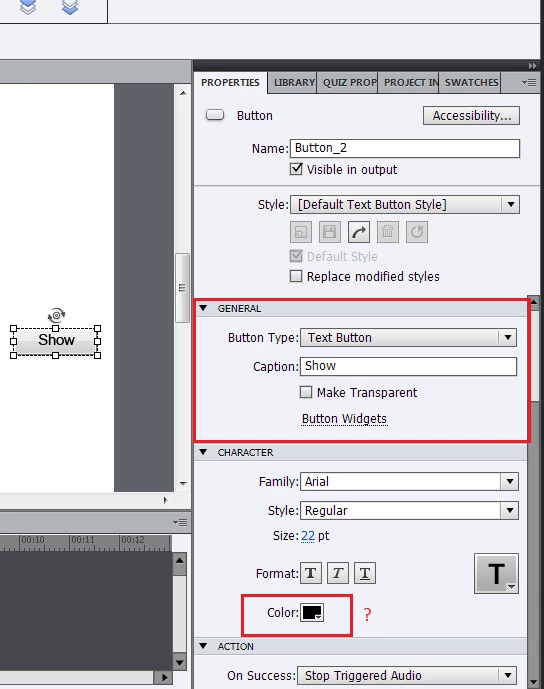
I am pretty sure that when I used Captivate 6 and I created a button, there was an option in the Properties pane to allow me to change the fill color of the button. I am using Captivate 7 now, and I no longer see this option. Under the "General" tab, it allows me to change the button type, caption, make it transparent, or allows me to see button widgets. Did they remove the ability to simply change the fill color of a button?
This topic has been closed for replies.
Correct answer Sreekanth_S

I'm wondering if this is something that was maybe added in a service release. Either that or you may need to reset your preferences.

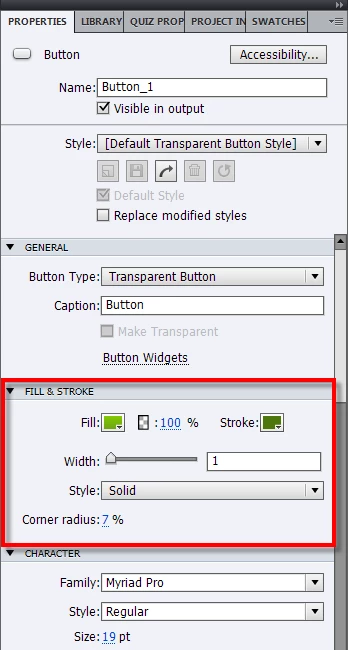
Mine has a section titled Fill & Stroke as shown below.

Cheers... Rick


Change the Style to Default Transparent Button Style.

Sreekanth

1 reply

Captiv8r
Legend
March 21, 2014

Try clicking the drop-down for Button Type and changing from a Text button to a Transparent button and you should see options.

Cheers... Rick

Known Participant
March 21, 2014

I tried the different button types, including the transparent one, but I still don't see anything. Am I missing something?

EDIT: I know I can create a Smart Shape and "Use as Button;" there is a color fill option there. But I was pretty sure that I remembered that color fill option being there for buttons as well.

Captiv8r
Legend
March 21, 2014

I'm wondering if this is something that was maybe added in a service release. Either that or you may need to reset your preferences.

Mine has a section titled Fill & Stroke as shown below.

Cheers... Rick