


Participating Frequently
July 6, 2013
Answered

How can I get embedded videos to play in ppt files within a connect meeting?

  • July 6, 2013
  • 3 replies
  • 15010 views

Hi all

I'm in a slight panic because I am running my first live session (with a sporting celebrity) on Monday, and the powerpoint file his representatives have sent me has a number of embedded WMV videos, which won't play in connect.

I'm aware adobe won't play any video files except flv. Can anyone recommend a good wmv > flv converter?

I have tried one online application, but I then couldn't import the FLV file into powerpoint.

I have also tried converting the whole ppt to SWF. This uploads ok but still won't play the videos or animations.

Would really appreciate some help - is there a way to import the flvs into ppt and will they then play?

Thanks

Harry
This topic has been closed for replies.
Correct answer sameer_puri

Hi Sameer

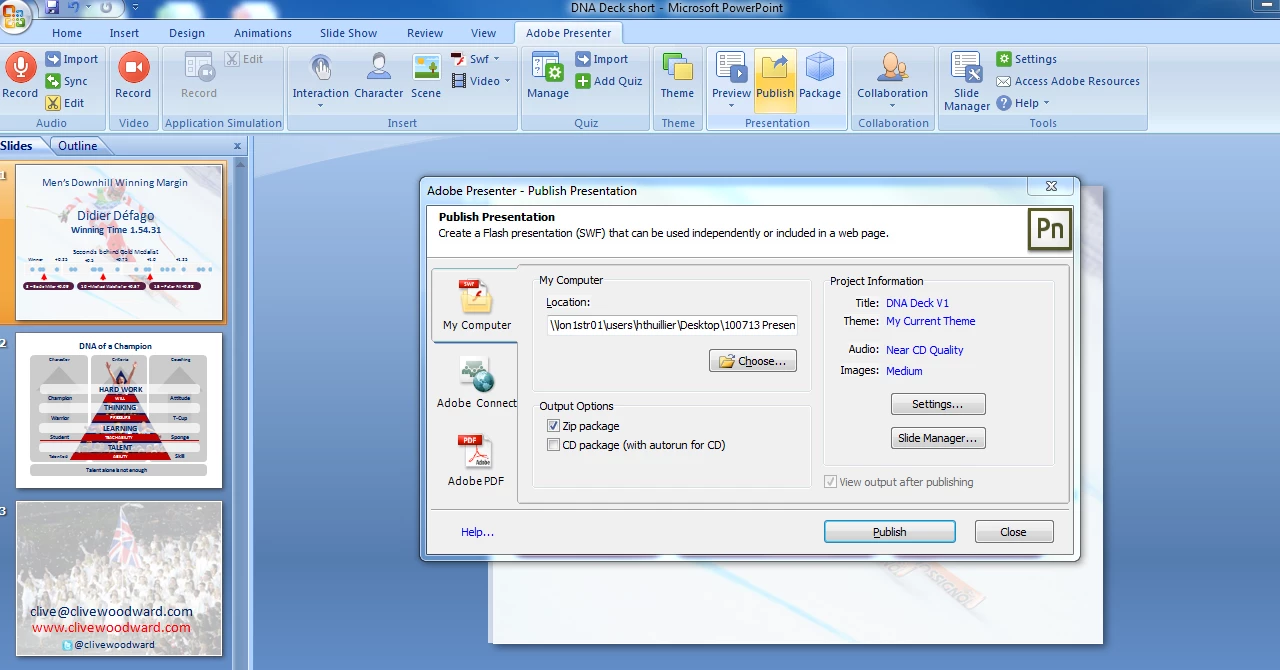
Thanks again. Option 2 doesn't work at all - the connect window doesn't open inside presenter. I also can't get the 1st option to work. I am using the settings in the screenshot below but nothing is output, or at least nothing that can be imported to connect?

Thanks

Harry


The issue looked to be a Presenter side issue with the trial version of Presenter not able to publish (even locally).

Sent the converted zip file to Harry. But just to re-confirm, as the videos were inserted using Powerpoint, not all the videos may work. So Harry, please check beforehand.

Thanks

Sameer Puri

3 replies

Participant
November 13, 2020

When building any Connect meetings I never try to embed videos or animations into the ppt, I have found it is much easier to create a new share pod, upload the video/animation into the share pod and drag in to the participant area at the appropriate time. (I usually put a slide in to prompt when to play video)

Hope this helps

TRKeller
Participant
November 9, 2020

Is this still an issue or is there a workaround that doesn't involve using another outdated Adobe application as a bridge for embedded powerPoint videos?  It looks like this was posted quite a while back so I would hope so.  Unfortunately, it looks like there are some security issues with Presenter so our organization has it on or red list.  This is a MAJOR oversite by adobe considering Connects target customers who almost all undoubtedly are stuck using MS office products whether we like it or not.  Looks like we may need to look elsewhere for a better solution

Thanks and have a great day, TODD KELLER Graphic Designer Front End Web Developer Employee Education System Veterans Health Administration Minneapolis, MN Cell: 612.791.2153   
sameer_puri
Adobe Employee
Adobe Employee
July 7, 2013

Hi Harry,

Even if you import FLV instead of WMV into a ppt, it wont play when you upload the ppt in the share pod.

If you want Powerpoint inserted videos to play, you need to use Adobe Presenter. You will have to publish your PPT(x) file to Connect and then share the content in the meeting. Powerpoint inserted videos will work then and in addition to that you can add videos from Presenter itself, which will also play inside meeting room.

You can ask for a Presenter trial from Adobe website.

Hope this info helps!

Sameer Puri

Participating Frequently
July 7, 2013

Hi Sameer

Many thanks for your reply - I should be getting the trial for adobe presenter tomorrow morning. In your third sentence, do you mean you'll have to publish ppt(x) files to presenter? And then upload the presenter file to connect? Hopefully this will become clear when I use the application.

Thanks

Harry

sameer_puri
Adobe Employee
Adobe Employee
July 8, 2013

Hi Harry,

Once you install Adobe Presenter, you will see all the options (from inserting Videos to publishing it to Connect) there. Though all of them are highly intuitive, you can always ask any questions that you may have, here on this forum. We will be happy to help.

Thanks

Sameer Puri