



Publicar En Digital
Participating Frequently
April 10, 2020
Answered

Limit of users exceeded (Soft limit to 1??)

  • April 10, 2020
  • 2 replies
  • 1560 views

Hi all,


Since a few days ago I am totally unable to host any kind of meeting with my Connect license (up to 500 users). 

It only allows host to connect. Then, any other user trying to access the room gets always the same message: "User limit exceeded for this account".


(Note: Of course I set up my room properly for guest access, so far and so on, I am Connect user since 2007, so save any possible basic or straightforward reply)

When I check my administration section of my Connect account, I can read this:
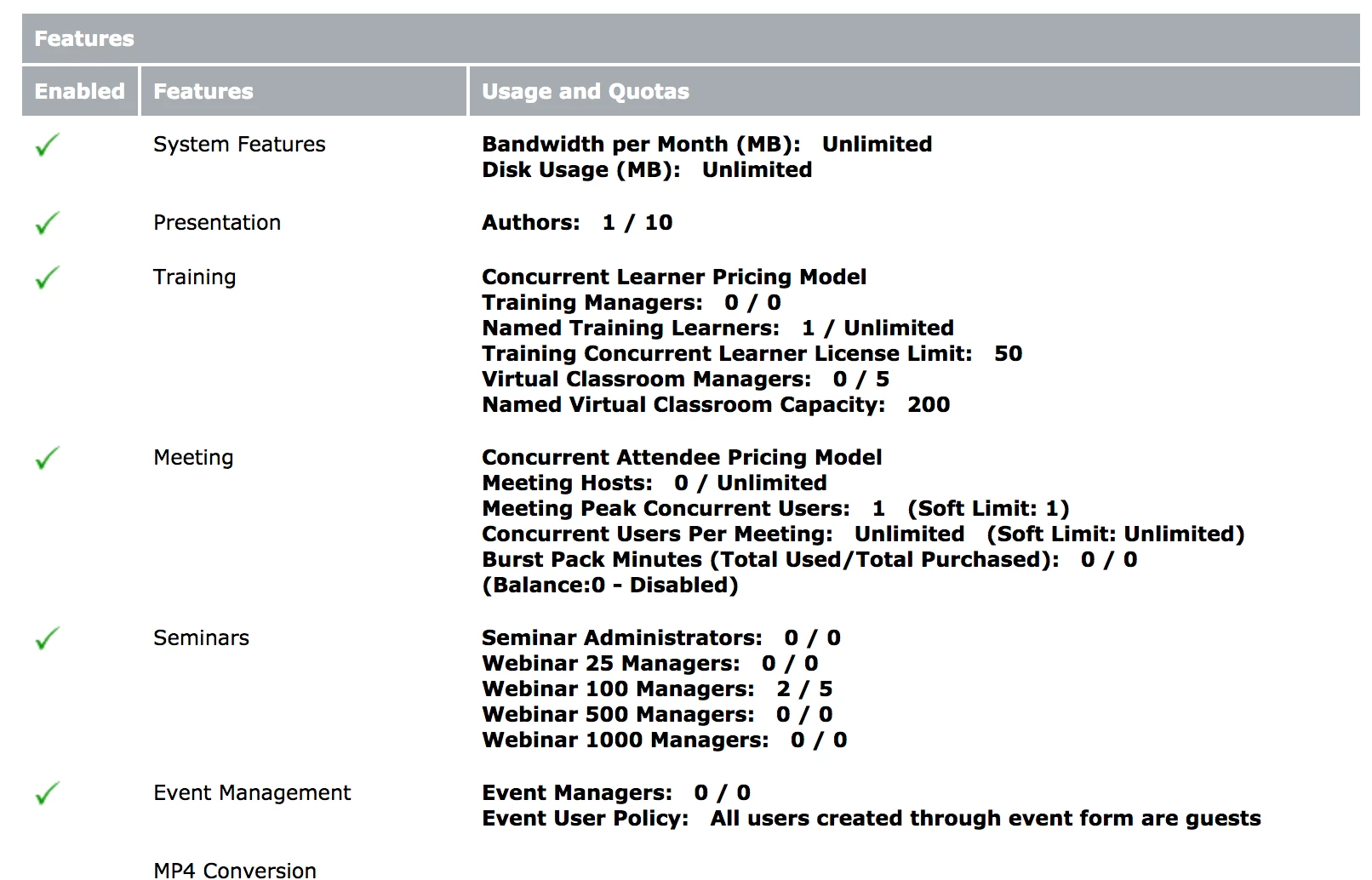
 

Look: Here you can read under "Meeting" that "Meeting Peak Concurrent Users" is set to 1 and "Soft Limit" also to 1 ?!?

This is happening too to other known users with similar license. We all are stuck in this situation.

Anyone can help?


Thanks!!


This topic has been closed for replies.
Correct answer Jorma_at_CoSo

Looking at your licensing, you didn't purchase any Meeting licenses. You have 5 Named Virtual Classroom Manager and 5 Named Wenbinar 100 Manager licenses. So, individuals in the  Virtual Classromm Manager group can create Virtual Classrooms in the Training section of Connect and they'll hold up to 200 attendees. Individuals in the Webinar 100 Manager group can create Seminar/Webinar rooms in their My Seminars folder in the Seminar section of Connect and they'll be able to hold up to 100 attendees.

I don't see any licensing for a 500 seat Shared Webinar or Named Webinar 5000 license.

2 replies

zweigle@clarix.com
Participating Frequently
February 5, 2021

It doesn't look like anyone has been assigned to the Virtual Classroom Managers group, so Virtual Classrooms can not run unless a member of that group is logged into the room.

Also - make sure that people are trying to enter rooms under 'Webinar Room' or 'Virtual Classrooms' license folders, else the Concurrent Meeting User limit is '1'.

Walter Zweigle - Sales Account Manager | Clarix Technologies Inc. | 585-899-5300 x156 | zweigle@clarix.comAdobe Connect | Adobe Learning Manager | Adobe Acrobat Sign
Jorma_at_CoSo
Jorma_at_CoSoCorrect answer
Legend
April 10, 2020

Looking at your licensing, you didn't purchase any Meeting licenses. You have 5 Named Virtual Classroom Manager and 5 Named Wenbinar 100 Manager licenses. So, individuals in the  Virtual Classromm Manager group can create Virtual Classrooms in the Training section of Connect and they'll hold up to 200 attendees. Individuals in the Webinar 100 Manager group can create Seminar/Webinar rooms in their My Seminars folder in the Seminar section of Connect and they'll be able to hold up to 100 attendees.

I don't see any licensing for a 500 seat Shared Webinar or Named Webinar 5000 license.

Publicar En Digital
Participating Frequently
April 10, 2020

Thanks. Now everything's clear. I used to be Meeting's customer, not so much Seminar's. 

Have the best day!

Jorma_at_CoSo
Legend
April 10, 2020

Glad I could help. You have a great day too!