
Inspiring
August 15, 2024
Question

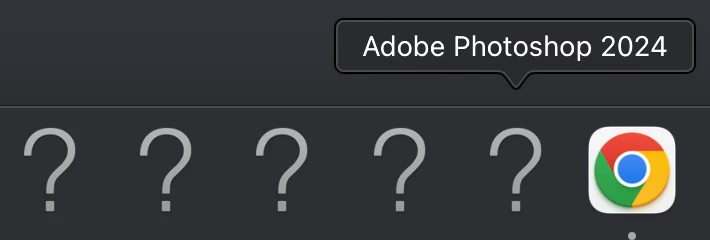
Adobe Apps show as a ? in my Dock (photo below) Is this normal

  • August 15, 2024
  • 1 reply
  • 4935 views

Recently I had to uninstall and Re-Install all my adobe apps with a new Install Location due to constantly getting the "Scratch Disks Full" option. I got tired of getting that even after always clearing Caches etc so purchased an Lacie SSD. I changed my install apps locations to this SSD to have more space and memory for my projects. I understand that I wont be able to open the applications without the SSD plugged in but is it normal for the Adobe Application logos to turn into a ? everytime i unplug the Lacie? Just wanting some clarification / recieve some understanding.
Thanks


This topic has been closed for replies.

1 reply

Inspiring
August 15, 2024

Also I just want to add that even once Lacie SSD is plugged in the Applications will still show a ? Until i click on application to open it, just wondering if this is normal for this.

jane-e
Community Expert
Community Expert
August 16, 2024
quote

I just want to add that even once Lacie SSD is plugged in the Applications will still show a ? Until i click on application to open it

By @Krew Visuals


When you launch an application, does the current question mark change to the correct icon or does the app create a new icon that disappears when you quit the app?


The question mark indicates that the app cannot be found. The icons on the Dock are aliases, and new ones can be created. The easiest way is to move an icon that is working, such as the Chrome icon in your screenshot.


Try recreating one alias to see if it solves your issue (or not), then continue if it works:

https://support.apple.com/guide/mac-help/open-apps-from-the-dock-mh35859/mac


Jane


jane-e
Community Expert
Community Expert
August 17, 2024

Thanks gave the aliases a try, and seemed to work but now I have been opening photoshop & premiere for example and all my plugin presets / fonts/ layouts etc are removed and need to be re-installed like a previous post I made. Having to keep reinstalling everything over & over. Wish I didnt run out of scratch disk space so easily with apps installed on desktop because now ive been running into so much new issues with adobe apps on the daily moving them to a hardrive. Thanks for help but im pretty defeated facing new problems with adobe so consistently. After 4 years Im pretty set on discontinuing my Adobe subscriptions once they expire. Thanks for help but ill be editing on alternative programs moving foward 


quote

Thanks gave the aliases a try, and seemed to work but now I have been opening photoshop & premiere for example and all my plugin presets / fonts/ layouts etc are removed and need to be re-installed like a previous post I made.

By @Krew Visuals


I'm glad the alias issue is working for you!


As to the scratch disk issue, Photoshop needs a lot of free space or it won't open. The amount depends on how large your files are. To avoid the issue, you need to either clear space on your hard drive or get a larger one. I have over 1Tb free space and have never had a problem. (You may or may not know this, but you didn't say.) Here are two help files that explain it:

https://helpx.adobe.com/photoshop/using/scratch-disks-preferences.html

https://helpx.adobe.com/photoshop/kb/troubleshoot-scratch-disk-is-full.html


"Recently I had to uninstall and Re-Install all my adobe apps with a new Install Location due to constantly getting the "Scratch Disks Full" option."

As to losing your all your plugin presets, that happened when you uninstalled, reinstalled, and then installed to a new location. When we tell folks to reset their preferences, we tell them to do it manually by quitting PS, renaming the preferences file, and relaunching. When PS can't find the preferences file, it creates a new clean one. If it doesn't help, they can restore the original file by restoring the name. Many of us back up this file.


We also suggest that you back up actions, swatches, brushes and everything that you have customized by saving them from the panel menus as you work or you risk losing them.


If your fonts are from Adobe fonts, all you need to do is activate them again.


I'm not sure what you mean by "layouts"?


We didn't get a chance to tell you all that before you started this thread, which only asked about the question marks in the Dock.


I wonder if there is anyway to recover some of things things from your HD. I have seen some posts similar to yours, but never with the apps on an external drive. Would you be willing to start a new thread in the Photoshop forum and ask if there is any way to retrieve some of what you have lost after the fact? Here's the link:

https://community.adobe.com/t5/photoshop-ecosystem/ct-p/ct-photoshop


Best of luck

Jane