


SteveJM
Inspiring
April 21, 2025
Answered

How to turn off Auto Update?

  • April 21, 2025
  • 1 reply
  • 641 views

Hi.

I'm trying to turn off Auto Updates in creative Cloud for all my apps, but when I uncheck  "Auto Update", and "remove older versions" , after clicking done, nothing happens, they are all still checked as Auto.

I really don't want this, I like to manually choose to update etc.

Any idea how to actually turn this off?

I'm running Win 11

Cheers.

Steve.
Correct answer D Fosse

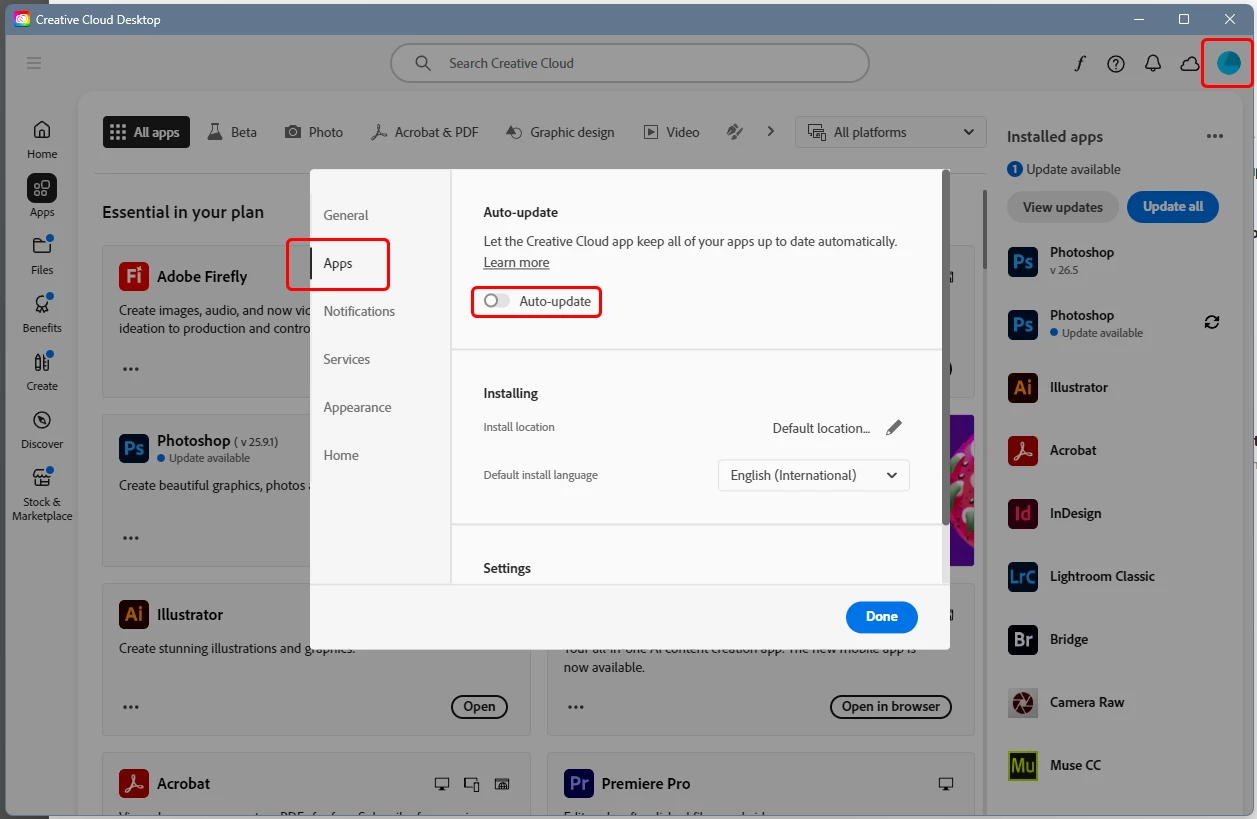
This is where you turn it off:


If it doesn't stick, sign out and back in. If that doesn't do it either, I'd reinstall the CC app.

1 reply

D Fosse
Community Expert
D FosseCommunity ExpertCorrect answer
Community Expert
April 21, 2025

This is where you turn it off:


If it doesn't stick, sign out and back in. If that doesn't do it either, I'd reinstall the CC app.

SteveJM
SteveJMAuthor
Inspiring
April 21, 2025

I may have done it.

Found it under "File - Preferences" in the top left dropdown box.

Fingers crossed.

Cheers.

Trevor.Dennis
Community Expert
Community Expert
April 22, 2025

Do you think this overides the Manage auto-updates panel?


Accessing via File > Preferences