

aellise1979
New Participant
February 9, 2018
Answered

Adobe Dimension won't open

  • February 9, 2018
  • 12 replies
  • 18606 views

I downloaded the app but can't open it on my computer.  This is my system specs:
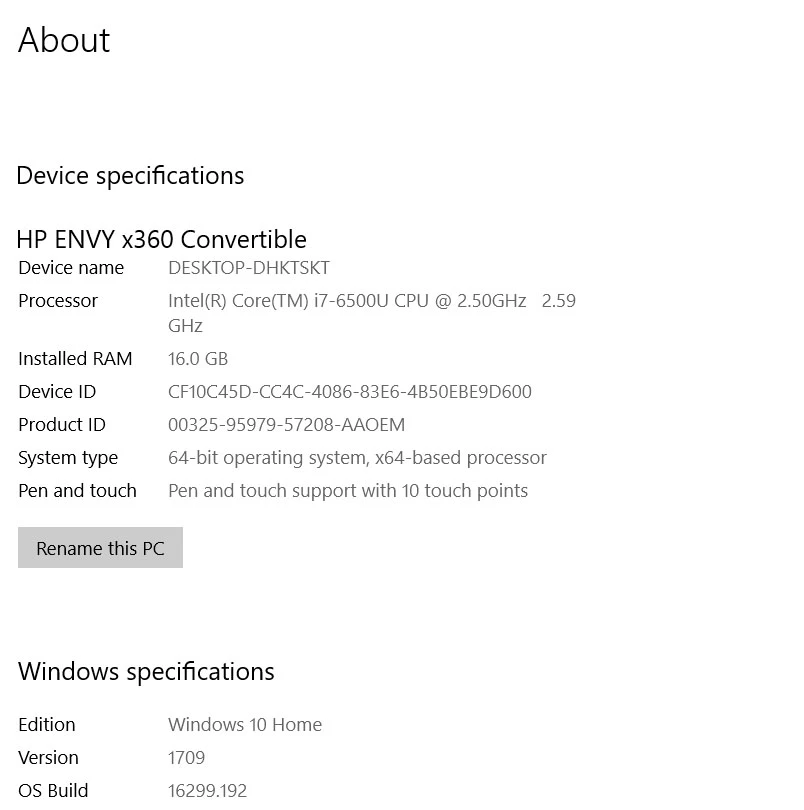
Assistance appreciated.  Thanks!

This topic has been closed for replies.
Correct answer JeanetteMathews

In our next planned update we are removing system requirements as a blocking factor.  We are testing that version now and you're welcome to join the Dimension CC Prerelease to get early access to that build and try it out.

12 replies

JeanetteMathews
Adobe Employee
JeanetteMathewsCorrect answer
Adobe Employee
March 24, 2018

In our next planned update we are removing system requirements as a blocking factor.  We are testing that version now and you're welcome to join the Dimension CC Prerelease to get early access to that build and try it out.

New Participant
October 23, 2018

I have been using and enjoying Adobe Dimension CC for a while now, but after downloading the latest update I can not get it to open. The start-up screen (the small rectangle with the copyright info and the artwork info) pops up but it stalls on "Loading application...".

I am using a Mac with 10.12.6 OS and a Quad-Core Intel Xeon processor.

JeanetteMathews
Adobe Employee
Adobe Employee
October 23, 2018

If you were previous able to use Dimension 1.0-1.1 and now 2.0 is not working, that is not expected!  Can you please send your full system information to tickets@adobedimension.com ?  Please also check if your system is generating log files.  It may not if it's being prevented from starting up, but if it is, please attach to the e-mail with your hardware info.  Please do not share these files here on the forums.

System Info

- Application Version (Can be located in the About screen)

- OS/Version

- Processor

- Memory/RAM

- Graphics Card/VRAM

Application Logs

DimensionGPUProfiler.log

Dimension.log

Mac:  ~/Library/Logs/Adobe/

Win:  ~\username\appdata\local\Adobe\Dimension

JeanetteMathews
Adobe Employee
Adobe Employee
February 10, 2018

Transformable hybrid laptop/tablet devices like the Envy and Surface Book and machines with integrated graphics cards have variable amounts of VRAM.  Since there isn't a dedicated GPU + VRAM the OS basically determines how much of the RAM should be reported as VRAM.  Dimension requires 512 MB VRAM as a minimum and not meeting that minimum blocks the app from launching.  We are working on changing the requirements to only warn instead of block.  In the mean time there is no Adobe approved method for changing system reported VRAM as it requires editing the registry which is not something we can officially recommend.

peter62081997
New Participant
February 14, 2018

The answer follows.

Adobe JM's hands are tied because w/o the right blend of software engineering and legal support the solution to problem is not officially  publishable because of potential liability - see later (bare in mind its a problem that has been rumbling on since last October).

This is a real shame because MANY subscribers have made MANY posts about possessing high powered h/w and Dimension still refuses them entry.

The deal is, Dimension looks for a subset of the graphic cards out there that can support e.g. if you have the latest Nvidia card it will work BUT if you have a suitable alternative card and memory Dimension s/w won't bother to find out.

All you have to do do is this -

1) Type regedit in the Win 10 search box

2) Navigate to HKEY_LOCAL_MACHINE\Software\Intel\GMM - kind of like you would in file explorer

https://www.intel.com/content/dam/support/us/en/documents/graphics/ReleaseNotes_GFX_15_36_21_4222.pdf

3) Figure out the menus to create a REG_DWORD value named “DedicatedSegmentSize” (it will make sense when you get there, have faith - this is not going to change your PC badly)

4) Now the crucial bit, make the value of your new “DedicatedSegmentSize” 512mb . Again, mess with the menus until you get the option to enter a decimal (Mb) value, then type in 512.

(Only because 512 is a kind of trigger number of VRAM Adobe Dimension wants to hear before it will run - Dimension could  be configured differently but you can understand Adobe leaning on the side of caution.

Dimension CC system requirements

Now you are done, restart your PC and it will work.

One warning - this will will make Dimensions work but if you do a lot of rendering - presumably you know what that this if you want to use this software - it means your CPU will get hot. Keep an eye on it, under no circumstances leave your device unattended. If it over heats this is at your own risk, its unlikely, but you do  have the option to switch things off if they get too hot.

Don't worry, the likely outcome is that you got to use and render in Dimensions when otherwise you could not.

It is GREAT!!!

Hope this helps

Pete

DS WildOutWest
Known Participant
January 24, 2019

"your CPU may overheat, so keep an eye on it...do not leave your computer unattended... " -do you have a thermometer crammed up in there ???

There is the Edge of absurdity, then there is the ABYSS - which obviously you have fallen into, Pete...