

aellise1979
New Participant
February 9, 2018
Answered

Adobe Dimension won't open

  • February 9, 2018
  • 12 replies
  • 18606 views

I downloaded the app but can't open it on my computer.  This is my system specs:
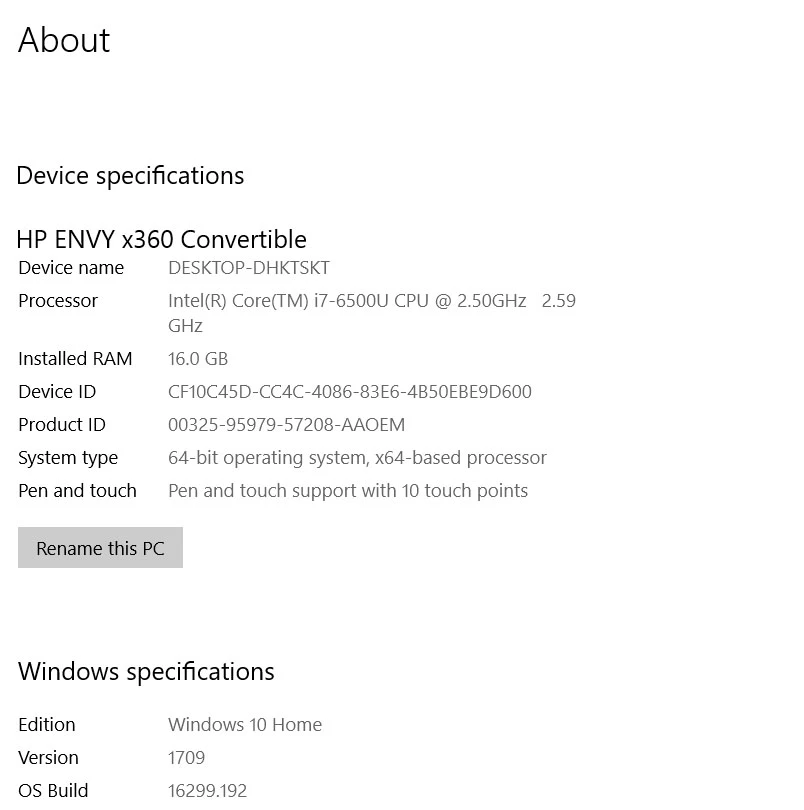
Assistance appreciated.  Thanks!

This topic has been closed for replies.
Correct answer JeanetteMathews

In our next planned update we are removing system requirements as a blocking factor.  We are testing that version now and you're welcome to join the Dimension CC Prerelease to get early access to that build and try it out.

12 replies

New Participant
March 13, 2023

remove one device, my max. number was reached but adobe didn't give the usual notification. 

Participating Frequently
December 6, 2020

Adobe is trying its best to make people buy new hardware just to run Adobe Dimension which is insane. I recommend you to shift on Cinema 4D which works perfect on almost any hardware and is a real professional tool...

New Participant
December 6, 2020

but i dont have the money for cinema 4D right now. I dont understand why i have to do that when demension is free and available for me to use. Your're telling me there's nothing else that you can do to help me fix this problem? 

Participating Frequently
December 7, 2020
So far, yes, there's any solution for that, I have Mac Pro 2010 with x5690
x 2 Processors, 96 GB DDR3 installed RAM and 256 GB NVMe drive with RX 580
8GB GPU and I can't run Adobe Dimension.

--
Best Regards,
Temur Ahmad
Divine Works
Facebook.com/divineworks.biz
Inspiring
October 21, 2020

I am having the same issue as reported by the user privaterevolution in Nov 2018. Today is the first day of Adobe MAX 2020, and I have tried Dimension versions v3.4, v3.1.1, and v3.1. All of them do the same thing, which is to open the Home screen with non-functional "New" and "Open" buttons. Quit is also non-functional, so I have to Force Quit the app.


My system specs are:

  Model Name: Mac Pro

  Model Identifier: MacPro5,1

  Processor Name: 6-Core Intel Xeon

  Processor Speed: 3.33 GHz

  Number of Processors: 2

  Total Number of Cores: 12

  L2 Cache (per Core): 256 KB

  L3 Cache (per Processor): 12 MB

  Hyper-Threading Technology: Enabled

  Memory: 32 GB


Graphics card:

  Chipset Model: Radeon RX 580

  Type: GPU

  Bus: PCIe

  Slot: Slot-1

  PCIe Lane Width: x16

  VRAM (Total): 8 GB

  Vendor: AMD (0x1002)

  Device ID: 0x67df

  Revision ID: 0x00e7

  EFI Driver Version: MacVidCards

  Metal: Supported, feature set macOS GPUFamily2 v1

Participating Frequently
October 21, 2020
I think Adobe is ignoring this issue deliberately and they don't want to
resolve this common problem for some reason...
Participating Frequently
September 23, 2021

Thats what I think, I contact the support several times they never call back even if they say so. Over an Year with my iMac 2019 and doesn't work on last version dimension 3.4.3 ox Big Sur.

Participating Frequently
May 13, 2020

I'm still having the same problem, Adobe Dimension starts but with a blank interface. Now it's giving me error "Does not meet minimum Open GL version. I have Mac Pro 5,1 Mojave 10.14.6 96 GB DDR3 Ram Intel Xeon x5690 x 2 (12 Core). Even the pre-release version giving the same error.

New Participant
August 9, 2019

Not working for me, either. Stuck on splash screen. HP Envy, Intel Core i7, 16 GB RAM. Any updates on the resolution of this issue?

Inspiring
April 29, 2020

The same problem... Dimension not loading. I tried support once 1 year ago, but nothing was done. I've already the problem.


When I launched today dimension from inside contents files, I had this message in terminal :


[app] loading euclid-core
Loading pepper plugin /Applications/Adobe Dimension/Adobe Dimension.app/Contents/Frameworks/euclid-core-plugin.pepper;application/x-escher-plugin
[app] done loading euclid-core
[warn] kq_init: detected broken kqueue; not using.: Undefined error: 0
[warn] kq_init: detected broken kqueue; not using.: Undefined error: 0
[warn] kq_init: detected broken kqueue; not using.: Undefined error: 0
[warn] kq_init: detected broken kqueue; not using.: Undefined error: 0
2020-04-29 18:13:39.955 Adobe Dimension[42587:5520541] *** WARNING: Textured window <AtomNSWindow: 0x7f9c09c5ec10> is getting an implicitly transparent titlebar. This will break when linking against newer SDKs. Use NSWindow's -titlebarAppearsTransparent=YES instead.


HELP !!!


RockyDavies
Known Participant
May 20, 2019

I'm in the same boat.  I've tried uninstalling and reinstalling a couple times.  It just shows me the splash page and the "get started" button.  I'll click it and nothing happens.  I'd love to try out the app.

Known Participant
March 31, 2019

Will not open for me. Stuck on splash Screen

OS Mojave

Mac Pro (early 2009)

  Model Identifier: MacPro5,1

  Processor Name: Quad-Core Intel Xeon

  Processor Speed: 2.26 GHz

  Number of Processors: 2

  Total Number of Cores: 8

  Memory: 64 GB

Radeon RX 480

  Type: GPU

  Bus: PCIe

  Slot: Slot-1

  PCIe Lane Width: x16

  VRAM (Dynamic, Max): 4096 MB

  Vendor: AMD (0x1002)

svenk15413467
New Participant
April 8, 2019

I mean that´s an basicly problem...

Mainboard: ASUS Prime A320M-K

AMD Ryzen 3 2200G with Radeon Vega 8 (3500 GHz)

16GB RAM / 8GB VRAM

WIN10 Pro 64Bit

Adobe Dimension: Intro of Loading, No Start.

I will test this additionally with graphics board GeForce GTX 1070 (8GB VRAM).

New Participant
January 24, 2019

Adobe dimensions will not load for me either. It acts as if it has loaded but will not fully open. Have uninstalled and then reinstalled today. Still having it giving a startup window that says "loading"

Participating Frequently
April 4, 2020

More than one year later, I'm experiencing the same problem. I installed and the software won't fully load, there's no menu, only the splash screen for ages... I uninstalled, installed the 2.xx version and it's still the same. I don't understand, I hope the problem is not my graphic card. I have 64 GB RAM memory and 

AMD Radeon HD 7950 3072 MB graphics.

anjai96245987
New Participant
January 24, 2019

Hi there, it's not working for me too. I get the welcome screen, but can't open anything.... it looks like it's minimized the whole time. My pc conf. is:

New Participant
February 5, 2019

anjai96245987,

Mine is now working. Installed the latest OS (10.14.3) now that I have a brand new mac mini with an external GPU. It appears that 16 GB of RAM is a must, as per a pop up window when launching Dimensions. Right now I am limping along with 4 GB. But within the next few days I will get 64 installed. Hope this might help answer your question as the Mod doesn't appear to be answering any more questions about it.

On a side note am downloading Adobe Fuse to be able to create native .OBJ files in order to bring them into Dimesions. Don't want to pay to either have a model created or end up buying one.

Good luck. Hope this might help answer the same question you and I appear to have had.

Participating Frequently
November 28, 2018

I have the same problem just stuck on loading application. I using OS.

when will you fix problem?