


New Participant
July 1, 2024
Answered

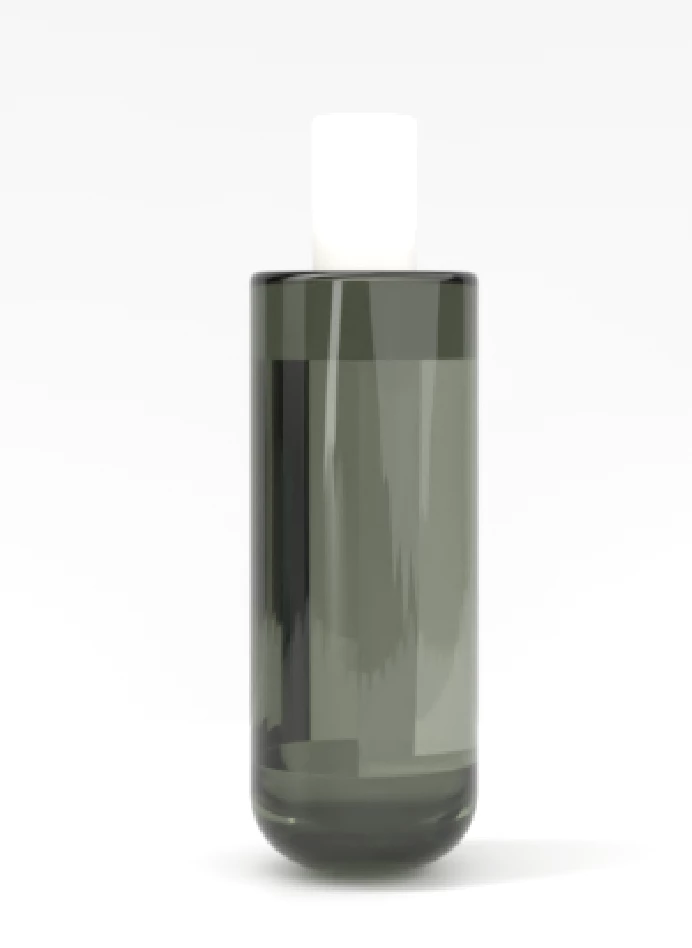
Dimension rendering glass bottles with glitches

  • July 1, 2024
  • 2 replies
  • 1209 views

I created 3D models in illustrator and have rendered them in glass in Dimension. 

I have used white planes on the vertical and horizontal axis and added the bottle model on top of this.

I am getting jagged lines in the model- please see image. Is there something I could be doing wrong?


Thanks for your help - new to dimension!
 

This topic has been closed for replies.
Correct answer Ares Hovhannesyan

3D object in Ai is created correctly. For now i am using a new Dn (Beta) and get smooth result. In your image glass looks also smooth. Not sure, but this artifact can be reflection of environment light. Try to change environment light or customize individual llights.

2 replies

Ares Hovhannesyan
Adobe Expert
July 1, 2024

Can you share Illustrator file? Try to create a curve and then use 3D Revolve in Illustrator for bottle. Export GLTF. 

BexArmAuthor
New Participant
July 2, 2024

I had been exporting as USDA/USDZ - Would GLTF be better? Bottle ai file here: https://we.tl/t-MqO10rrqPz

Ares Hovhannesyan
Ares HovhannesyanCorrect answer
Adobe Expert
July 2, 2024

3D object in Ai is created correctly. For now i am using a new Dn (Beta) and get smooth result. In your image glass looks also smooth. Not sure, but this artifact can be reflection of environment light. Try to change environment light or customize individual llights.

BexArmAuthor
New Participant
July 1, 2024

I will also add- the render is low quality despite me selecting high quality PSD.