



FeriZsolnai
Known Participant
June 12, 2020
Question

Normal map problem

  • June 12, 2020
  • 1 reply
  • 679 views

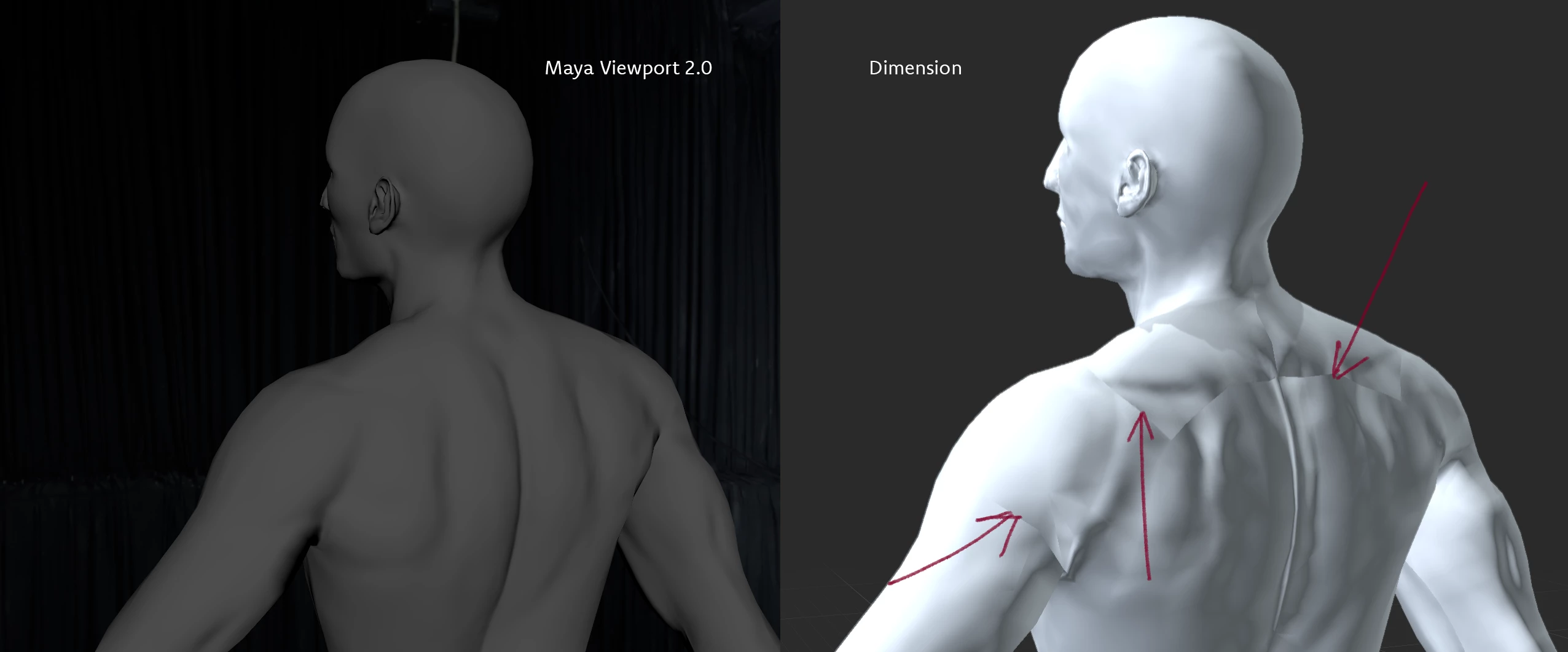
Hi, I'm trying to render a model in Dimension. It was modelled and UV'd in Maya, sculpted in ZBrush, and the normal map was generated in ZBrush as well. It looks fine in Maya Viewport 2.0.

When I load it in Dimension, though, it look false. In Maya, when this thing occurs, you know that your normal map is in sRGB colour space, while it should be in RAW. But in Dimension, I found no way to set this.

How am I supposed to use a normal map here?
This topic has been closed for replies.

1 reply

Ussnorway7605025
Braniac
June 13, 2020

looks back to front to me i.e, the ridges should be gullies so I would flip it around in Photoshop

FeriZsolnai
Known Participant
June 13, 2020

If you meant I should invert the green channel, no, that is not the problem and that won't fix it. It isn't back to front; the problem is that the UV seams show up and it behaves, as I said, as if it was in sRGB colour space instead of RAW.