Participating Frequently
July 29, 2019
Question

Scale tool not aligning to scene?

  • July 29, 2019
  • 3 replies
  • 1471 views

Hi all. I have a question about the scale tool – is the widget supposed to align to the scene in the same way it does for the move tool and the rotate tool?

Mine stays stuck in position and won't allow me to scale an imported object to specific sizes.

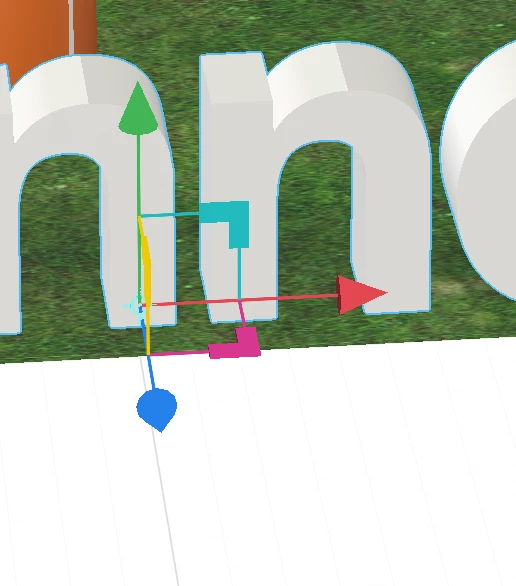
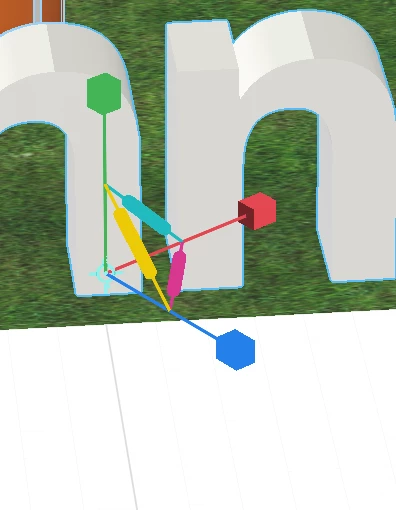
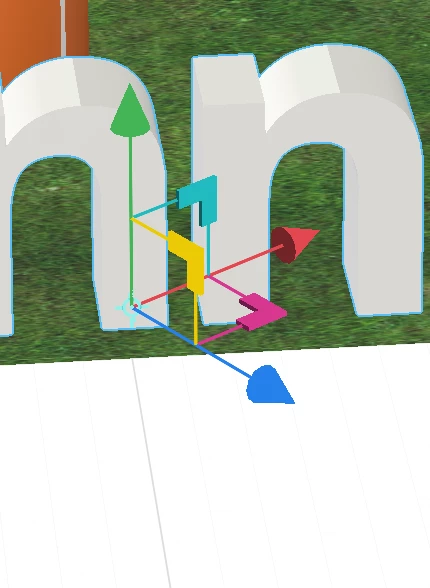
I created some 3D type in Illustrator and imported it, but it comes into Dimension on a funny angle. I can manually rotate it to fit, and the move and rotate tools will both change to align to the scene, but the scale tool stays aligned to the object only, meaning I can't give it specific X, Y, Z sizes.

Is it supposed to do this?

As an example:
This topic has been closed for replies.

3 replies

Ussnorway7605025
Brainiac
August 1, 2019

Photoshop is the best tool of the two ime but some people like illustrator and the tip workflow for that is to export as a svg then use any of the old school 3rd party tools (most of them are free now) to make your svg into a stl which is itself an old standard but still used in a lot of building design software and Dimension can read them

if you pop a post Adobe Dimension: Feature Requests: Top (314 ideas) – Adobe Dimension Feedback Portal the dev team will see it and who knows maybe one day

Ares Hovhannesyan
Community Expert
July 30, 2019

You mention that "you created some 3D type in Illustrator and imported it into Dn"

Can you explain how you do that?. Ai files can be imported as decals or background. SVG files also.

Thank you

Ussnorway7605025
Brainiac
July 30, 2019

both Photoshop and Illustrator can be used to make 3d text (or other shapes) as models that can then be imported into Dimension... I used Photoshop to make my example above

Ussnorway7605025
Brainiac
August 1, 2019

If I understand you want to align to scene scale widget to scene as you can do with Move and Rotate Toll. See capture

As you can see in drop down menu for Scale tool there is a setting "Align to Scene" with shortcut Q. But I can confirm that it doesn't work for Scale Tool and I am able to reproduce these bug.

I will report Dn Team about this bug (or it not works for Scale Tool as default). Will back to you after feedback.


its not a bug... he made the model off center to begin with so the scale looks off center in Dimension

the issue is that "align to scene" doesn't work with scale tool... the question of should it work or would that make the widget harder to use is something only testing with answer

Ussnorway7605025
Brainiac
July 29, 2019

not by default no

you can reset the tool that way by right clicking the icon and setting it

I don't use the widget because its a pain when there are a lot of items in the screen and the design team keeps changing it at random anyway

I adjust scale by mouse over the numbers and sliding up or down this gives me the option to scale by size or by scale

p.s, having the lock icon on the scale makes them all scale together in the same way that holding down the shift does when using the widget... pick the way you like best but assume it will change next build mate

Participating Frequently
July 29, 2019

Thanks Ussnorway, I know what you mean about the numbers being more useful than the widget!

My problem is that when I right click the icon and adjust the tool to align to scene, the scale tool does not adjust (only the move and rotate tools do).

Adjusting the values by using the numbers was also not working for me because the 3D object was not set square to the X, Y, Z axis, so it's impossible to adjust one value without distorting the others.

As you see in my pic, the object is type – so I needed the X and Y values to stay the same but adjust the depth of the type with the Z value.

For this instance, I ended up editing my 3D object to sit square and then reimporting it, but would have been much easier just to align the scale tool to the scene and be able to adjust it there.

So does the scale tool not align to scene like the other tools, even when the option is turned on in the tool menu?

Ussnorway7605025
Brainiac
July 30, 2019

I had another look at your image and it looks off center in the model itself mate

anyway I confirm that scale is working correct for me on Windows... If I was you then I would re-import the 3d model and try scaling first i.e, before moving the text into whatever spot you want it to rendor at