iviansur
Known Participant
July 17, 2019
Answered

Unable to open document bug

  • July 17, 2019
  • 10 replies
  • 10860 views

A new updated version of Adobe Dimension (Version 2.3) refuses to re-open saved documents. After restarting the application it does not want to open documents that are saved before restarting the programm (saving process was not terminated and was completed successfully.) Same issue on Windows and on Mac. I've submitted log file to suggested e-mail, but thought to write about this issue here as well. It relates to my 8+ hour work and besically I've failed to produces renderings for a very important presentation because of this bug. Please help to resolve this problem asap.

thanks.
    This topic has been closed for replies.
    Correct answer JeanetteMathews

    Wanted to provide an update here.  We have a fix in progress and are testing it on our Prerelease and with files that customers are sending in.  We hope to release this fix next week if testing goes well!


    For anyone who would like immediate access, you can join the Dimension Prerelease Program using this link:  

    https://www.adobeprerelease.com/beta/6D4BC437-A571-40B6-B398-1D29A4A13985/participate/7A1DBA5A-6CF2-4023-EE2F-3CA7B25DF3BE

    Once you're on the Prerelease website, simply download the Dimension build marked "2.3.1 - r.1054" which contains the fix.  It should open any files that weren’t working before.   If you run into a file that isn't working do please let me know at tickets@adobedimension.com so we can triage!

    Thank you all for your patience.  I wanted to also add a message from myself and the team that we are sincerely sorry for the impact to everyones work that this issue has caused. 

    10 replies

    New Participant
    February 6, 2023

    I'm writing in February 2023 with Version 3.4.7 for Mac.

    Apparently the issue appears when the machine runs out of memory. Try clean some stuff up and hope for the best.

    This was true for this specific file and situation. In the past this same issue happened when I dropped in a ready made OBJ (which I found on Adobe Stock LOL). I had the luck to have a previous version of the file without that hellish fake houseplant and everything went smooth. 


    Hope this message in a bottle helps somebody somewhere sometime.

    New Participant
    June 20, 2021

    My file is 5.4 GB and wont open. I just worked for 5 days on this and now what, I gotta restart this? Come on!!!!

    Please help !!!!!!

    13230155 Peter
    New Participant
    August 19, 2021

    Same happend here today. File 2.8GB, 1 week of work, day before deadline. Not able to produce final renders. Adobe, please, this cannot happen! It makes me crazy!


    Working on Mac, Dimension latest version 

    13230155 Peter
    New Participant
    August 20, 2021

    Found solution: I found that Adobe created huge 44GB folder of Snapshot files in FelixDCXAppID folder. I delete it and now was able to open the file again. It seems that lack of space on disk can be an issue. Due to that big folder I ended with just 20GB of free space, which seems was not enought to open big .dn files.

    Participating Frequently
    June 18, 2021

    Having the same issue now too

    New Participant
    January 18, 2021

    @JeanetteMathews I have the same issue in 2021 with the newest built. Two days ago everythign was ok. Suddenly it stopped working - same way like @iviansur explained before. Any news about that? How to resolve the problem - I can't access my files... [Windows version]

    AshleyDoran-AussieBum
    New Participant
    February 17, 2021

    @JeanetteMathews Also haveing the same issue - I have sent my file to the support email address and the logs! Hopefully you can assist as I have a project due TOMORROW for a client

    JeanetteMathews
    Adobe Employee
    JeanetteMathewsCorrect answer
    Adobe Employee
    August 2, 2019

    Wanted to provide an update here.  We have a fix in progress and are testing it on our Prerelease and with files that customers are sending in.  We hope to release this fix next week if testing goes well!


    For anyone who would like immediate access, you can join the Dimension Prerelease Program using this link:  

    https://www.adobeprerelease.com/beta/6D4BC437-A571-40B6-B398-1D29A4A13985/participate/7A1DBA5A-6CF2-4023-EE2F-3CA7B25DF3BE

    Once you're on the Prerelease website, simply download the Dimension build marked "2.3.1 - r.1054" which contains the fix.  It should open any files that weren’t working before.   If you run into a file that isn't working do please let me know at tickets@adobedimension.com so we can triage!

    Thank you all for your patience.  I wanted to also add a message from myself and the team that we are sincerely sorry for the impact to everyones work that this issue has caused. 

    iviansur
    iviansurAuthor
    Known Participant
    August 2, 2019

    Thanks, , problem solved for me. It worked on MAC and I'll check on PC later today. You guys are great!

    JeanetteMathews
    Adobe Employee
    Adobe Employee
    August 1, 2019

    Hello all!  Jeanette here, the Product Manager for Dimension.  I wanted to reach out and apologize for the severe issue with Dimension 2.3 not loading some files.  We've traced down the issue and are testing a fix internally.  We hope to have a new build available in a few days.  In the mean time, please send any scenes you are unable to open to me at tickets@adobedimension.com .  Please send the actual .dn saved file.  We will use these for testing the fix before deploying it live for everyone.

    if your file is too large to email you can send via Dropbox, Google Drive, We Share, or another file transfer service.

    If it's below 50 MB you can e-mail directly to tickets@adobedimension.com.

    Thank you all!

    - Jeanette

    Participating Frequently
    July 26, 2019

    I got a reply this morning too – no fix yet though. My .dn file is approx. 760MB so I can't email a copy of it for testing.

    Whatever the prolem is I don't think it's a quick fix so I ended up recreating my work and being careful not to use the option key to duplicate objects and all my new files seem to be fine, even though all the file sizes are huge as well.

    These files all have .PNG images applied to objects, so not sure if that is a problem?

    Fingers crossed that there's a resolution... loving this app so far and want to keep being able to use it.

    Participating Frequently
    July 24, 2019

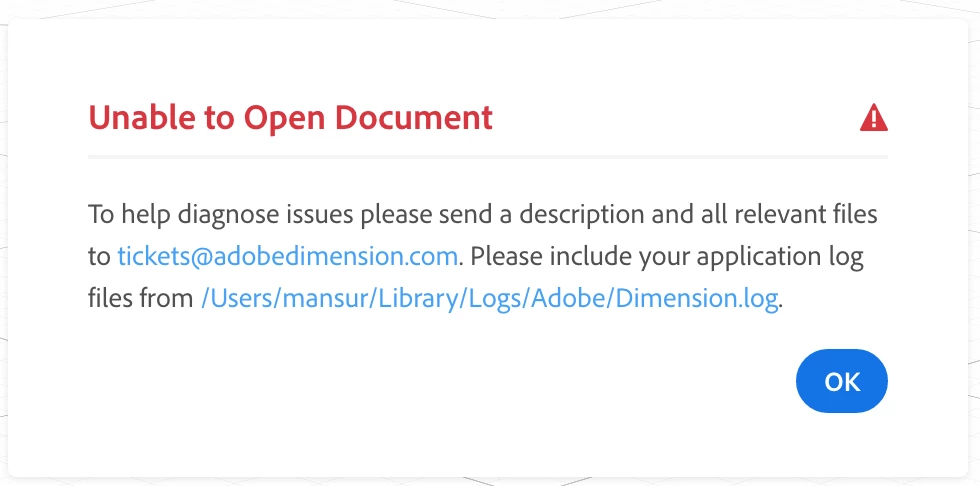
    I've just had this problem as well – emailed the log to the tickets email address but waiting for a reply. Is there a resolution for this? I had no probs working on the file or saving it, but now neither the file or the backups will open in Dimension. I keep getting this error:

    Ussnorway7605025
    Braniac
    July 24, 2019

    No there is no fix yet and you will not see any reply from your email to that address

    iviansur
    iviansurAuthor
    Known Participant
    July 24, 2019

    I actually got a reply from the support team. I've provided the problem file, but the problem is still not resolved. Waiting for it so I can share the outcomes. 

    Ussnorway7605025
    Braniac
    July 18, 2019

    so if you make a new Dn with this build, save it, then it opens back up again i.e, its only older Dn files your Dimension will not open yes?

    also you say this is both Windows and Mac so are you sharing the files across some kind of network... presumably formatted to exfat

    iviansur
    iviansurAuthor
    Known Participant
    July 18, 2019

    Neither those that were created in older version nor created in the new version of Dimension can be opened. I've used flesh drive, email, Creative Cloud, Dropbox, to move DN file from Windows to Mac and vice versa.

    Ussnorway7605025
    Braniac
    July 18, 2019

    can you share one of these files in a dropbox (or some such) for testing?

    also if you uninstall this build of Dimension and reinstall one of the older ones does that then allow you to open files?

    Ussnorway7605025
    Braniac
    July 18, 2019

    that should not be happening and doesn't happen for me... the library sync doesn't work but that is Adobe server so did you try and save something like a model into your library from a Dimension document?

    also when you upgraded Dimension to the new 2.3 build did you also grab the (undocumented) update to your cc app to make it 4.9.0.504?

    • if you have both the patches then I would assume a folder permission issue... try making a copy of one of your Dn files, move it to a new folder on your Windows desktop and see it Dimension can open it from there

    iviansur
    iviansurAuthor
    Known Participant
    July 18, 2019

    Thanks

    Well, it happens to me. I'm not using Adobe Library and Creative Cloud to store the working document. I've tried relocating this document and this also did help.

    Dimension was automatically updated. Creative Cloud version is Version 4.8.2.476 and I have no idea how to update it to Version 4.9.

    Ussnorway7605025
    Braniac
    July 18, 2019

    mcmansur  wrote

    this also did help.

    cool and Adobe should offer you 4.9 once they wake up over in the US... its just that the app updates can bugger file permissions while they are installing themselves but there isn't any major reason to grab them