
Known Participant
September 15, 2017
Answered

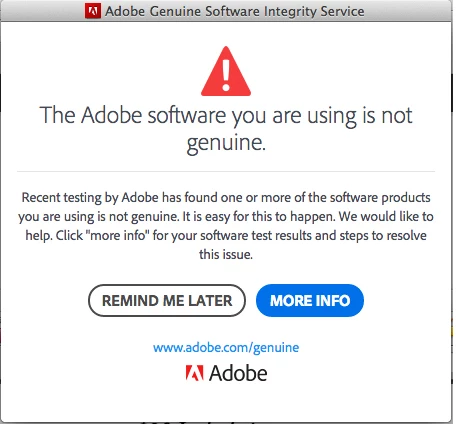
Adobe software is not genuine pop-up AGAIN!

  • September 15, 2017
  • 3 replies
  • 43695 views

In april I began getting the "your software is not genuine" pop-up. So I contacted Adobe. I was told that, yes, my software was in fact genuine but I would have to reload the programs for the pop-up to stop. I was issued an NEW serial number and used it to reinstall the programs. Today I began receiving the pop-ups AGAIN!!! It says the serial number I was given is not valid! ADOBE GAVE IT TO ME!

What the hell is going on? Will I have to go through all that again?
This topic has been closed for replies.
Correct answer kglad

probably so unless you can live with clicking 'remind me later'.

using a browser that allows popups and cookies, contact adobe support during pst business hours by clicking here and, when available, click 'still need help', https://helpx.adobe.com/contact.html

3 replies

Known Participant
September 18, 2017

Jeff A Wright​ why did you move this thread? It doesn't belong in Downloading, Installing, Setting Up. The pop-up has nothing to do with setting up, installing or downloading. It has to do with Adobe sending annoying pop-ups to legitimate software users.

Jeffrey_A_Wright
Community Manager
Community Manager
September 18, 2017

Claire Thomas I am sorry that you continue to face messages that the Adobe software you are using is not genuine.  You mentioned you spoke with a member of our support team.  Do you have a case number that I can reference?

Known Participant
September 19, 2017

I checked just now Claire Thomas and there have been no activation requests for the serial number.  The reason Deactivate is likely greyed out is due to the connection failure preventing the computer from access the necessary Adobe activation servers.

Claire did you download and run the limited access repair tool available in Resolve connection errors with Adobe Creative Cloud and Creative Suite applications ?  This should have automatically removed any entries that may have been preventing connection failures in the host file.  If you have not already downloaded and run the Limited Access Repair tool then please do so Claire.


I ran limited access repair tool and there were 0 files. When I go to help in InDesign to activate the choices are: product registration, deactivate, updates. When I hit product registration and log in it says: Could not start your adobe CS live subscription. Try again later.

Known Participant
September 18, 2017

Why was this thread moved to Downloading, Installing and Setting Up? It will not get seen by those that are having trouble with this pop-up!

kglad
Community Expert
kgladCommunity ExpertCorrect answer
Community Expert
September 15, 2017

probably so unless you can live with clicking 'remind me later'.

using a browser that allows popups and cookies, contact adobe support during pst business hours by clicking here and, when available, click 'still need help', https://helpx.adobe.com/contact.html

Known Participant
September 18, 2017

I contacted Adobe via chat and was told that I would have to reinstall AGAIN!!!! I'm beyond PISSED! So damn annoying. I've not reinstalled and instead have moved the pop-up down to it's lowest possible spot so I can't see it and will not click on remind me later. Adobe needs to take care of this. I paid for my software when they allowed it and now I'm being harassed by Adobe. Shame on them.

Participating Frequently
October 27, 2018

me too!

\