
Participant
February 17, 2021
Answered

'You have been signed out' CC will not let me sign in or even uninstall apps

  • February 17, 2021
  • 5 replies
  • 24614 views

Hello, right now on my main computer adobe creative cloud will either be constantly loading or it will say 'you have been signed out' with an option to sign in. However, pressing the sign in button just brings me back to the exact same page - it doesn't even let me enter my username or password.


Also, I have looked at this page: Adobe Creative Cloud signs you out or asks you to sign in repeatedly

and none of those solutions workBecause the Creative Cloud desktop iteself handles the installing/uninstalling of apps, and said apps need to be uninstalled before CC can be uninstalled.

There is also no obm file in my Adobe appdata folder, like this thread ( Solved: "You've been signed out" error every time I try to... - Adobe Support Community - 5570906) suggested.


The one thing I can do is stop all adobe related processes using task manager. What can I do to uninstall the CC apps and get a fresh start or sign in?
Correct answer kglad

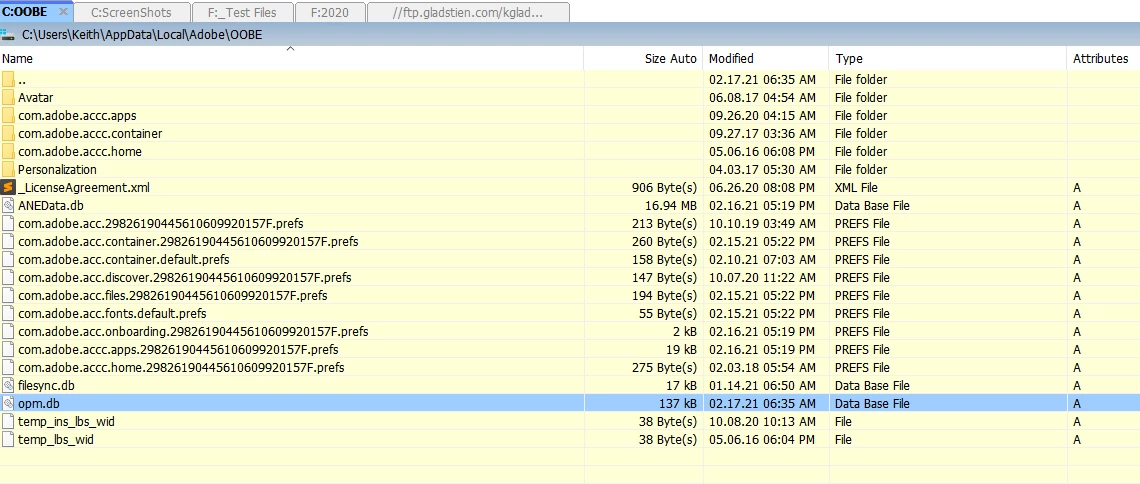
no.  here's my oobe folder:


first, reset the cc app:

to reset the cc desktop app, make sure it's in the foreground, then press:

Win: Ctrl + Alt + R
Mac: Cmd + Opt + R

if that fails, try to repair
https://helpx.adobe.com/download-install/kb/creative-cloud-install-stuck.html

if that fails go ahead and uninstall/reinstall per the above link

if that fails, do a clean cc install following each applicable step:

uninstall every cc app including preferences, https://helpx.adobe.com/creative-cloud/help/uninstall-remove-app.html
then uninstall the cc desktop app, https://helpx.adobe.com/creative-cloud/help/uninstall-creative-cloud-desktop-app.html
clean your computer of cc files per http://www.adobe.com/support/contact/cscleanertool.html
check for, and if available, update your os
restart your computer (don't skip this)
reinstall the cc desktop app, https://creative.adobe.com/products/creative-cloud.
if you're unable to install the cc desktop app at this stage, use an administrator account (solution 4 here, https://helpx.adobe.com/creative-cloud/kb/creative-cloud-missing-damaged.html)
use the desktop app to install your cc programs/trials

5 replies

Participant
February 27, 2025

This is no help. I paid my money and I can't even use this.

kglad
Community Expert
Community Expert
February 27, 2025

@lola_2296 


are you seeing the sign-in sign-out loop?

Participating Frequently
February 28, 2024

Hello, 

I'm having the same problem. I've just got a new Mac using Sonoma. I tranferred all my applications to it, then got a message saying Creative Cloud wouldn't work and I needed to migrate, but nothing happened when I clicked 'migrate'.


Tried to download Photoshop, then when that didn't work, Creative Cloud for Desktop. I've also tried most of the things suggested on this page, but nothing works. Some of the suggestions I can't follow because it won't let me log in to Creative Cloud. I'm just getting the screen shown in the author's screenshot. 

kglad
Community Expert
Community Expert
February 28, 2024

@AnnCha11 


what do you mean by, "i transferred..."?


did you use a migration tool?

Participating Frequently
February 28, 2024

Thanks for the reply. Yes, I used Migration Assistant.app

Participant
December 29, 2022

Having the exact same problem. Really starting to hate adobe. I'm trying to uninstall these apps and it wont even let me do that because I can't sign in. 

kglad
Community Expert
Community Expert
December 29, 2022
Participant
February 23, 2024

This says to uninstall the CS, but you can't do that because it syas that it needs that program to run other programs.

Participant
July 28, 2021

if you just delete the adobe creative cloud folder then launch a program like primere pro that uses the creative cloud it will let you sign in and automatically reinstall creative cloud for you, ran into this problem maybe ten minutes ago and this solution fixed it right away. 

Participant
February 23, 2024

This didn't work with me.  I deleted the folder and opened Photoshop and it tells me that it can't verify me.

kglad
Community Expert
Community Expert
February 17, 2021

your cached adobe credentials are stored in the OOBE folder which is hidden by default.  ie, you need to unhide your hidden folders/files.


Mac OS:

\User\<user name>\Library\Application Support\Adobe\OOBE folder.

To access the hidden user Library folder see*


Windows:

\Users\<user name>\AppData\Local\Adobe\OOBE folder.

To view the hidden AppData folder, see **


* https://helpx.adobe.com/x-productkb/global/access-hidden-user-library-files.html


** https://helpx.adobe.com/x-productkb/global/show-hidden-files-folders-extensions.html#:~:text=Click%20the%20Options%20icon%20on,files%2C%20folders%2C%20and%20drives.

Participant
February 17, 2021

I tried doing what was on the windows link you gave me but my files are not hidden. In the OOBE folder there is only _LicenseAgreement.xml and dlcanalytics.db. Do either of those have something to do with this?


Also I forgot to upload a screenshot of what my CC looks like so I attached that

kglad
Community Expert
kgladCommunity ExpertCorrect answer
Community Expert
February 17, 2021

no.  here's my oobe folder:


first, reset the cc app:

to reset the cc desktop app, make sure it's in the foreground, then press:

Win: Ctrl + Alt + R
Mac: Cmd + Opt + R

if that fails, try to repair
https://helpx.adobe.com/download-install/kb/creative-cloud-install-stuck.html

if that fails go ahead and uninstall/reinstall per the above link

if that fails, do a clean cc install following each applicable step:

uninstall every cc app including preferences, https://helpx.adobe.com/creative-cloud/help/uninstall-remove-app.html
then uninstall the cc desktop app, https://helpx.adobe.com/creative-cloud/help/uninstall-creative-cloud-desktop-app.html
clean your computer of cc files per http://www.adobe.com/support/contact/cscleanertool.html
check for, and if available, update your os
restart your computer (don't skip this)
reinstall the cc desktop app, https://creative.adobe.com/products/creative-cloud.
if you're unable to install the cc desktop app at this stage, use an administrator account (solution 4 here, https://helpx.adobe.com/creative-cloud/kb/creative-cloud-missing-damaged.html)
use the desktop app to install your cc programs/trials