

Updating Adobe Creative Cloud stuck at 39%
Good afternoon,
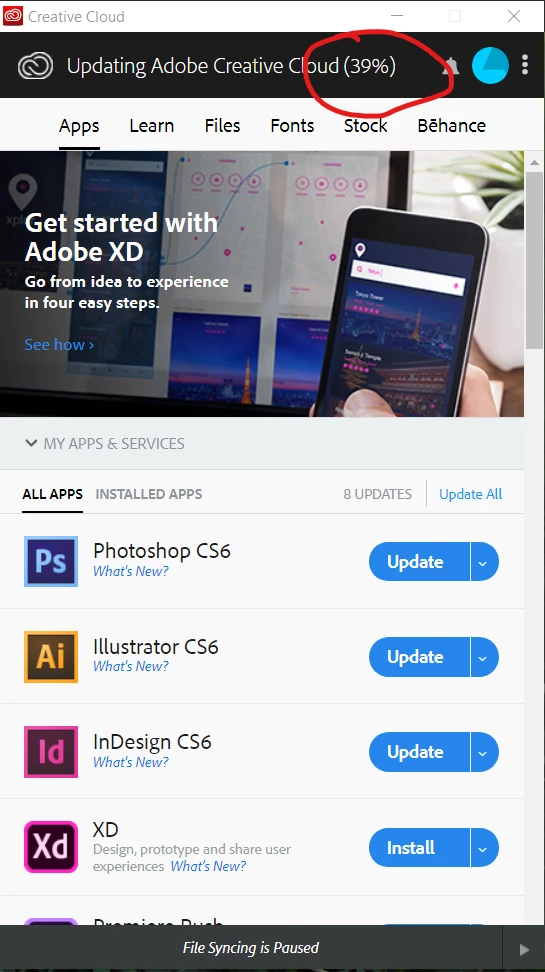
I recently had to get my computer re-imaged and after two days, my Adobe Creative Cloud apps are the only ones I still can't get to install. I downloaded the Adobe Creative Cloud app and installed it without issue. However, when I opened it and logged in, I get a message that 8 apps need to be updated. Before the Apps can update, the Creative Cloud app starts updating, and gets as far as 39% before becoming stuck there. I have tried the following to resolve this myself:
- I ran the Creative Cloud Cleaner Tool, both as myself and as the administrator.
- I removed Adobe Creative Cloud and reinstalled. I did this twice - the second time I reinstalled, I tried running the installer as administrator.
- I have restarted my computer numerous times.
- I removed Creative Cloud from the Windows startup options, paused file syncing, told it not to automatically update the apps, and tried restarting the computer once more. This time, I opened it manually and when straight to "Check for Updates."
None of these resolved the issue. It's still stuck in the same place:
I am about to uninstall it and decide that I'm not using any of these apps any longer. Does ANYONE have any ideas how to resolve this that I have not already tried? Isn't there ANYONE at Adobe who can assist me with this?
Thanks,
Julia Allen
 AdChoices