
allenje
Participant
April 26, 2019
Answered

Updating Adobe Creative Cloud stuck at 39%

  • April 26, 2019
  • 4 replies
  • 37507 views

Good afternoon,

I recently had to get my computer re-imaged and after two days, my Adobe Creative Cloud apps are the only ones I still can't get to install. I downloaded the Adobe Creative Cloud app and installed it without issue. However, when I opened it and logged in, I get a message that 8 apps need to be updated. Before the Apps can update, the Creative Cloud app starts updating, and gets as far as 39% before becoming stuck there. I have tried the following to resolve this myself:

  • I ran the Creative Cloud Cleaner Tool, both as myself and as the administrator.
  • I removed Adobe Creative Cloud and reinstalled. I did this twice - the second time I reinstalled, I tried running the installer as administrator.
  • I have restarted my computer numerous times.
  • I removed Creative Cloud from the Windows startup options, paused file syncing, told it not to automatically update the apps, and tried restarting the computer once more. This time, I opened it manually and when straight to "Check for Updates."

None of these resolved the issue. It's still stuck in the same place:
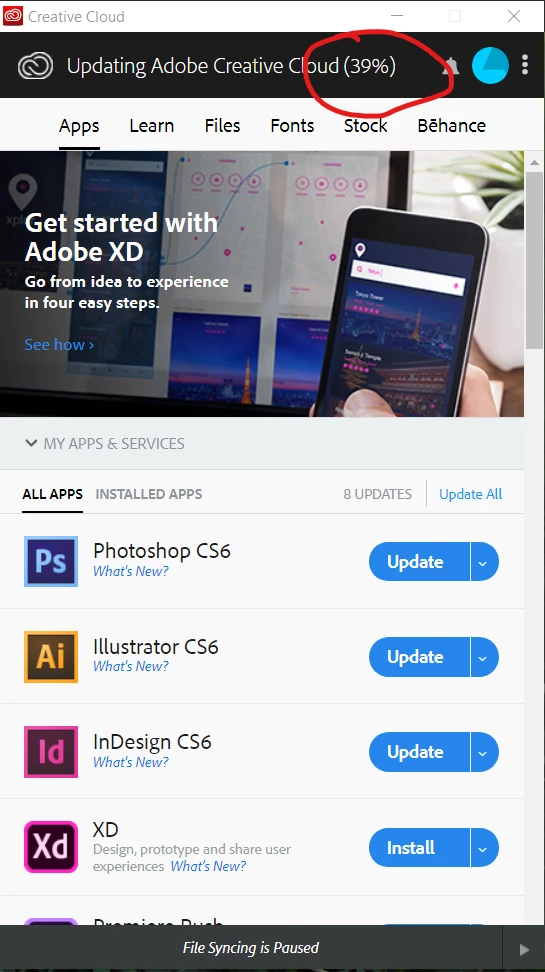
I am about to uninstall it and decide that I'm not using any of these apps any longer. Does ANYONE have any ideas how to resolve this that I have not already tried? Isn't there ANYONE at Adobe who can assist me with this?

Thanks,

Julia Allen

Correct answer kglad

uninstall everything cc including preferences, https://helpx.adobe.com/creative-cloud/help/uninstall-remove-app.html

then uninstall the cc desktop app, https://helpx.adobe.com/creative-cloud/help/uninstall-creative-cloud-desktop-app.html

clean your computer of cc files per http://www.adobe.com/support/contact/cscleanertool.html

empty your temp directory

make sure you have read/write privileges on your temp directory

make sure you have plenty of free c drive disc space.

restart your computer (don't skip this)

reinstall the cc desktop app, https://creative.adobe.com/products/creative-cloud.

if you're unable to install the cc desktop app at this stage, use an administrator account (solution 4 here, https://helpx.adobe.com/creative-cloud/kb/creative-cloud-missing-damaged.html)

use the desktop app to install your cc programs/trials

4 replies

February 26, 2020

I was reading all the replies to the problems with adobe. I never once had any of the problems. some anti virus can interact with adobe products and some malware can do the same. the best way to avoid problems is to run a dignostic check. I don't think unstalling and installing works becuase its only good with some of the products depending on how the database is set up. for example, run a diagnostic first with a great anti virus problem than allow the anti virus to check any errors of a adobe problem. even clients can check problems on a computer if scannned properly. lastly, uninstalling a product is fundementally fine, than reinstalling it back is not the only solution. sometimes the solution is having a good enough anti virus that a user underatands because some anti virus detetion systems don't allow software from other companies to interact and actually block the data on the computer! adobe products might be the same. key is to run a digistic check find the actual cause before uninstalling and reinstalling adobe! a lot of the time its not even adobe but other products that cause other problems to make look like its adobe! finally, over the years of using adobe I have no problems do to maintance, running diagnostics, check for errors with windows event viewer, report viewer, with apple u can use itunes to run a diagnostics check! hope this helps!! 

Participant
March 13, 2020

Had this problem on my new PC. Rebooted in safe mode (with networking) and all installs went smooth, without having to do any repairs, uninstalls, etc.

Participant
June 15, 2020

Hi, 


I wanted to know what you meant by safe mode, and also "Adobe Support" is an appsolute joke, I was told to use ccc (Creative Cloud Cleaner) which didn't work and then I was also told to mess with the properties which didn't work either and then I download the 2020 Direct link, also did nothing, I love paying 53 bucks a month for something I can't even use. My mom bought this for me for my birthday and now, it is ridiculus how much trouble I have to go to install an update and a edtiting software. If anyone has any luck please reply.

Participant
February 26, 2020

Sorry you are stuck Allende. Mine is also stuck, I can't uninstall my Adobe programs because they want to update to uninstall. I can't update because they get stuck at 39%. So essentially Adobe is now as good as Malware on my computer. Many of us users are extremely pissed and complaining, but the software developers aren't changing the uninstall algorithm to a much simpler version that will work. I'm going to be very careful when installing adobe products from now on.

Participant
February 16, 2020

Hello,

Is there any other option available? I have 7-8 of these Apps including indesign, dreamweaver and illustrator amongst others installed on my system and only photoshop is stuck at 10%. I cannot spend productive time in erasing all of them and download them again.

Any help would be appreciated.

ProDesignTools
Community Expert
Community Expert
February 17, 2020

Sure. Instead of erasing all of them and downloading them again, did you try ter_rez's recommendation above of repairing the CC Desktop app "in place"?


Another possibility: Some folks have reported that updating their system's graphics drivers (e.g., NVIDIA or AMD or Intel) to the latest versions fixed the downloading issue... Not sure why, but it's worth trying.


If that doesn't help, then did you see the other option suggested above about getting the direct download links instead? That way you can download & install the main creative tools without using the Creative Cloud Desktop app.

kglad
Community Expert
kgladCommunity ExpertCorrect answer
Community Expert
April 26, 2019

uninstall everything cc including preferences, https://helpx.adobe.com/creative-cloud/help/uninstall-remove-app.html

then uninstall the cc desktop app, https://helpx.adobe.com/creative-cloud/help/uninstall-creative-cloud-desktop-app.html

clean your computer of cc files per http://www.adobe.com/support/contact/cscleanertool.html

empty your temp directory

make sure you have read/write privileges on your temp directory

make sure you have plenty of free c drive disc space.

restart your computer (don't skip this)

reinstall the cc desktop app, https://creative.adobe.com/products/creative-cloud.

if you're unable to install the cc desktop app at this stage, use an administrator account (solution 4 here, https://helpx.adobe.com/creative-cloud/kb/creative-cloud-missing-damaged.html)

use the desktop app to install your cc programs/trials

Participating Frequently
October 16, 2019
What the heck kind of answer is that? I'm just wondering if you could throw a few more time-wasting steps in there. Why not just go buy a new computer? This is so ridiculous. I have an idea. Why not just make apps that work?
Participant
October 23, 2019

I agree, the proposed solution is terrible. I figured a much simpler solution. If you are a Windows 10 user, instead of uninstalling Adobe CC you can try "repairing" it instead.


These are the steps that what worked for me:

1. Open the "Task Manager" and end the task on ALL Adobe processes, including background processes. 

2. Go to "Add or Remove Programs", click on Adobe Creative Cloud and click Unistall

4. Say Yes the "Allow app to make changes" dialog box

5. When you are prompted with a message asking you if you are sure you want to uninstall Adobe CC click the "Repair" button instead