Hosun
Inspiring
July 13, 2019
Answered

Change colour on two links when hovering on a single link [was: hover]

  • July 13, 2019
  • 3 replies
  • 2284 views

Hi osgood_,

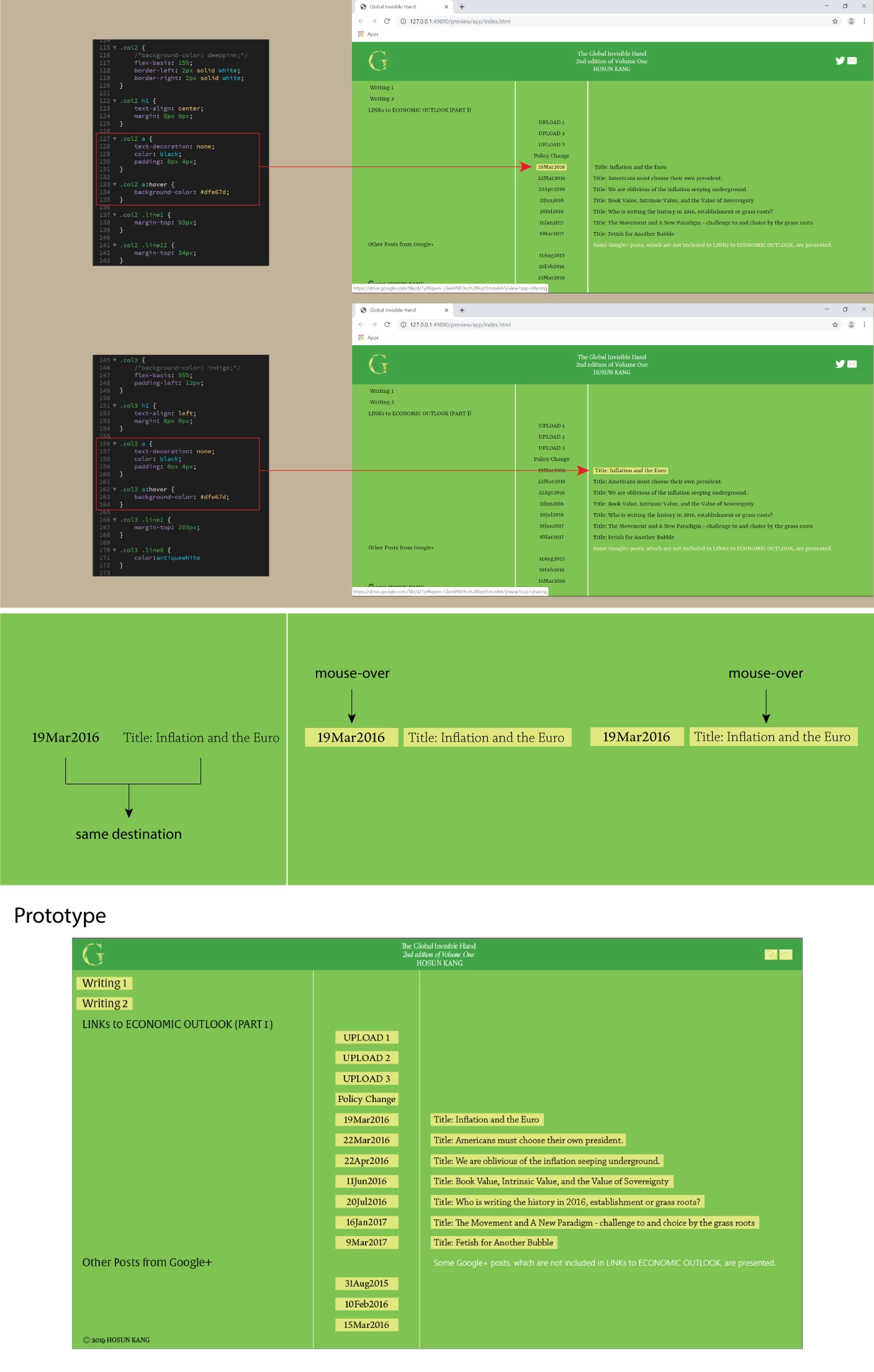
As seen in the image below, I am making a hover on "date" and "title".

"19Mar2016" and "Title: Inflation and the Euro" share the same destination.

So, I want to make the background color change on both, upon mouse-over on either "date" or "title".

How would I do?

Global Invisible Hand

Hosun Kang

This topic has been closed for replies.
Correct answer osgood_

Actually this gets more complex as you need the hover to work both ways so more unique data-class="mar19_2016_1" and classes are needed class="mar19_2016_2"

Unless there is a more streamlined way of doing this, which Im sure there must be, Im not sure its worth the extra effort. Its not very elegant but it works, maybe  someone else can come up with a solution which is a bit less cumbersome.

<!DOCTYPE html>

<html lang="en">

<head>

<meta charset="UTF-8">

<title>Test</title>

<style>

* {

box-sizing: border-box

}

.col-wrapper {

display: flex;

width: 80%;

margin: 0 auto;

}

.col-wrapper h3 {

margin: 0;

padding: 10px;

font-size: 15px;

}

.col2  {

width: 30%;

padding: 30px;

}

.col2 h3:hover {

background-color: yellow;

cursor: pointer;

}

.col3 h3:hover {

background-color: yellow;

cursor: pointer;

}

.col3{

width: 70%;

padding: 30px;

}

</style>

</head>

<body>

     <div class="col-wrapper">

<div class="col2">

<h1>Col 1</h1>

<h3 data-class="mar19_2016_1" class="mar19_2016_2">19 Mar 2016</h3>

<h3 data-class="mar22_2016_1" class="mar22_2016_2">22 Mar 2016</h3>

<h3 data-class="apr22_2016_1" class="apr22_2016_2">22 Apr 2016</h3>

<h3 data-class="jun11_2016_1" class="jun11_2016_2">11 Jun 2016</h3>

<h3 data-class="jul20_2016_1" class="jul20_2016_2">20 Jul 2016</h3>

<h3 data-class="jan16_2017_1" class="jan16_2017_2">16 Jan 2017</h3>

<h3 data-class="mar9_2017_1" class="mar9_2017_2">9 Mar 2017</h3>

<h3 data-class="aug31_2015_1">31 Aug 2015</h3>

<h3 data-class="feb10_2016_1">10 Feb 2016</h3>

<h3 data-class="mar15_2016_1">15 Mar 2016</h3>

</div>

<div class="col3">

<h1>Col 2</h1>

<h3 data-class="mar19_2016_2" class="mar19_2016_1">Title: Inflation and the Euro</h3>

<h3 data-class="mar22_2016_2" class="mar22_2016_1">Title: Americans must choose their own president.</h3>

<h3 data-class="apr22_2016_2" class="apr22_2016_1">Title: We are oblivious of the inflation seeping underground.</h3>

<h3 data-class="jun11_2016_2" class="jun11_2016_1">Title: Book Value, Intrinsic Value, and the Value of Sovereignty</h3>

<h3 data-class="jul20_2016_2" class="jul20_2016_1">Title: Who is writing the history in 2016, establishment or grass roots?</h3>

<h3 data-class="jan16_2017_2" class="jan16_2017_1">Title: The Movement and A New Paradigm - challenge to and choice by the grass roots</h3>

<h3 data-class="mar9_2017_2" class="mar9_2017_1">Title: Fetish for Another Bubble</h3>

</div>

     </div>

<!-- end col-wrapper -->

<script>

const col2h3 = document.querySelectorAll('.col2 h3');

const col3h3 = document.querySelectorAll('.col3 h3');

col2h3.forEach(function(date) {

date.addEventListener('mouseenter', getDateMouseEnter);

})

col2h3.forEach(function(date) {

date.addEventListener('mouseleave', getDateMouseLeave);

})

col3h3.forEach(function(date) {

date.addEventListener('mouseenter', getDateMouseEnter);

})

col3h3.forEach(function(date) {

date.addEventListener('mouseleave', getDateMouseLeave);

})

function getDateMouseEnter() {

var date = this.getAttribute('data-class');

var currentDate = document.querySelector('.' + date);

currentDate.style.backgroundColor = "yellow";

}

function getDateMouseLeave() {

var date = this.getAttribute('data-class');

var currentDate = document.querySelector('.' + date);

currentDate.style.backgroundColor = "";

}

</script>

</body>

</html>

3 replies

Nancy OShea
Community Expert
July 13, 2019

I don't recommend this often because tables are such a chore to work with in responsive layouts  but what you have here is perfect for a data table.  And you can trigger table rows to change background color with pure CSS.  No JS required.

<!doctype html>

<html lang="en">

<head>

<meta charset="utf-8">

<title>Data Tables</title>

<meta http-equiv="X-UA-Compatible" content="IE=edge">

<meta name="viewport" content="width=device-width, initial-scale=1">

<style>

table {

width: 75%;

margin: 0 auto;

border: 4px solid #555;

color: #000;

font-family: Calibri, Candara, Segoe, Segoe UI, Optima, Arial, sans-serif;

font-size: calc(16px + 1vw);

line-height: calc(1.1em + 0.5vw);

}

td {

padding: 3%;

border: 1px dotted #666

}

tr:nth-child(odd) { background-color: antiquewhite }

tr:nth-child(even) { background-color: aliceblue }

tr:hover { background-color: gold }

</style>

</head>

<body>

<table>

<caption>

Data Table

</caption>

<tbody>

<tr>

<td>Lorem</td>

<td>Ipsum</td>

<td>Dolor</td>

<td>Quora</td>

<td>Lorit</td>

</tr>

<tr>

<td>Lorem</td>

<td>Ipsum</td>

<td>Dolor</td>

<td>Quora</td>

<td>Lorit</td>

</tr>

<tr>

<td>Lorem</td>

<td>Ipsum</td>

<td>Dolor</td>

<td>Quora</td>

<td>Lorit</td>

</tr>

<tr>

<td>Lorem</td>

<td>Ipsum</td>

<td>Dolor</td>

<td>Quora</td>

<td>Lorit</td>

</tr>

<tr>

<td>Lorem</td>

<td>Ipsum</td>

<td>Dolor</td>

<td>Quora</td>

<td>Lorit</td>

</tr>

</tbody>

</table>

</body>

</html>

Nancy O'Shea— Product User & Community Expert
Brainiac
July 13, 2019

https://forums.adobe.com/people/Nancy+OShea  wrote

I don't recommend this often because tables are such a chore to work with in responsive layouts  but what you have here is perfect for a data table.  And you can trigger table rows to change background color with pure CSS.  No JS required.

<!doctype html> <html lang="en"> <head> <meta charset="utf-8"> <title>Data Tables</title> <meta http-equiv="X-UA-Compatible" content="IE=edge"> <meta name="viewport" content="width=device-width, initial-scale=1"> <style> table { width: 75%; margin: 0 auto; border: 4px solid #555; color: #000; font-family: Calibri, Candara, Segoe, Segoe UI, Optima, Arial, sans-serif; font-size: calc(16px + 1vw); line-height: calc(1.1em + 0.5vw); } td { padding: 3%; border: 1px dotted #666 } tr:nth-child(odd) { background-color: antiquewhite } tr:nth-child(even) { background-color: aliceblue } tr:hover { background-color: gold } </style> </head>  <body> <table> <caption> Data Table </caption> <tbody> <tr> <td>Lorem</td> <td>Ipsum</td> <td>Dolor</td> <td>Quora</td> <td>Lorit</td> </tr> <tr> <td>Lorem</td> <td>Ipsum</td> <td>Dolor</td> <td>Quora</td> <td>Lorit</td> </tr> <tr> <td>Lorem</td> <td>Ipsum</td> <td>Dolor</td> <td>Quora</td> <td>Lorit</td> </tr> <tr> <td>Lorem</td> <td>Ipsum</td> <td>Dolor</td> <td>Quora</td> <td>Lorit</td> </tr> <tr> <td>Lorem</td> <td>Ipsum</td> <td>Dolor</td> <td>Quora</td> <td>Lorit</td> </tr> </tbody> </table> </body> </html>      

That would be the obvious choice but the layout shown requires a space between one column and the other column so somehow you need to connect the indivdual table cells up so both have the colored background if one or the other cell is hovered over, not the complete <tr></tr> table row.

Also we dont know if the information is adjacent to each other, it might be anywhere in the list, hardly likely, but a possibility.

Do I think this is worth the effort, only if its simplified by the use of a table with co-joined cells and the OP is happy for the whole row to be highlighted on hover.

A solution to address seperate containers anywhere on the page is there but is currently pretty cumbersome. I dont have time to see if I can streamline it.

pziecina
Brainiac
July 13, 2019

Os.

You could do this using the css psuedo class 'target', along with css animations. But I think that would be way beyond the OPs current skill level, and if you want an example from me you will have to wait until tomorrow, as I'm off for my evening drink .

Brainiac
July 13, 2019

Yes, you can do that but you need some javascript, as has been suggested.

The idea is you give your information a - data-class="mar19_2016" - attribute, see below. I've simplified the code to use <h3></h3> tags and I would suggest you also do the same.

You dont need all the <h1></h1> tags wrapped in <section></section> tags. Its counter productive. When I explained about that in an earlier post I meant use the <h1> tag sparingly per page, where there was a genuine need for a <section> tag not introduce <section> tags just to accommoadte the use of multiple <h1> tags.

Give your information in Col3 a class each that matches with the data-class attribute set in Col2 see below:

Then use the javascript included at the foot of the page, insert it before the closing </body> tag.

Also be aware mouse hover events do nothing on mobile.

<!DOCTYPE html>

<html lang="en">

<head>

<meta charset="UTF-8">

<title>Test</title>

<style>

* {

box-sizing: border-box

}

.col-wrapper {

display: flex;

width: 80%;

margin: 0 auto;

}

.col-wrapper h3 {

margin: 0;

padding: 10px;

font-size: 15px;

}

.col2  {

width: 30%;

padding: 30px;

}

.col2 h3:hover {

background-color: yellow;

cursor: pointer;

}

.col3{

width: 70%;

padding: 30px;

}

</style>

</head>

<body>

<div class="col-wrapper">

<div class="col2">

<h3 data-class="mar19_2016">19 Mar 2016</h3>

<h3 data-class="mar22_2016">22 Mar 2016</h3>

<h3 data-class="apr22_2016">22 Apr 2016</h3>

<h3 data-class="jun11_2016">11 Jun 2016</h3>

<h3 data-class="jul20_2016">20 Jul 2016</h3>

<h3 data-class="jan16_2017">16 Jan 2017</h3>

<h3 data-class="mar9_2017">9 Mar 2017</h3>

<h3 data-class="aug31_2015">31 Aug 2015</h3>

<h3 data-class="feb10_2016">10 Feb 2016</h3>

<h3 data-class="mar15_2016">15 Mar 2016</h3>

</div>

<!-- end col2 -->

<div class="col3">

<h3 class="mar19_2016">Title: Inflation and the Euro</h3>

<h3 class="mar22_2016">Title: Americans must choose their own president.</h3>

<h3 class="apr22_2016">Title: We are oblivious of the inflation seeping underground.</h3>

<h3 class="jun11_2016">Title: Book Value, Intrinsic Value, and the Value of Sovereignty</h3>

<h3 class="jul20_2016">Title: Who is writing the history in 2016, establishment or grass roots?</h3>

<h3 class="jan16_2017">Title: The Movement and A New Paradigm - challenge to and choice by the grass roots</h3>

<h3 class="mar9_2017">Title: Fetish for Another Bubble</h3>

</div>

<!-- end col3 -->

</div>

<!-- end col-wrapper -->

<script>

const col2h3 = document.querySelectorAll('.col2 h3');

const col3h3 = document.querySelectorAll('.col3 h3');

col2h3.forEach(function(date) {

date.addEventListener('mouseenter', getDateMouseEnter);

})

col2h3.forEach(function(date) {

date.addEventListener('mouseleave', getDateMouseLeave);

})

function getDateMouseEnter() {

var date = this.getAttribute('data-class');

var currentDate = document.querySelector('.' + date);

currentDate.style.backgroundColor = "yellow";

}

function getDateMouseLeave() {

var date = this.getAttribute('data-class');

var currentDate = document.querySelector('.' + date);

currentDate.style.backgroundColor = "";

}

</script>

</body>

</html>

osgood_Correct answer
Brainiac
July 13, 2019

Actually this gets more complex as you need the hover to work both ways so more unique data-class="mar19_2016_1" and classes are needed class="mar19_2016_2"

Unless there is a more streamlined way of doing this, which Im sure there must be, Im not sure its worth the extra effort. Its not very elegant but it works, maybe  someone else can come up with a solution which is a bit less cumbersome.

<!DOCTYPE html>

<html lang="en">

<head>

<meta charset="UTF-8">

<title>Test</title>

<style>

* {

box-sizing: border-box

}

.col-wrapper {

display: flex;

width: 80%;

margin: 0 auto;

}

.col-wrapper h3 {

margin: 0;

padding: 10px;

font-size: 15px;

}

.col2  {

width: 30%;

padding: 30px;

}

.col2 h3:hover {

background-color: yellow;

cursor: pointer;

}

.col3 h3:hover {

background-color: yellow;

cursor: pointer;

}

.col3{

width: 70%;

padding: 30px;

}

</style>

</head>

<body>

     <div class="col-wrapper">

<div class="col2">

<h1>Col 1</h1>

<h3 data-class="mar19_2016_1" class="mar19_2016_2">19 Mar 2016</h3>

<h3 data-class="mar22_2016_1" class="mar22_2016_2">22 Mar 2016</h3>

<h3 data-class="apr22_2016_1" class="apr22_2016_2">22 Apr 2016</h3>

<h3 data-class="jun11_2016_1" class="jun11_2016_2">11 Jun 2016</h3>

<h3 data-class="jul20_2016_1" class="jul20_2016_2">20 Jul 2016</h3>

<h3 data-class="jan16_2017_1" class="jan16_2017_2">16 Jan 2017</h3>

<h3 data-class="mar9_2017_1" class="mar9_2017_2">9 Mar 2017</h3>

<h3 data-class="aug31_2015_1">31 Aug 2015</h3>

<h3 data-class="feb10_2016_1">10 Feb 2016</h3>

<h3 data-class="mar15_2016_1">15 Mar 2016</h3>

</div>

<div class="col3">

<h1>Col 2</h1>

<h3 data-class="mar19_2016_2" class="mar19_2016_1">Title: Inflation and the Euro</h3>

<h3 data-class="mar22_2016_2" class="mar22_2016_1">Title: Americans must choose their own president.</h3>

<h3 data-class="apr22_2016_2" class="apr22_2016_1">Title: We are oblivious of the inflation seeping underground.</h3>

<h3 data-class="jun11_2016_2" class="jun11_2016_1">Title: Book Value, Intrinsic Value, and the Value of Sovereignty</h3>

<h3 data-class="jul20_2016_2" class="jul20_2016_1">Title: Who is writing the history in 2016, establishment or grass roots?</h3>

<h3 data-class="jan16_2017_2" class="jan16_2017_1">Title: The Movement and A New Paradigm - challenge to and choice by the grass roots</h3>

<h3 data-class="mar9_2017_2" class="mar9_2017_1">Title: Fetish for Another Bubble</h3>

</div>

     </div>

<!-- end col-wrapper -->

<script>

const col2h3 = document.querySelectorAll('.col2 h3');

const col3h3 = document.querySelectorAll('.col3 h3');

col2h3.forEach(function(date) {

date.addEventListener('mouseenter', getDateMouseEnter);

})

col2h3.forEach(function(date) {

date.addEventListener('mouseleave', getDateMouseLeave);

})

col3h3.forEach(function(date) {

date.addEventListener('mouseenter', getDateMouseEnter);

})

col3h3.forEach(function(date) {

date.addEventListener('mouseleave', getDateMouseLeave);

})

function getDateMouseEnter() {

var date = this.getAttribute('data-class');

var currentDate = document.querySelector('.' + date);

currentDate.style.backgroundColor = "yellow";

}

function getDateMouseLeave() {

var date = this.getAttribute('data-class');

var currentDate = document.querySelector('.' + date);

currentDate.style.backgroundColor = "";

}

</script>

</body>

</html>

Hosun
HosunAuthor
Inspiring
July 14, 2019

Hi,

Thank you very much for your help.

I will revise and upgrade my project.

It would take some time.

There is lang="en" in <html>.

What is it?

Hosun Kang

Community Expert
July 13, 2019

Based on what I am seeing in the layout, you will likely need to incorporate javascript to your css to get the desired result. If the elements were nested within a single area, it would be possible to just use CSS, but because of their separation and the fact that this may be dynamically-driven from a database, I would say CSS alone will likely not be enough.