Participant
March 17, 2021
Answered

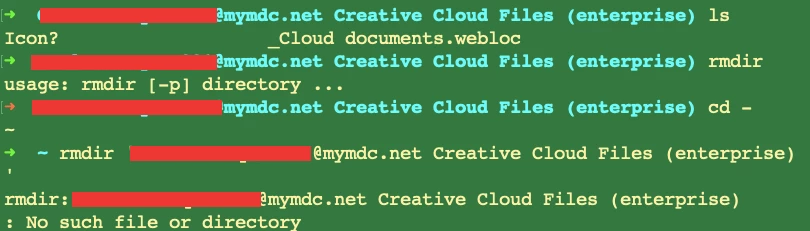
Creative Cloud Account in Terminal

  • March 17, 2021
  • 2 replies
  • 550 views

I noticed this in the directory and I can not remove it. I want to remove it and delete the account. I do not even use it. How do I do that?

This topic has been closed for replies.
Correct answer SuJoshi

Hello,

I assume these are leftover login cache files that are showing on the device. You can try the below steps to remove these files:

> Run creative cloud cleaner tool: https://helpx.adobe.com/in/enterprise/kb/cc-cleaner-tool-for-enterprise-users.html

> Delete the contents from the "~/library/>Application Support>Adobe>OOBE" location

> Clear the Adobe entries from Keychain >> select Login >> secure notes.


Hope, this will resolve your issue.

2 replies

Legend
March 18, 2021

I think you may be trying to use the Unix/MacOS command line without knowing how to quote filenames. DO NOT TRY. DO NOT GUESS. It's very, very easy to get this wrong and wipe your whole disk. I have done it!

John T Smith
Community Expert
Community Expert
March 17, 2021

To Cancel https://helpx.adobe.com/manage-account/using/cancel-creative-cloud-subscription.html
-FAQ https://community.adobe.com/t5/account-payment-plan/cancel-subscription-faq-s/td-p/11843852
-do be aware that cancelling early means paying 1/2 of the remaining time as a fee

Be sure to remain signed in with your Adobe ID before accessing the link below
Do be aware that Adobe's staffing is impacted by the virus, so wait times are long
-make sure that your browser does NOT block ads, scripts, or pop-ups
-you must also allow 'cookies' in your web browser for this to work
https://helpx.adobe.com/contact.html?rghtup=autoOpen
.
Also: beware of answering anyone who sends you a private message
-click for more information about scammers https://tinyurl.com/10791730

carlo5FF5Author
Participant
March 17, 2021

Thank you, it does not work. I do not even have a privacy tab to delete the account.

SuJoshiCommunity ManagerCorrect answer
Community Manager
March 18, 2021

Hello,

I assume these are leftover login cache files that are showing on the device. You can try the below steps to remove these files:

> Run creative cloud cleaner tool: https://helpx.adobe.com/in/enterprise/kb/cc-cleaner-tool-for-enterprise-users.html

> Delete the contents from the "~/library/>Application Support>Adobe>OOBE" location

> Clear the Adobe entries from Keychain >> select Login >> secure notes.


Hope, this will resolve your issue.