
Participant
November 17, 2016
Answered

Creative Cloud Packager-Advanced Package Options-Conflicting Processes

  • November 17, 2016
  • 4 replies
  • 5644 views

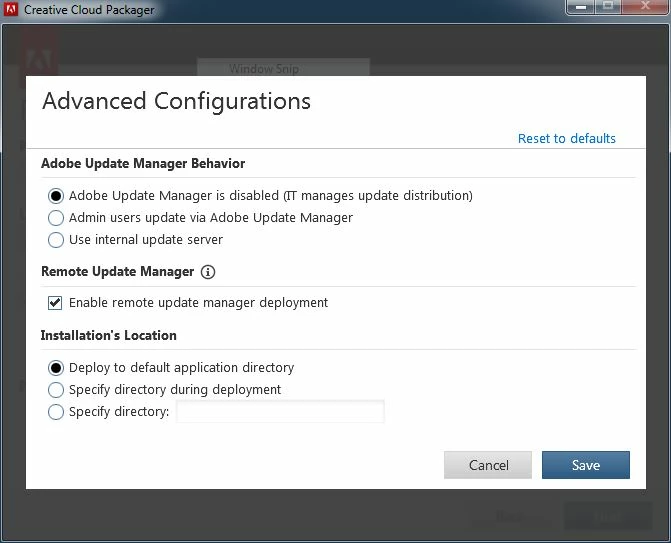
Hi. I am experiencing a problem with my Creative Cloud Package which fails to install if it detects conflicting running processes. I assumed that this is was due to my not having specified the package to continue installation in the event that conflicting processes were detected. However, the option to specify Conflicting Processes behavior does not appear under Advanced Configurations? Any idea why? Thanks!
[Moved from regular Cloud forum to special Deployment forum... Mod]

[Here is the list of all Adobe forums... https://forums.adobe.com/welcome]

This topic has been closed for replies.
Correct answer alisterblack

This behaviour has changed.

Creative Cloud Help | Creative Cloud Packager release notes

  • When you create a package, a ConflictingProcessList.xml is created inside the build package folder. This file contains information about processes that will conflict with the installation process. For more information, see Deploy packages.
  • When you start the installer, it will check for the conflicting processes running on the host computer and exit the installation if any conflicting processes are found.

4 replies

Participant
December 21, 2016

judging my alisterblack's lack of response, I assume that he knows we are right and that this "design" is a major screw up on Adobe's part...something that the CC dev teams are good at.

alisterblack
Inspiring
December 21, 2016

The information provided is directly from the engineering team but I will be sure to pass on your feedback.

Participant
September 2, 2017

Hello STAFF,

Any update to this problem from your wonderfull engineering team who code with theire feet?
I already create a lot of package and everytime the installation finished in error. Of course, no log just "tell it to your admniistrator". I'm the administrator and???
Trying to install package in command line with "verboseR" hoping the installer give me more information but I was just dreaming. The same error with the same answer :-/.

Inspiring
December 15, 2016

This has always worked perfect in the past since CS 5    so yes this is a step backwards.    Maybe they meant it worked 95% of the time! reason for dropping sounds fishy to me.

alisterblack
alisterblackCorrect answer
Inspiring
November 17, 2016

This behaviour has changed.

Creative Cloud Help | Creative Cloud Packager release notes

  • When you create a package, a ConflictingProcessList.xml is created inside the build package folder. This file contains information about processes that will conflict with the installation process. For more information, see Deploy packages.
  • When you start the installer, it will check for the conflicting processes running on the host computer and exit the installation if any conflicting processes are found.
Participant
December 13, 2016

Alisterblack...

Your response really does not answer the question.  How do we get the latest CCP created packages to ignore the conflicting executables?  Our users aren't smart enough to close all the app in the conflicting processes XML file.alisterblack

alisterblack
Inspiring
December 15, 2016

I have to agree with adamvadala on this. We've been relying on that functionality since the CS days. What conceivable technical explanation is there for removing this option that couldn't be remedied through pending operations that would take effect on reboot (which is an easy enough step to add to the end of the deployment)?


Previously the Packager had the option to deploy despite conflicting processes, however our engineers report that this still failed in 95% of cases, therefore it was not a useful function.

John T Smith
Community Expert
Community Expert
November 17, 2016