
October 23, 2017
Answered

Make CC UninstallString Completely Silent to Uninstall Software

  • October 23, 2017
  • 2 replies
  • 19419 views

The UninstallString in  the registry for CC products is as follows

"C:\Program Files (x86)\Adobe\Adobe Creative Cloud\HDCore\Uninstaller.exe" --uninstall=1 --sapCode=ILST --productVersion=20.1.0 --productPlatform=win64 --productAdobeCode={ILST-20.1.0-64-ADBEADBEADBEADBEADBEA} --productName="Adobe Illustrator CC 2015.3" --mode=2

When I run this in CMD, it open Creative Cloud application and asks the user if they want to keep the preference or remove the preference before uninstalling it.
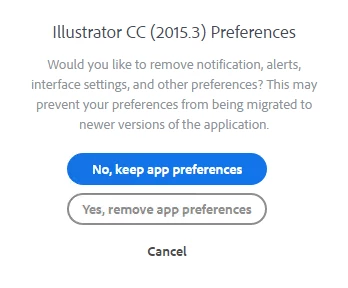
How can I suppress this prompt and make the uninstaller competently silent. I don't care if preferences are kept or removed, but I don't want any prompt for the user.

This topic has been closed for replies.
Correct answer alisterblack

alisterblack​ The package does not list all the version avialbe to uninstall.

Is there a way to use UninstallString and make it silent? Appreciate your help!


Another option is to use the Creative Cloud Cleaner Tool. This allows you to choose which apps you want to uninstall by uncommenting an xml file.

See Use the Creative Cloud Cleaner Tool to solve installation problems

2 replies

Participant
May 27, 2022

Is there any way to stop the "keep preferences" dialog from showing up WITHOUT using the Cleaner Tool? On the Uninstall Creative Cloud Products page it lists a --deleteUserPreferences parameter but using it does not stop the dialog from showing up. This should be possible to do.

alisterblack
Inspiring
October 25, 2017

Hi,

We recommend to use Creative Cloud Packager to build an uninstall package.

Details and command lines are here

Participant
April 11, 2018

Broken link

alisterblack
Inspiring
April 17, 2018

Are you looking for this?

Uninstall Creative Cloud Products