Dennis_Z
Known Participant
September 15, 2021
해결됨

Move CC Library from personal account to a company account

  • September 15, 2021
  • 4 답변들
  • 6446 조회

So Adobe made the change of adding both personal accounts and company accounts.

All my Creative Cloud libraries have been added to my personal account.


My company account has 0 libraries and also 0 shared Xd files. The libraries are very important to us, we have lots of them, also the Xd files.


How to I move all libraries from the personal account to the company account?

And how do I share them with my colleagues? Because they are already invited on them.


For example:

My mail is account1@adobe.com . I invite my colleague, account2@adobe.com.

I'm the owner of multiple libraries on account1. When I invite account2@adobe.com adobe will say they are already invited. I can't choose to invite either the personal or company account.


This change is very annoying honestly. 
이 주제는 답변이 닫혔습니다.
최고의 답변: Vikrant R

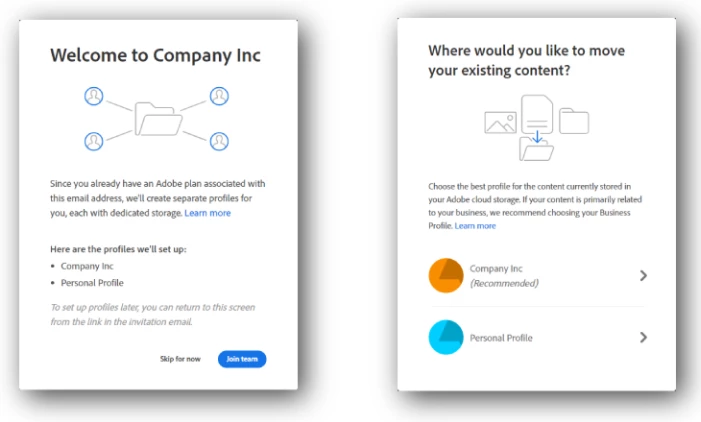
Right after your org accounts were upgraded, did you get an option to choose where to move your assets? If you selected your company/org profile, the assets should have moved. (Some details about the process here)

The migration choice is a *one-time* thing. If someone decides to move assets to the Personal Profile, thereafter assets need to be moved manually.


To move Libraries manually, you have two options. 

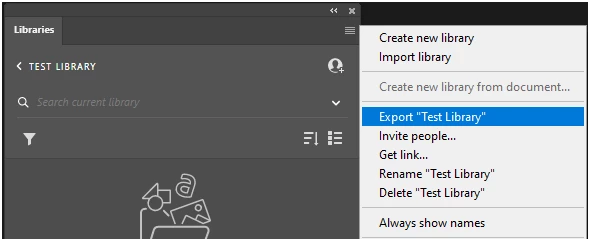
  • Open the Libraries panel inside any app and then export the library as a .cclib file. And then reimport it into the Business profile after signing out and signing back in to the Business profile.
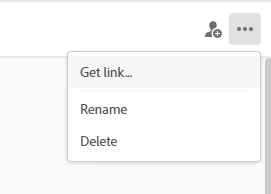
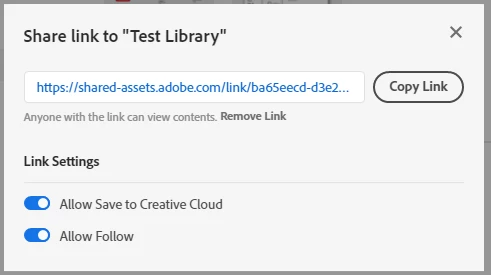
  • In the CC Desktop app or CC website, grab the link to the library. And then in a different browser (or in InCognito window, paste that link and sign in with you Business profile.


I'd recommend leveraging the new storage features, and create these as Team Libraries, so that everyone on the team has access and can collaborate easily. Select a personal Library and choose Move to team.


Let me know if this helps.

4 답변

Participant
June 17, 2024

Just had this issue, and its a nightmare to try rebuild the libraries and account. 

Still havent figured it out

Participant
March 29, 2022

Our company never got the choice either and funny thing is that I am the only team member that this happened to. All the other designers had their files transfer. I am downloading and reuploading things, but some items will be lost when My "personal" account goes dark.

And I may be able to salvage all my CC libraries and Files, but over the years I have published items on InDesign and Acrobat and shared them with clients or linked to them on materials. I can not seem to find where or how to retrieve those items. Nor would it be possible to decipher which ones are important enough to try to archive. 


I guess I get a clean slate to work with, but how many "broken link" and "lost access" emails are headed my way? (I hate to imagine.) Thanks a lot Adobe. 😞

Participant
March 29, 2022

New response from Adobe's Customer Service: “I am terribly sorry for your inconvenience”

Participant
November 23, 2021

We had the same thing happent to us. Im surprised you decided to manually move them yourself. Adobe created the problem and should be responsible for fixing it. What a waste of hours on all of our teams.... 


I also posted on the public forum and they seem to be hiding them behind this enterprise section. Be better Adobe.

Inspiring
November 29, 2021

This is also happening to our agency will changing to business plan. We've transfered many of our employees accounts and I can confirm that some accounts did NOT get the step of "Would you like to move your files and libraries".
This is definitly an issue on Adobe side.
Many hours wasted and Adobe support well, really really not the greatest. I get answers 1 o 3 times.

Dennis_Z
Dennis_Z작성자
Known Participant
September 15, 2021

Small update:

  • Noticed all typekit fonts are gone too. You all have to re-add those. Which again is annoying if you have a ton of them.
  • Adobe support is awful. I tried the live chat, and I feel like they have a hard time understanding me over at India. Tried to get in touch with the Adobe Support over the phone in the UK. But even when calling the UK support I get connected in India and they seem to have a hard time following me and providing a proper answer. Long story short I think the Adobe support is poor and lacking. 
Vikrant R
Vikrant R답변
Inspiring
September 15, 2021

Right after your org accounts were upgraded, did you get an option to choose where to move your assets? If you selected your company/org profile, the assets should have moved. (Some details about the process here)

The migration choice is a *one-time* thing. If someone decides to move assets to the Personal Profile, thereafter assets need to be moved manually.


To move Libraries manually, you have two options. 

  • Open the Libraries panel inside any app and then export the library as a .cclib file. And then reimport it into the Business profile after signing out and signing back in to the Business profile.
  • In the CC Desktop app or CC website, grab the link to the library. And then in a different browser (or in InCognito window, paste that link and sign in with you Business profile.


I'd recommend leveraging the new storage features, and create these as Team Libraries, so that everyone on the team has access and can collaborate easily. Select a personal Library and choose Move to team.


Let me know if this helps.

Dennis_Z
Dennis_Z작성자
Known Participant
September 20, 2021

Thank you for your reply @Vikrant R!


I never received that one-time pop-up. Nor did my colleagues. Hence why it was so vague to us. But I'll be doing everything manually then.