Known Participant
April 29, 2017
Answered

"Couldn't Load Plugin": New Beta 26.0.0.89 PPAPI does not work in Chrome, Windows XP

  • April 29, 2017
  • 30 replies
  • 15317 views

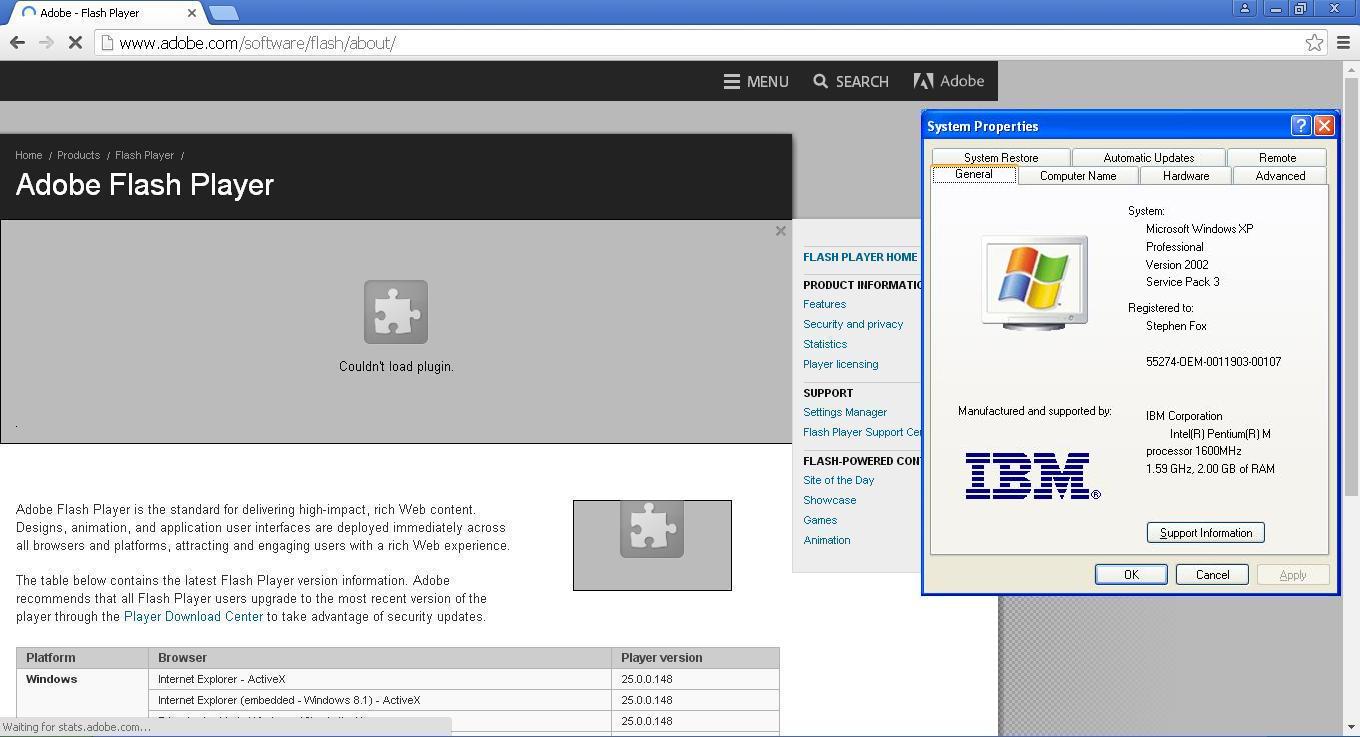
The new beta 26.0.0.89 released on 4/27 does not work in Chrome and Windows XP. All previous versions did.

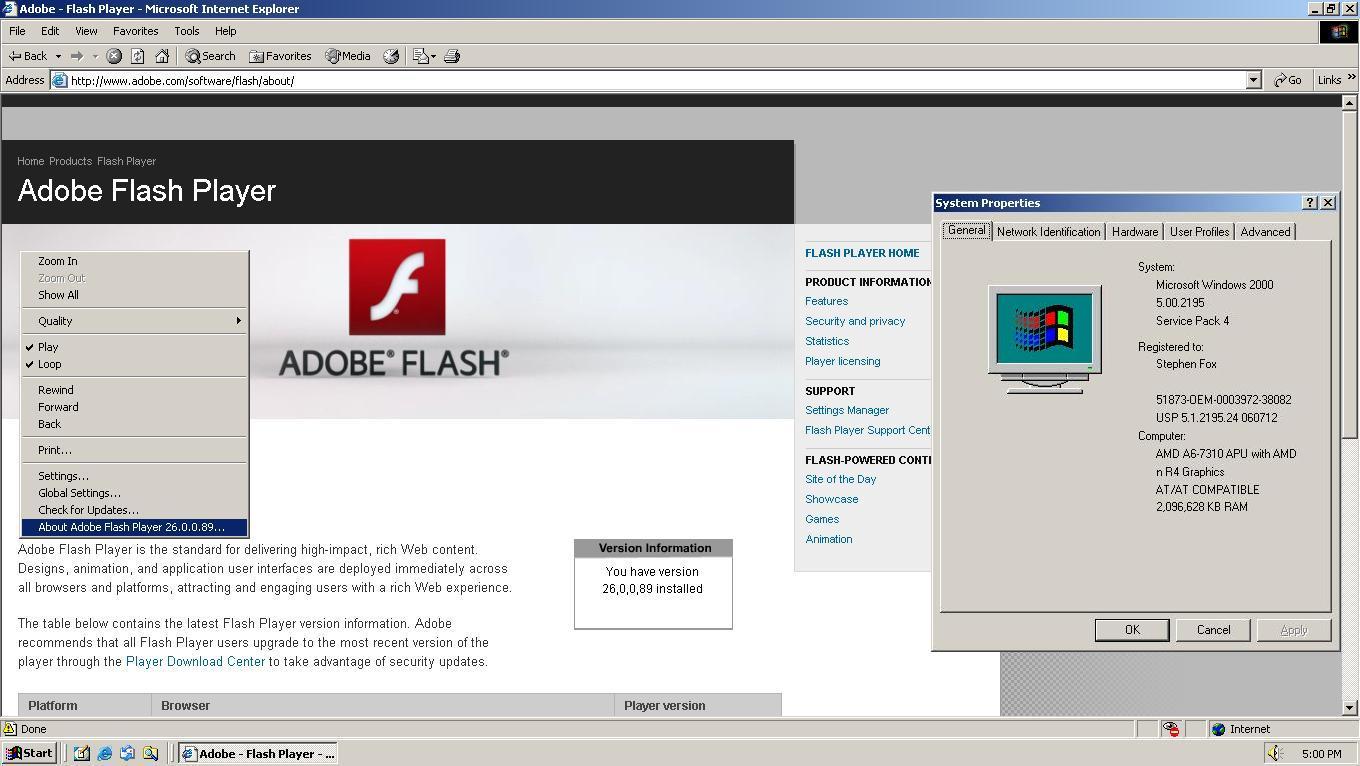
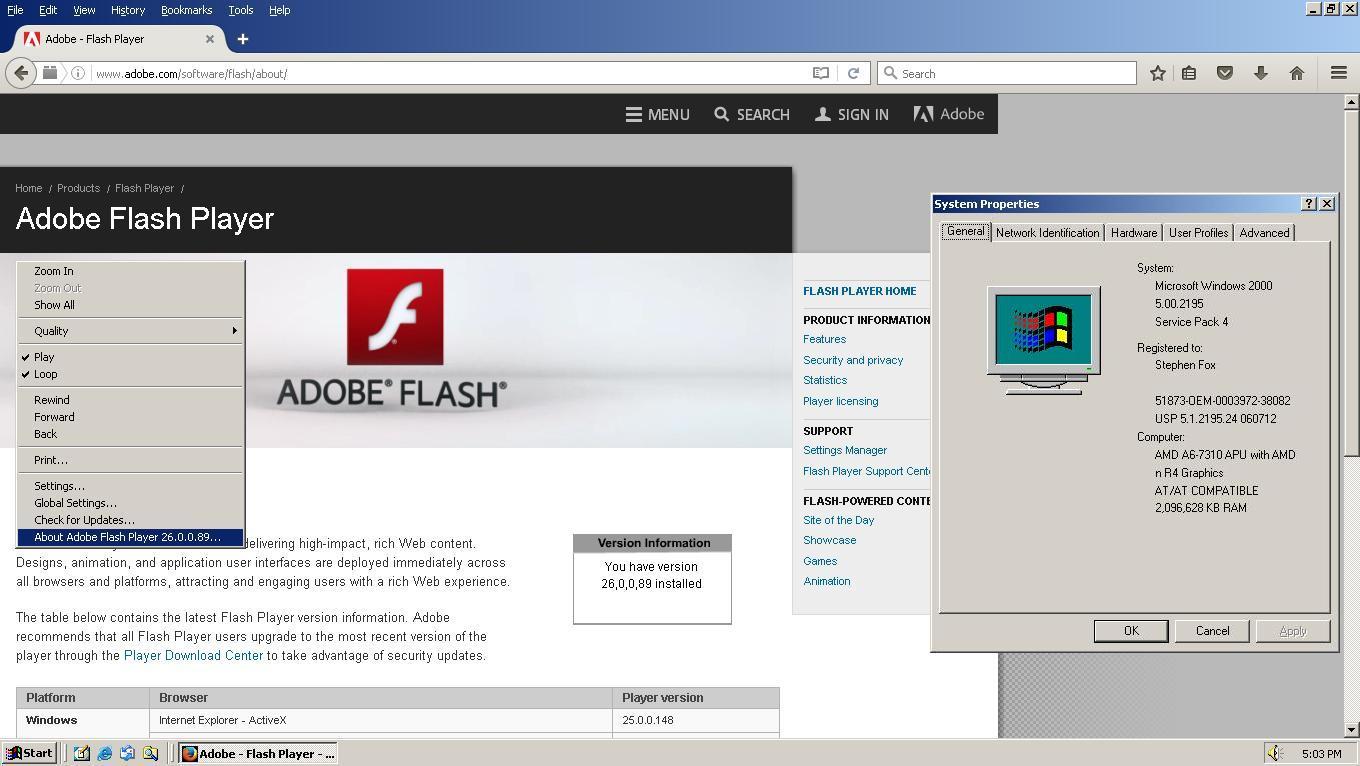
Windows XP is still a supported operating system. Also, the normal Internet Explorer and Firefox plugins work correctly, both on Windows 2000 and XP. It's only the Chrome PPAPI that does not. Available from this page: Download Adobe Flash Player 26 Beta for Desktops - Adobe Labs

Direct link on that page is: https://fpdownload.macromedia.com/pub/labs/flashruntimes/flashplayer/install_flash_player_ppapi.exe
This topic has been closed for replies.
Correct answer _maria_

Hi sdfox7

This issue has been fixed in today's beta release, 26.0.0.102, available at Download Adobe Flash Player 26 Beta for Desktops - Adobe Labs .

--

Maria

30 replies

sdfox7Author
Known Participant
May 2, 2017

I guess I should try to simplify this for tomorrow when you test on a XP system.

Generally when Adobe releases a new version of the ppapi.exe file, all one needs to do on an XP system is run the file, then copy

pepflashplayer32_26_0_0_89.dll

from the \system32 directory, and paste it into

\PepperFlash directory. After doing so, you rename it to pepflashplayer.dll, which then overwrites the previous version of the PepperFlash player.

This has always worked, and as you can see above, I'm using 25.0.0.148 and it is named pepflashplayer.dll. For some reason with 26.0.0.89 beta, it is not working now.

_maria_
Community Manager
Community Manager
May 2, 2017

Thanks for posting the steps you take to use update Flash Player.  I did try this on Vista and it worked.  I'll try this on XP tomorrow.

Both options (your method of copying the file and using --ppapi-flash-path and --ppapi-flash-version) should work.

Chrome 49 (automatically) recognized pepflashplayer.dll from one of two locations, depending on how Chrome updated Flash Player:
Flash Player updates installed via Chrome's Component Updater install to the User's location (Vista path, adjust for XP):

  • C:\Users\UserID\AppData\Local\Google\Chrome\User Data\PepperFlash
    (I don't recall if it includes the Flash Player version number in the directory path. The installation I have installed Flash Player to Program Files, not the per user location, so I can't verify).

  • Flash Player updates installed via a Chrome update installed to C:\Program Files\Google\Chrome\Application\CHROME_VESION\PepperFlash or :\Program Files (x86)\Google\Chrome\Application\CHROME_VERSION\PepperFlash\ (32-bit location on 64-bit OS), for example, C:\Program Files (x86)\Google\Chrome\Application\49.0.2623.112\PepperFlash\pepflashplayer.dll on my 64-bit Vista.
    • With newer versions of Chrome, Google updates Flash via Component Updater, not Chrome updates, but Chrome 49 could have been either method.

Using --ppapi-flash-path and --ppapi-flash-version in the launch command allows Chrome to load the PPAPI plugin from the location specified in the argument.  the --ppapi-flash-version argument is used to show the loaded version in chrome://plugins, else it would default to some other version.

It has been my experience that when using the method you're using to update Flash Player PPAPI (via copying it to the Chrome location) does not update the version in chrome://plugins and Chrome continues to display the version installed either via Component Updater or a Chrome Update in chrome://plugins.  But the version listed in https://www.adobe.com/products/flash or https://helpx.adobe.com/flash-player.html will display the copied version.

<edited to include screenshot>

sdfox7Author
Known Participant
May 2, 2017

Yes, Chrome 49 can only recognize pepflashplayer.dll as the file name. And yes, I copied it to the \26.0.0.89 directory, which now allowed chrome://plugins to correctly detect the version.

If you cannot see the entire plugin path, clicking on the picture should allow you to see the full-window of the jpg, my images are hosted externally so as not to take up your forum's bandwidth: http://sdfox7.com/xp/files/plugin5.jpg

The contents of the C:\Windows\System32\Macromed\Flash directory are below, trying to add a duplicate file as pepflashplayer.dl did not work:

sdfox7Author
Known Participant
May 2, 2017

Ok, I fixed one problem: later versions of Chrome install the PepperFlash to an additional folder: 26.0.0.89. Adding this folder and moving the files from

C:\Program Files\Google\Chrome\Application\49.0.2623.112\PepperFlash

to

C:\Program Files\Google\Chrome\Application\49.0.2623.112\PepperFlash\26.0.0.89

allows chrome://flags to now detect the correct version:

However, the plugin still does not work.

I discovered the path change by looking at the destination path of my Windows 7 host machine (XP Mode is a guest virtual machine):

_maria_
Community Manager
Community Manager
May 2, 2017

The Plugin URL path is cut-off.  Please post the entire URL path.

Regarding "C:\Program Files\Google\Chrome\Application\49.0.2623.112\PepperFlash\26.0.0.89", it's really not possible for 26.0.0.89 to install to this location.  Flash Player standalone installers will *not* install to this path. They only install to C:\Windows\System32\Macromed\Flash and C:\Windows\SysWOW64\Macromed\Flash (on 64-bit OS).  Only the embedded Flash Player version will install to the Google\Chrome\Applications path directory.

Did you rename the pepflashplayer.dll file and copy it to the C:\Program Files\Google\Chrome\Application\49.0.2623.112\PepperFlash\26.0.0.89 location?

What are the contents of the C:\Windows\System32\Macromed\Flash directory?

sdfox7Author
Known Participant
May 2, 2017

A strange observation: chrome://plugins reports the original version number of PepperFlash that shipped with Chrome 49 (21.0.0.213) even though the Adobe test page shows that 25.0.0.148 is indeed installed.

Installing the 26.0.0.89 version does not change the version number reported in chrome://flags, it still reports 21.0.0.213.

_maria_
Community Manager
Community Manager
May 2, 2017

That's definitely different behaviour than what I'm observing in Vista (and shown on my screenshot).


Can you please expand the chrome://plugin details (click the +Details link in the upper right) and post the screenshot again? You're screenshot should of chrome://plugins Flash entry should look like the one I posted.  Also, is this a 32-bit or 64-bit Windows XP system?


What is the exact command-line argument you are using?  The screenshot of the Chrome shortcut Target doesn't show the entire information.

sdfox7Author
Known Participant
May 2, 2017

This is a 32-bit XP system. Also, I copy and pasted from your post into the target ine: (I'm not sure if all the quotes belong, but I included them all):

"C:\Program Files\Google\Chrome\Application\chrome.exe" --ppapi-flash path="C:\Windows\System32\Macromed\Flash\pepflashplayer32_26_0_0_89.dll" --ppapi-flash-version="26.0.0.89"

sdfox7Author
Known Participant
May 2, 2017

I appreciate you going through the trouble.

For sanity's sake, here is Chrome 49 running with 25.0.0.148, no issues, so there is something going on with the beta 26 dll:

_maria_
Community Manager
Community Manager
May 2, 2017

I'll have access to an XP system tomorrow and will investigate it further.

Can you post two screenshots of the chrome://plugins page (with details), one with 25.0.0.148 and another 26.0.0.89?

Thank you.

sdfox7Author
Known Participant
May 2, 2017

m_vargas

I believe I have followed your instructions correctly. I still experience the issue. Something changed in the PepperFlash dll from stable 25 to beta 26.

sdfox7Author
Known Participant
May 2, 2017

If you want to duplicate the situation, Chrome 49.0.2623.112 m is the final version for XP and Vista, and you can get it from my XP EOL directory here: http://sdfox7.com/xp/sp3/EOL/ChromeStandaloneSetup.exe

I want to emphasize that the current shipping version 25.0.0.148 DOES work correctly, it is only the beta 26.0.0.89 that does not.

I also tried reverting to an old manifest.json (also stored in the /PepperFlash directory) to see if that was related, but that did not resolve the issue.

_maria_
Community Manager
Community Manager
May 2, 2017

Thank you, but I can't access an XP system at the office (old, unsecure and blocked by Adobe).  I am testing on a Windows Vista system with Version 49.0.2623.112, the last supported version for XP/Vista.  The stable version, 25.0.0.148, loads in the same manner (launching from command with the --ppapi-flash-path and --ppapi-flash-version arguments).  Otherwise, it loads the embedded version.

sdfox7Author
Known Participant
May 2, 2017

I am using Chrome 49.0.2623.112. I am attempting to use the beta 26.0.0.89 PepperFlash PPAPI plugin.

The normal ActiveX and NPAPI plugins work correctly on Windows 2000 and XP.

I was hoping that the PPAPI bug could be fixed before the final release on Patch Tuesday, May 9.

Thank you both for looking into this.

_maria_
Community Manager
Community Manager
May 2, 2017

By default, Chrome 49 doesn't use the non-embedded Flash Player version (the PPAPI version you installed from the beta downloads page), it only loads the embedded version.  It wasn't until Flash Player 51 (or newer, I don't recall exact version) that Chrome loads the non-embedded Flash Player if the version is equal to, or greater than, the embedded version.  Since Chrome is no longer supported on XP, Google no longer updates the embedded version of Flash Player for Chrome.  The forum post you link to, about Chrome not loading the Flash Plugin is most likely not related to your issue, especially since the OP specifically states that it doesn't apply to Chrome (first sentence).

To have Chrome 49 use the non-embedded version, launch Chrome with the  --ppapi-flash-path and --ppapi-flash-version command-line arguments.  For example:

"C:\Program Files (x86)\Google\Chrome\Application\chrome.exe" --ppapi-flash-path="C:\Windows\SysWOW64\Macromed\Flash\pepflashplayer32_26_0_0_89.dll" --ppapi-flash-version="26.0.0.89"

This is from a 64-bit Windows Vista system.  If you have a 32-bit OS, use:

"C:\Program Files\Google\Chrome\Application\chrome.exe" --ppapi-flash-path="C:\Windows\System32\Macromed\Flash\pepflashplayer32_26_0_0_89.dll" --ppapi-flash-version="26.0.0.89"

If you have a short-cut to Chrome, you can edit the shortcut 'Target' to include these arguments and parameters.

_maria_
Community Manager
Community Manager
May 2, 2017

@sdfox7


What version of Chrome are you using?

--

Maria

divya010193
Adobe Employee
Adobe Employee
May 1, 2017

Hi,

As you are using Google chrome browser, Flash Player comes installed with chrome and all updates are pushed by Google as part of Chrome updates. You will not be able to install/uninstall Flash Player for chrome.

Please see Adobe Flash isn't working - Chrome Help

You may want to try resetting Chrome (Reset Chrome settings to default - Chrome Help ).  If that doesn't work another option is to completely uninstallChrome and then re-install it.

Thanks!

sdfox7Author
Known Participant
May 1, 2017

divya_1993

By the way, this same bug was reported last year with PepperFlash 23, and an Adobe employee recognized it as such, a "bug":

XP/Vista: Flash PPAPI plugin 23.0.0.162 doesn't work in Opera and Chromium

divya010193
Adobe Employee
Adobe Employee
May 2, 2017

Hi,

Which browser are you specifically referring to?

For Chrome Flash Player comes installed with chrome and all updates are pushed by Google as part of Chrome updates.

Whereas, the PPAPI installer that you have referred to is used in Chromium based browsers like Opera, Opera Developer.

Are you using Chrome (beta) browser?

If no, the latest Flash player (release channel) version that you would be able to see on chrome is 25.0.0.148 as seen in the screenshot that you sent.