


Inspiring
January 14, 2025
Answered

Accessing free trial of FrameMaker 2022

  • January 14, 2025
  • 2 replies
  • 1659 views

Adobe has a page where you can sign up for a free trial vesion of FrameMaker. I completed the form on that page, and got the download, and installed it.

However, when I start the app, it presents a dialog box as follows:
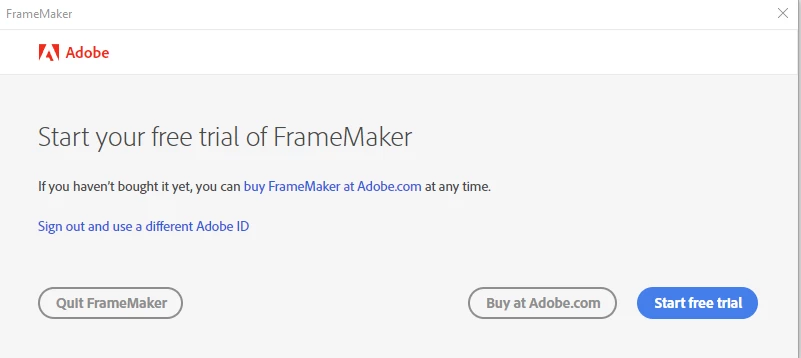
 

Clicking the "Start free trial" button opens a page to start a free trial of Adobe Creative Cloud, which is something I already have, and does not include FrameMaker. 


So I am confused about how to actually start the free trial. Closing the dialog box exits the application. 


I got a confirmation email saying "Welcome to your Adobe FrameMaker Trial." It gives an email address for queries, but no one has responded to an email I sent asking how to start the free trial.


It seems like the free trial enrollment system is broken.

Correct answer Michael at Astec

UPDATE #2: I got a callback from the Adobe support person, named "Shashank." He walked me through the process step by step. The big thing was that, after making a change to my profile that he had previously told me about (disabling automatic profile selection), I had not shut down FrameMaker and restarted it. That was the secret key.

So while in trial mode, to use FrameMaker I have to sign out from other Adobe apps (sign out the main account, which is the business profile), start FrameMaker, sign in to the personal profile that is connected to the buiness profile. Then when done using/testing FrameMaker, I have to sign out, and then sign back in to other Adobe apps using the business profile. A bit of a pain, but I guess I can handle that for the short term.

I was happy with the responsiveness of this support team, and this person in particular. I guess you could call it the Shashank Redemption.

2 replies

Michael at AstecAuthorCorrect answer
Inspiring
January 15, 2025

UPDATE #2: I got a callback from the Adobe support person, named "Shashank." He walked me through the process step by step. The big thing was that, after making a change to my profile that he had previously told me about (disabling automatic profile selection), I had not shut down FrameMaker and restarted it. That was the secret key.

So while in trial mode, to use FrameMaker I have to sign out from other Adobe apps (sign out the main account, which is the business profile), start FrameMaker, sign in to the personal profile that is connected to the buiness profile. Then when done using/testing FrameMaker, I have to sign out, and then sign back in to other Adobe apps using the business profile. A bit of a pain, but I guess I can handle that for the short term.

I was happy with the responsiveness of this support team, and this person in particular. I guess you could call it the Shashank Redemption.

Matt-Tech Comm Tools
Community Expert
January 15, 2025

Stephen King would be proud 😉


Yes, that profile workaround matches what I've heard of in corporate environments.


-Matt SullivanFrameMaker Course Creator, Author, Trainer, Consultant
Jeff_Coatsworth
Community Expert
January 14, 2025

Try this link - https://helpx.adobe.com/framemaker/kb/framemaker-downloads.html 
Sorry - hit enter too quick - then download the Update 4 version - that actually downloads a file.

Inspiring
January 14, 2025

I have the app and it is installed. I just cannot use it, because there is no apparent way to activate the trial mode.

Jeff_Coatsworth
Community Expert
January 14, 2025

When you start it up, what is happening? Post a screenshot using the "Insert Photos" icon.