


Community Expert
August 30, 2022
Answered

add background color to body text paragraph?

  • August 30, 2022
  • 1 reply
  • 371 views

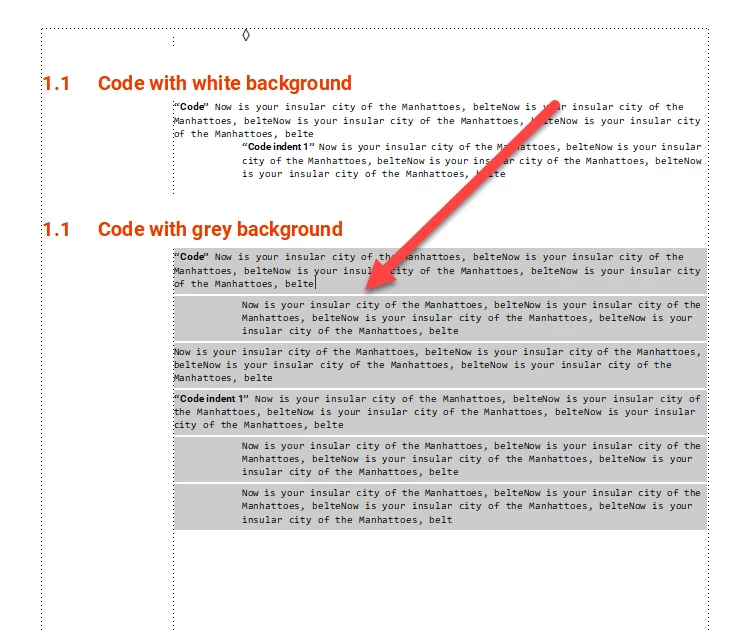
FrameMaker 16.0.4.1062. As I understand it, with FrameMaker 2020 we were supposed to be able to have a uniform fill behind paragraph text AND with no white lines below. In this document I have added grey background colour in the font setting. I have added grey color in Advanced - Paragraph box and a grey line above and below, the paragraph. This should give me a uniform grey colour behind the entire text. Only I STILL get white lines below the paragraphs.

So... CAN this be made to work? Is it possible to have a uniform fill color behnd the text with no white lines?
 

    This topic has been closed for replies.
    Correct answer Barb Binder

    Yes. Use a negative value for spacing above paragraph (i.e., -4pt or -6pt).


    ~Barb

    1 reply

    Barb Binder
    Barb BinderCorrect answer
    Community Expert
    August 30, 2022

    Yes. Use a negative value for spacing above paragraph (i.e., -4pt or -6pt).


    ~Barb

    ~Barb at Rocky Mountain Training
    Dave Creamer of IDEAS
    Community Expert
    August 31, 2022

    To adjust the paragraph space, you can combine the negative spacing for the above/below paragraph spacing with a reference page frame set to the fill color. 


    David Creamer: Community Expert (ACI and ACE 1995-2023)