


Participant
February 9, 2019
Answered

Adobe Distiller Not Installed With FM 2019 x64-english

  • February 9, 2019
  • 3 replies
  • 2050 views

Hi, I have a problem using the "Save as pdf" function in Adobe FM 2019 x64. When this function was used to save a book, the following error message was returned in the console window:
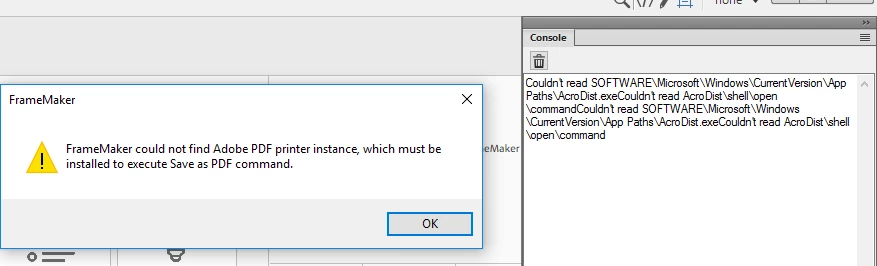
Then I tried to troubleshoot the problem by checking if the Adobe PDF printer was created. It was not. I also found distiller was not installed together with FM. Although the installation file for distiller was included in the installation package, I could not install it separately. I have reinstall FM several times but still cannot fix the problem.

What is the root cause for this problem? Could it be that I am using an old windows version?

My OS info is shown as follows: 

Windows 10 Enterprise Version 1511 (OS build 10586.1540)

This topic has been closed for replies.
Correct answer liangz36892341

HI linsims. Thanks for sharing the tips. I tried the 2nd solution described in the linked article because I have no Adobe Acrobat DC (Pro).There is no Documents\*.pdf (Adobe PDF) for me to choose from the existing printer port. As I expected, distiller is not installed together with the FM installation so no wonder Adobe PDF Converter does not exist.

Nevertheless, I have solved the problem myself eventually. I installed FM 2019 on another computer with Windows 10 Version 1803 and distiller was installed successfully. So my initial doubt about the OS version proves to be the root cause of the problem.

I don't think it is enough to only state Windows 10 at the following page:

FrameMaker System Requirements

Hope Adobe support can see this post and take some action to update the information of system requirements for FM.

3 replies

LinSims
Community Expert
Community Expert
February 10, 2019

Hmmm.

Adobe published a trouble shooting article that addresses this situation. You've already tried the first solution, more or less. The second solution is to manually install the printer. The link gives further instructions. If this doesn't work, I would have to suggest contacting Adobe technical support.

Adobe PDF printer is missing | Manually install PDF printer

liangz36892341AuthorCorrect answer
Participant
February 10, 2019

HI linsims. Thanks for sharing the tips. I tried the 2nd solution described in the linked article because I have no Adobe Acrobat DC (Pro).There is no Documents\*.pdf (Adobe PDF) for me to choose from the existing printer port. As I expected, distiller is not installed together with the FM installation so no wonder Adobe PDF Converter does not exist.

Nevertheless, I have solved the problem myself eventually. I installed FM 2019 on another computer with Windows 10 Version 1803 and distiller was installed successfully. So my initial doubt about the OS version proves to be the root cause of the problem.

I don't think it is enough to only state Windows 10 at the following page:

FrameMaker System Requirements

Hope Adobe support can see this post and take some action to update the information of system requirements for FM.

christiang23458508
Participant
June 6, 2019

Hi,

unfortunately the Windows Version is not the root cause, because i still have the Problem and i have installed FM2019 on a Windows 10 v1803 and  on a Windows 10 v1809. On both machines the Adobe Distiller is missing. All other System Requirements are checked.

I installed and uninstalled several times on both machines, still no Distiller.

LinSims
Community Expert
Community Expert
February 9, 2019

Did you install only FM2019, or do you also have Adobe Acrobat?

If you have both, you have to do a custom install FM2019 without the FM version of the Adobe printer/distiller, because having both installed causes issues.

If you have only FM2019, double check that you didn't do a custom install that didn't include Frame's version of the acrobat printer/distiller. A reinstall might fix the issue.

Participant
February 9, 2019

Hi linsims. I have Acrobat Reader DC instead of Adobe Acrobat. It is installed in C:\Program Files (x86)\Adobe. FM2019 has been installed in C:\Program Files\Adobe\Adobe FrameMaker 2019. I uninstalled the Reader DC and resintalled the FM. The PDF generation problem persisted. I don't have any custom install option except choosing the install location. I have tried both the default and custom locations. Neither works.

Matt-Tech Comm Tools
Community Expert
Community Expert
February 9, 2019

You may want to try the new File > publish > PDF option instead of Save, PDF.

Among other things you will probably find it is a faster route.

-Matt SullivanFrameMaker Course Creator, Author, Trainer, Consultant
Participant
February 9, 2019

Just tried File > Publish > PDF and I got the same error message: