


Applying Update 8 to FrameMaker 2019 Fails
I have a valid license for FrameMaker 2019. I want to apply Update 8. Whether I install inside FM via Help -> ...Updates or locally with the downloaded update file, the update proces fails with this error:
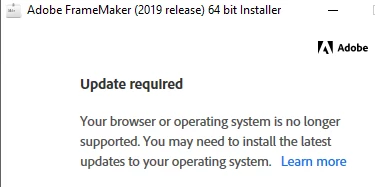
Update required
Your browser or operating system is no longer supported. You may need to install the latest updates to your operating system. Learn more
The Learn More page takes me here
https://helpx.adobe.com/x-productkb/global/update-operating-system-and-browser.html
I tried every step in the document and I am still unable to apply the update. The past two hours, I installed IE 11, even though I updated to Edge and set IE requests to use Edge long ago. Applied every patch Microsoft had for my laptop (Windows 10 21H1), reset compatibility mode in IE and forced via policy then reran gepedit.msc /force, also set IE as the default browser for everything I do, added registry keys for FrameMaker as well as the standard Adobe products cited in the document link above. Rebooted about six times during the ordeal. Nothing works. Stunned that for this product, it's so hard to do a simple update procedure. Perhaps the displayed upgrade dialog is inaccurately displayed, shadowing nother issue?
Any input would be appreciated.
 AdChoices