


4everJang
Braniac
September 1, 2011
Question

Can I force Straddle for table cells in the EDD ?

  • September 1, 2011
  • 3 replies
  • 2320 views

This is a question for the techies:

In my structured EDD, I have created hazard statements according to the ANSI Z535.6 standard, using a table format - with the table heading showing the hazard category (notice, caution, warning, danger) and the rows showing the individual messages. In the individual messages I have an icon to the left and the message text next to it. Visually, it is better to separate the two cells with a thin line. But in the header there is no icon to the left and I would like to remove the thin line. Yes, I am a perfectionist, I know

Here is what it looks like now:
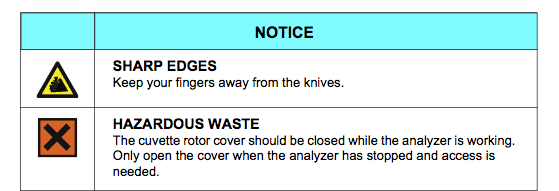
As far as I can tell, there is no way to tell Frame to suppress the column separator line in the heading without also removing it in the body rows. And if I do remove the line, there is still a thin white line visible, as the heading cells are filled with an image covering its entire area (but that image does not cross over the invisible line, at least not in the PDF). Another option would be to use straddle on the heading cells, but I need to be able to do everything from the structured EDD and paragraph plus table formats. Is there a way to do this ?

Thanks in advance

Jang

This topic has been closed for replies.

3 replies

Inspiring
September 3, 2011

Jang,

  You are correct that an EDD cannot specify that a straddle be created. However, it can define a structure that is only valid if there is a straddle. In your case, I would define the header row to consist of a single cell.

     --Lynne

4everJang
4everJangAuthor
Braniac
September 29, 2011

Hello Lynne,

I've been out of my office for a while, so that is why this reply is a little late.

Although this would indeed create a structure that is valid when the header row cells are straddled, it would not remove the need for manually applying the straddle option, which is not what I want. I did remove the line between the columns (it had no real use in the message panels anyway) and it left me with a very thin white line between the two header cells. Hardly visible, but zooming in on the PDF reveals them. Not perfect, but good enough for now.

As far as I can tell now, the only way to make the hazard statements look perfect (without the thin white line) and not involving manual labor is to write a little script that does this for all hazard statement headers in the book. But then this might cause unforeseen problems with transformations to other targets. So probably I won't bother at all.

Thanks for the suggestion, though.

Jang

September 1, 2011

Ours look like this:

If that's close to what you want I'd be glad to share.

4everJang
4everJangAuthor
Braniac
September 1, 2011

Hello Peter,

I am sorry, but that is not compliant to ANSI Z535 and also it lacks the freedom to add specific icons to messagepanels that are grouped into the same hazard statement (with one heading that shows the hazard level). In ANSI Z535, there are 4 very clearly defined hazard categories, although there may be a lot of specific hazards that can be grouped into these levels. The heading is described in a lot of detail and not to be messed with.

In the meantime I have decided to drop the line between the rows and I will probably use a script to make the cells in the heading into one straddled cell, so it will look perfect. Thanks for the offer.

Jang

Michael_Müller-Hillebrand
Braniac
September 1, 2011

Jang,

The answer to the original question is simply No, AFAIK. You could use Auto-text to enter hazard warning tables, you could... as we all know there unfortunately is more than one way it.

I would try to get rid off the border lines, as there are very often far too many lines in technical documentation.

- Michael

4everJang
4everJangAuthor
Braniac
September 1, 2011

Hi Michael,

Oh, well. I had already figured out that this is not an option. I did remove the line between the rows, as it does not add any thing to the clarity of the message panels in my hazard statement table. But FM cannot handle two adjacent cells with graphic frames without adding a single hairline between them, even if I told the program that the border should be None. Something about the importance of frames for FM, I guess. I have only been able to remove the extra unwanted and uncalled-for hairline by straddling the cells (manually). Of course I will have to adapt the EDD to allow straddled cells in the header, but that is peanuts compared to the stuff I have been doing to make this design work in the first place.

As I will have to create a small script to perform a series of necessary steps before a book can be published, and my hazard statement tables all have the exact same small problem, I will probably include a script that goes through the whole book and applies a straddle to any cells in the heading row of any hazard table. Being a perfectionist, writing that script before handing my stuff over to my customer will make me happier than not doing it and saving some time by delivering a solution that does not make me perfectly happy.

When all the hard work for my current projects is done, I will try to publish an article on how to implement ANSI Z535 compliant hazard statements in structured FM documents. Might be useful for others, too. I will show you my solution at the tcworld fair, if you have some time for that.

Ciao

Jang

Michael_Müller-Hillebrand
Braniac
September 1, 2011

I will show you my solution at the tcworld fair, if you have some time for that.

You're welcome at my booth 412 in hall 4 — see you in October!

- Michael