Russ,
I opened your test file in FM 2015 with the default setting (On) for RemoveExtraWhiteSpacesOnXMLImport and with it set to Off. The behavior I got was slightly different than you reported, but I believe it is correct.
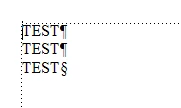
When the option is On, the document window shows 3 pgfs; the Structure View shows a <test> with 3 <p>s.
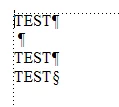
When the option is Off, the document window shows not the 4 pgfs you reported, but 6. Three of these contain a <p> element with the text "TEST"; the others are text ranges within the <test> element, each containing a single space. All of these text ranges correspond to line breaks in the input document: after the <test> start-tag, after the end-tag for the first <p>, and after the end-tag for the last <p>.
The XML recommendation mandates that all white space is significant. Therefore, FM is correct not to discard it. Converting the line breaks to spaces is consistent with FM's treatment of line breaks within a paragraph.
When you open the same file using a DTD that does not permit text ranges between <p> elements, FM does not create the text ranges.
While surprising at first, I believe the behavior is correct. I therefore didn't bother testing in FM 11 or FM 12.
The catch is that if you want white space after xrefs treated correctly, you need to turn the option off and if you want to avoid line breaks coming in as data characters, you need to turn the option on. Solutions are:
1) Use a DTD
2) Preprocess the input to remove line breaks that format the XML
3) Preprocess the input to change a space after an xref to a character reference
4) Hope Adobe fixes the bug soon
--Lynne



 AdChoices