


QuintinSeegers
Brainiac
June 26, 2023
Question

Chapter numbering changes when converting to PDF (FM2022 v17.0.2)

  • June 26, 2023
  • 3 replies
  • 1010 views

I've run into an odd scenario. I have several chapters (separate FM Documents) in my book. The first chapter in my book has the Chapter Numbering set to 1:
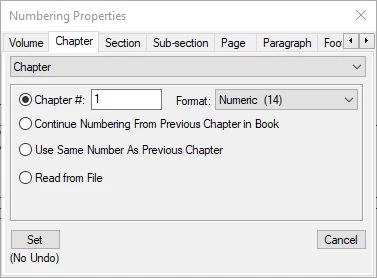
All other chapters are set to "Continue Numbering from Previous Chapter in Book."


After updating the book, when I open each Chapter (FM document), the chapter number shown is correct: the first numbered as Chapter 1, the second as Chapter 2, etc. The chapter numbers in the TOC are also correct.


When I convert the book to PDF (Save as PDF or Publish), however, the numbering is reset, with the first chapter being Chapter 0, with the subesequent Chapters numbered sequencially from there.


When I open the chapters (FM documents) to check, they still show the correct numbering.


Any suggestions as to why this is happening? I can't find any reason for the the numbering to change during the PDF generation process.

    This topic has been closed for replies.

    3 replies

    Matt-Tech Comm Tools
    Adobe Expert
    June 26, 2023

    Can  you please confirm that the paragraph style displaying your chapter number is using the chapnum building block? It's possible that the paragraph style itself is using an independent numbering scheme.

    -Matt

    -Matt SullivanFrameMaker Course Creator, Author, Trainer, Consultant
    QuintinSeegers
    Brainiac
    June 26, 2023

    Hi Matt,

    Yes, the Element's paragraph definition it's definitely using the <$chapnum> system variable:


    Matt-Tech Comm Tools
    Adobe Expert
    June 26, 2023

    Bingo...you're using chapnum in a structured book.

    Set your numbering in the EDD using the elemnum instead

    -Matt SullivanFrameMaker Course Creator, Author, Trainer, Consultant
    Barb Binder
    Adobe Expert
    June 26, 2023

    Hi Quintin:


    I have no idea why the numbering would change on the PDF export. The only idea I have is that you're not looking at the same version of the PDF? Is that a possibility? So, for example, in the book window, choose File > Save as PDF (which uses the last settings from the publish pod), when it completes the conversion, choose the View Output button, so that you're looking at the PDF that Fm just created. Is it really changing the numbering during the export?


    ~Barb

    QuintinSeegers
    Brainiac
    June 26, 2023

    Hi Barb,

    That was my through too, but then I deleted the PDF to make sure and recreated the PDF - still had the change in chapter numbering.

    Document:

    PDF:

    As another test, I changed the first Chapter's numbering to start at 2. When I generated the PDF, the chapters were numbered from 1 onwards.


    Bob_Niland
    Adobe Expert
    June 26, 2023

    That unset:
    ○ Read from File
    means that this is the book-level Numbering dialog.
    There is some chance that the Book numbering & component file numbering don't match.

    My usual practice is to set numbering in the component files themselves, then set the .book tree to 
    ⦿ Read from File

    QuintinSeegers
    Brainiac
    June 26, 2023

    Hi Bob,

    When I select the Book, I don't have an option to set the Numbering:

    Because we have different page numbering for certain documents in the book as well as the specific Chapter numbering that are document specific, I've always set the numbering at document level. I've not had this behaviour before.

    Bob_Niland
    Adobe Expert
    June 26, 2023

    re: When I select the Book, I don't have an option to set the Numbering:

    Correct. Instead, right-click on each book name in the book's tree.
    The options there are stored in the .book file, and they can differ from what's in the component .fm files.