



Chapter numbering changes when converting to PDF (FM2022 v17.0.2)
I've run into an odd scenario. I have several chapters (separate FM Documents) in my book. The first chapter in my book has the Chapter Numbering set to 1:
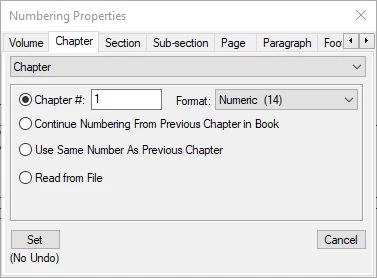
All other chapters are set to "Continue Numbering from Previous Chapter in Book."
After updating the book, when I open each Chapter (FM document), the chapter number shown is correct: the first numbered as Chapter 1, the second as Chapter 2, etc. The chapter numbers in the TOC are also correct.
When I convert the book to PDF (Save as PDF or Publish), however, the numbering is reset, with the first chapter being Chapter 0, with the subesequent Chapters numbered sequencially from there.
When I open the chapters (FM documents) to check, they still show the correct numbering.
Any suggestions as to why this is happening? I can't find any reason for the the numbering to change during the PDF generation process.
 AdChoices