



ashrae-editor
Known Participant
August 9, 2016
Answered

Cross-References in PDF Output from Framemaker: How to Center Pages?

  • August 9, 2016
  • 1 reply
  • 1156 views

I believe I understand well-enough how cross-references work in Framemaker, but one thing that bothers me is how, when generating a PDF from Framemaker and clicking on a cross-reference, the resulting page view locates the cross-reference marker at the very top of a page.

This is very inconvenient and confusing when, say, cross-referencing a figure caption that appears at the bottom of a page. The resulting page view when following such a cross-reference in a PDF centers the text of the _following_ page, with the text of the figure caption barely visible at the top of the page.

My question: Is there a way to construct cross-references such that that the resulting page view, when clicking in a PDF, is centered on the page on which the cross-referenced material appears?

Thanks so much.

JMW
    This topic has been closed for replies.
    Correct answer Barb Binder

    Not that I'm aware of in FrameMaker.

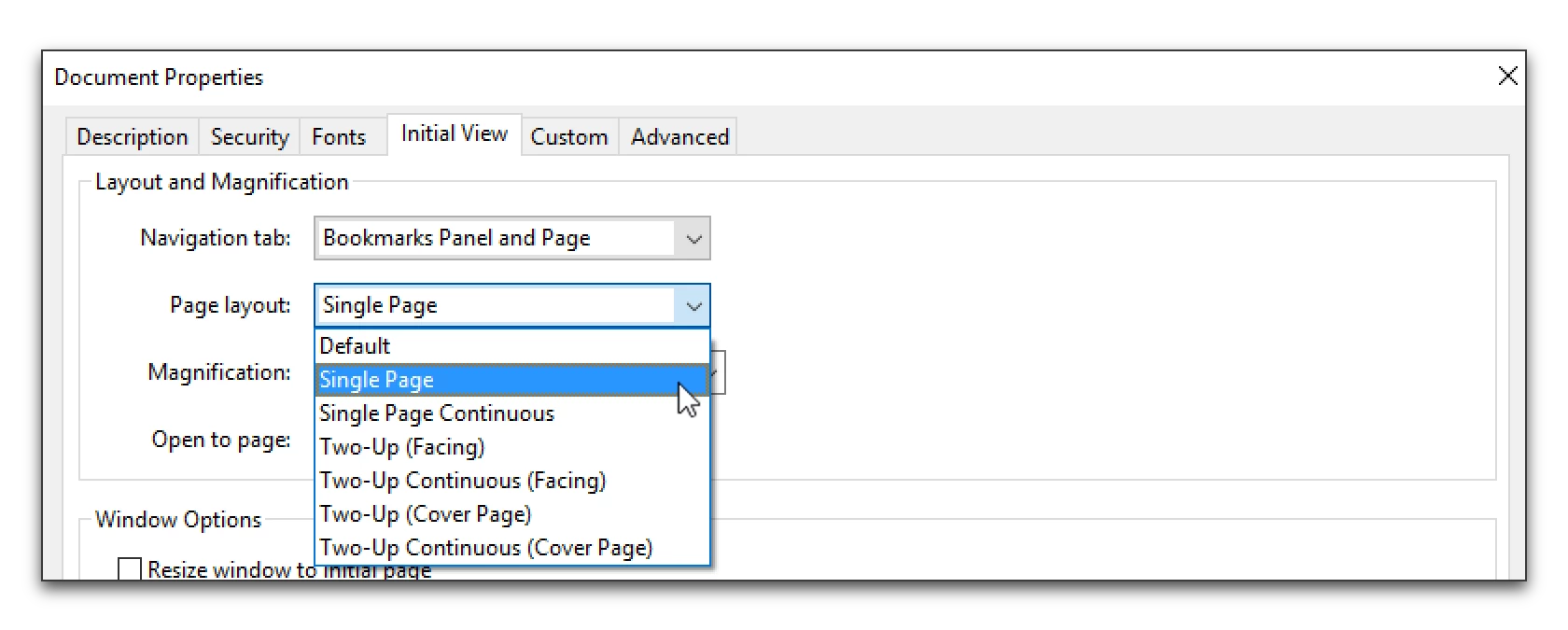
    But in Acrobat, set the Initial View to Single Page instead of Continuous.

    File > Properties > Initial View.

    Two Up (Facing) and Two Up (Cover Page) would also work.

    1 reply

    Barb Binder
    Community Expert
    Barb BinderCommunity ExpertCorrect answer
    Community Expert
    August 9, 2016

    Not that I'm aware of in FrameMaker.

    But in Acrobat, set the Initial View to Single Page instead of Continuous.

    File > Properties > Initial View.

    Two Up (Facing) and Two Up (Cover Page) would also work.

    ~Barb at Rocky Mountain Training
    ashrae-editor
    Known Participant
    August 9, 2016

    Excellent! I thought there might be an Acrobat setting, but I wasn't sure. Thanks, BB.

    Jeff_Coatsworth
    Community Expert
    Community Expert
    August 9, 2016

    IIRC – that’s a user-set setting – you don’t have any control over it from the production side