Inspiring
August 12, 2020
Answered

Customize PDF Bookmarks in FrameMaker

  • August 12, 2020
  • 3 replies
  • 1346 views

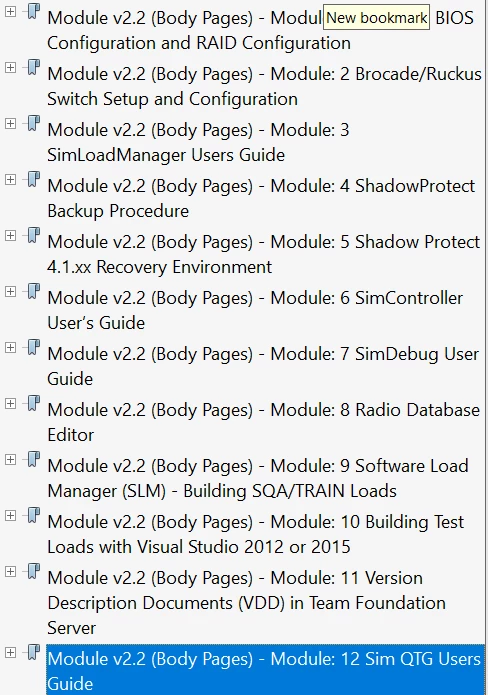
I am looking to have better control of the bookmarks in the PDF output from FrameMaker. In the document, I am working with once I save as PDF and I view said document in Acrobat the bookmarks appear with the paragraph tag, and the section tag what I would like to see is just the Section tag. i.e.
What IS displayed: Module v2.2 (Body Pages) - Module 1 Dell 7920 BIOS Configuration and RAID Configuration

What should be displayed Module: 1 Dell 7920 BIOS Configuration and RAID Configuration


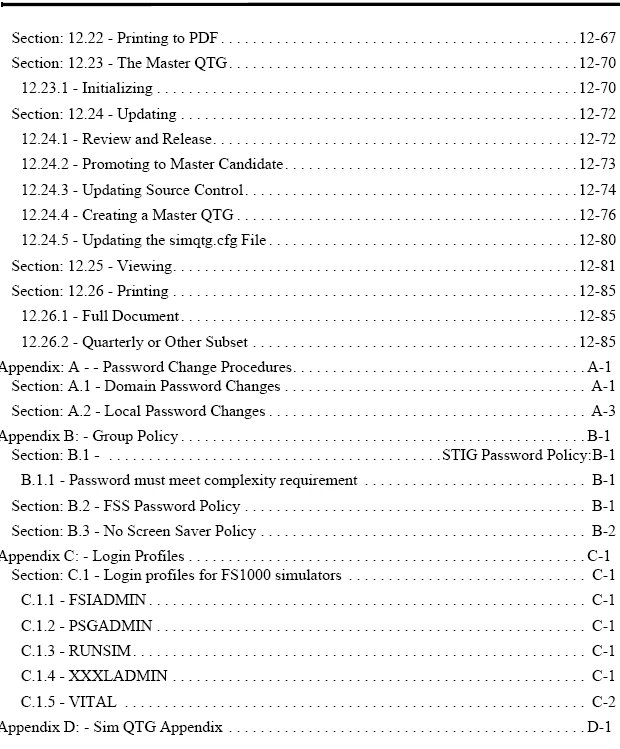
This issue is accompanied by the lack of Appendix sections having bookmarks in the PDF. They have links in the TOC sections that function properly but there are not bookmarks that show in Acrobat for Appendices A-D attached are screenshots of how it looks now. 


This topic has been closed for replies.
Correct answer Winfried Reng

Hi,


Did you check the settings in Format | Document | PDF Setup?

Did you compare these with the settings of your TOC? (Right click on the TOC in your book and select Set Up Table of Contents)


What do you mean with Section tag? You can select only paragraph tags in the PDF setup. Or Elements, when you have a structured environment.


Best regards


Winfried

3 replies

Winfried RengCorrect answer
Community Expert
August 13, 2020

Hi,


Did you check the settings in Format | Document | PDF Setup?

Did you compare these with the settings of your TOC? (Right click on the TOC in your book and select Set Up Table of Contents)


What do you mean with Section tag? You can select only paragraph tags in the PDF setup. Or Elements, when you have a structured environment.


Best regards


Winfried

Inspiring
August 13, 2020

Is there a way to set a new default for these settings? I am finding that setting this document by document is extremely tedious. 

Matt-Tech Comm Tools
Community Expert
August 13, 2020

I believe these are stored in Document Properties...try importing Document Properties (File>Import>Formats) from a document that has the tag structure you want.

-Matt SullivanFrameMaker Course Creator, Author, Trainer, Consultant
Jeff_Coatsworth
Community Expert
August 12, 2020

And you're creating the PDF output by Publishing to PDF? How is your PDF output settings set up? Have you tried doing the other ways (print Adobe PDF printer instance, Save as PDF) as an experiment?

Inspiring
August 12, 2020

I have tried publishing as PDF and saving as PDF. I have not tried printing as PDF. I am not entirely familiar with the Publish option as I typically will just save as PDF so I am not sure what settings can be manipulated in the publisher. 

Jeff_Coatsworth
Community Expert
August 12, 2020

What's it actually look like in your FM TOC?

Inspiring
August 12, 2020

One of the two attachments in the previous post shows some of the TOC layouts below are screenshots of the FM TOC in body page view, the PDF TOC in reader view, and the Bookmark view in PDF. I am not sure why the bookmark does not simply match the TOC heading. Is there setting on the output to make them match so the bookmark just says Module: 1 Dell BIOS and RAID Configuration?