Known Participant
April 27, 2021
Question

Error Messages When Saving FM 2019 and 2020 Files

  • April 27, 2021
  • 2 replies
  • 531 views

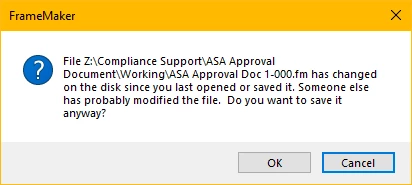
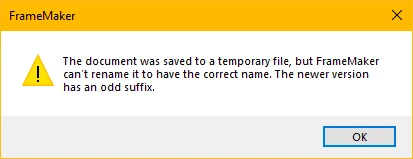
Our team continues to receive error messages when trying to save FrameMaker files on our company server. The errors have occurred in both 2019 and 2020 versions. We don't seem to get the errors when working from our desktop. We've also had files disappear when we update the book file. Can anyone provide any insight on what might be causing these issues? 
Thanks for any help you can provide!!

    This topic has been closed for replies.

    2 replies

    Adobe Expert
    April 28, 2021

    Hi,


    Your error messages imply that that there are network issues, or your anti-virus software blocks the files or something like that.

    When files from a book disappear, when you update the book, then this is a major issue! I noticed this as well, maybe four or five times in the last two years. Now I am really paranoid and almost always keep a backup copy, before I update a book. I am not sure, but I think that I did not notice this with FM 2020, only FM 2019. Or at least not with update 1 of FM 2020.

    Can you write a report in tracker, so that Adobe can refer to this report? https://tracker.adobe.com/#/home


    Are your FM versions updated? The latest versions are update 1 for FM 2020 and update 8 for FM 2019.


    Best regards


    Winfried

    louriehAuthor
    Known Participant
    April 28, 2021

    Yes, I am using both FM 2020 Update 1 and FM 2019 Update 8, although I may have been on Update 6 when some of these issues occurred. I will write up a report in tracker. Thanks!

    louriehAuthor
    Known Participant
    April 28, 2021

    My company account does not allow me to access tracker. How do I report these issues to Adobe?

    Matt-Tech Comm Tools
    Adobe Expert
    April 27, 2021

    It sounds like a write-access issue...Are you using any form of version control or content management system?


    -Matt

    -Matt SullivanFrameMaker Course Creator, Author, Trainer, Consultant
    louriehAuthor
    Known Participant
    April 27, 2021

    No, we are not using a content management system. We use FrameMaker to produce our manuals and then save them as PDFs for the end-users. Most of our manuals are in Unstructured FrameMaker, but we also have a few in Structured.

    Matt-Tech Comm Tools
    Adobe Expert
    April 28, 2021

    If you can save the files to the local drive, then it sounds like a network-specific issue.

    I've had problems saving to a network location, even if it's literally on my local drive (related to using a virtual machine)


    Try remapping your network devices to see if it clears up.


    If that doesn't help, reset your preferences...Navigate to 

    C:\Users\(username)\AppData\Roaming\Adobe\FrameMaker and rename the 16 directory to 16-old (or similar). Restart FrameMaker and see if that helps.

    -Matt

    -Matt SullivanFrameMaker Course Creator, Author, Trainer, Consultant