


Corinna2017
New Participant
April 26, 2017
Question

error postscript-File

  • April 26, 2017
  • 2 replies
  • 851 views

Hallo together,

we use FrameMaker Version 11 for our cliche and create a ps-file for the manufacturer.

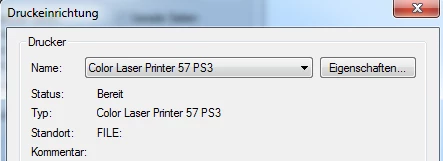
We use the this printer:
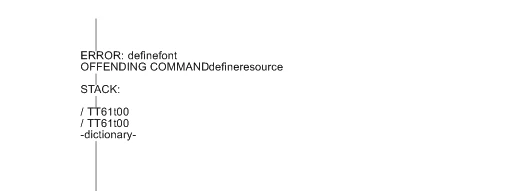
But now, if we try to import this ps-file in another program, we receive a error message, like this
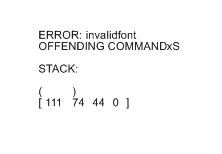
or this
If I created a ps-file (same printer) in another program (Macromedia FreeHand) i can import this file with no problems.

So, i have no idea, what the problem is.

Can anybody help me?

Thanks a lot

Corinna

    This topic has been closed for replies.

    2 replies

    Bob_Niland
    Community Expert
    April 26, 2017

    What are the settings for color model (RGB vs. CMYK), and font embedding?

    Is there some reason why this specific Ps driver needs to be used, vs. the generalized drivers provided by Adobe?

    Corinna2017
    New Participant
    April 27, 2017

    Hi,

    Thanks you for your answers.
    Knowingly, I have nothing changed, whether of course any software updates have been automatically imported etc. I do not know (big company, that goes automatically).
    The printer driver is always used here, I guess earlier, there was not this Adobe driver or we did not have it or the resolution was not sufficient?
    The problem with the Adobe PDF Printer is for me that I can not create the ps directly. So I must create a pdf and then rename in Explorer in ps. Whether it is a loss of quality, etc., I do not know and wanted to use our printer drivers, which works from other graphics programs without problem.

    Maybe I am doing something wrong here as well? I choose to print to file and can then directly create a ps. But this can not be read without error. Perhaps the settings in the Adobe PDF Printer do not agree?

    These settings are used

    Thanks a lot

    Corinna

    Arnis Gubins
    Inspiring
    May 2, 2017

    Hi again,

    i have the full version of Acrobat. Embedded all fonts is selected.

    I can direct create the ps-files, but the manufacturer can not import this.

    He uses Corel Draw X7.

    Thanks

    Corinna


    That sounds like a terrible workflow. To what purpose would one import FrameMaker files into CorelDraw? Note: I've been using both CorelDraw and FM for 25 years and wouldn't even dream of doing that.

    The errors that show in the initial posting are probably due to incomplete font embeddings (i.e. FM via Distiller only embeds a subset of the font to cover only the characters used in the document). It looks like the importing app (CorelDraw in your case) has a hard time dealing with a subset font.

    You can force full embedding of a font in Acrobat using third-party utilities like EnfocusPro and then either try importing PDFs or EPS files into CorelDraw.

    Alternatively re-consider what is trying to be accomplished by importing FM's ps files into CorelDraw and look at alternative applications for the end result.

    Jeff_Coatsworth
    Community Expert
    April 26, 2017

    What happens if you use the Adobe PDF printer?

    Corinna2017
    New Participant
    April 26, 2017

    Hi Jeff,

    i have tried this.

    If i choose the Adobe PDF printer and create a pdf-file, i can import this without error.

    If i rename the created pdf-file to *.ps, i can import this without error.

    When i choose the Adobe PDF printer and select print in file and select direct *.ps , than its not possible to import (error message).

    I'm helpless about this problem (it works normally without problems)

    Thanks a lot

    Corinna

    Jeff_Coatsworth
    Community Expert
    April 26, 2017

    So the error's not happening in FM but in the other program? So what's changed in your environment if this worked before?