

Participating Frequently
October 5, 2022
Answered

File > Publish > Default.sts

  • October 5, 2022
  • 5 replies
  • 1225 views

To save a .Book as a pdf. This has worked flawlely for four years, however, something changed yesterday.
I go to File > Publish and the window in blank.
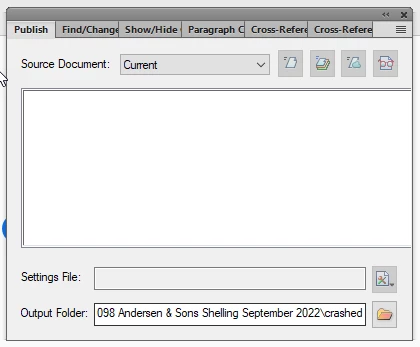
 Settings File: Default.sts is missing. 

    This topic has been closed for replies.
    Correct answer Barb Binder

    Ok, well that's not normal. The next thing I would do is try resetting preferences. Note: if you are using Fm 2020, the folder is called 16.

    https://www.rockymountaintraining.com/adobe-framemaker-resetting-preferences/


    ~Barb

    5 replies

    Barb Binder
    Community Expert
    October 6, 2022

    @Delkor Tech Pubs:


    Glad to hear it. That was a new one for me. And rebuilding the FrameMaker preferences is similar to a remove and reinstall, just much faster. 


    ~Barb

    ~Barb at Rocky Mountain Training
    Barb Binder
    Community Expert
    October 6, 2022

    Yes.


    That way, if it doesn't solve the problem, you can delete the new "16", and rename "16 Backup" to "16" and you will be right back where you are now. Hopefully, it will work though.


    ~Barb

    ~Barb at Rocky Mountain Training
    Barb Binder
    Barb BinderCorrect answer
    Community Expert
    October 6, 2022

    Ok, well that's not normal. The next thing I would do is try resetting preferences. Note: if you are using Fm 2020, the folder is called 16.

    https://www.rockymountaintraining.com/adobe-framemaker-resetting-preferences/


    ~Barb

    ~Barb at Rocky Mountain Training
    Participating Frequently
    October 6, 2022

    C:\Users\rbullock\AppData\Roaming\Adobe\FrameMaker\16
    I should change folder '16' to 16 'backup' - correct?

    Participating Frequently
    October 6, 2022

    thank you Barb - I'm now able to build a pdf from FrameMaker again 🙂

    Barb Binder
    Community Expert
    October 6, 2022

    Hi @Delkor Tech Pubs:


    Both commands in are the menu on the far right of the Setting's File text box:


    ~Barb

    ~Barb at Rocky Mountain Training
    Participating Frequently
    October 6, 2022

    I can accees this window through File > Publish; however, I can change Source Document and Output folder. everything else is not accessable. 

    Participating Frequently
    October 6, 2022

    I have the Default.sts file in C:\Program Files\Adobe\Adobe FrameMaker 2020\fminit\PublisherDefault.sts

    Barb Binder
    Community Expert
    October 5, 2022

    Hi @Delkor Tech Pubs:


    There is a New button in the menu on the far right side of the Settings File text box. You can create a new one very quickly.


    Or, you can load the default.sts file by clicking Open from the same menu:

    C:\Program Files\Adobe\Adobe FrameMaker 2020\fminit\Publisher


    ~Barb

    ~Barb at Rocky Mountain Training
    Participating Frequently
    October 6, 2022

    where is the Setting File text box? "New button in the menu on the far right side of the Settings File text box"