


New Participant
November 9, 2019
Question

Fixing text outside of text box?

  • November 9, 2019
  • 2 replies
  • 945 views

This may be a noobish question, so appologies in advance if this has been asked before (I couldn't find anything online similar). I'm trying to create a text box within an anchored frame, and I don't understand why the top of the text is partially beyond the borders of the text box (see attached below - the top of the "T" is outside of the text box). Is this standard FrameMaker behaviour or is there a way to correct this? 
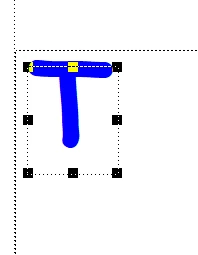
 

Any advice is much appreciated!


This topic has been closed for replies.

2 replies

Bob_Niland
Community Expert
November 10, 2019

It's the font. Just arbitrarily testing, MS Comic Sans (which that appears to be) and Arial do that. Times New Roman just touches the edge. Courier New is a bit below the edge. A number of work-arounds might be applied, depending on the usage model.

frameexpert
Community Expert
November 9, 2019

This is likely a function of the particular font and its internal bounding box. If you try other fonts, you will see that their position within the text box varies.