


QuintinSeegers
Brainiac
June 13, 2023
Question

FM 2022 Keeps crashing with Internal Error 17024 (Windows 10)

  • June 13, 2023
  • 4 replies
  • 4769 views

No matter what document/book I open, FrameMaker keeps crashing with the following error:
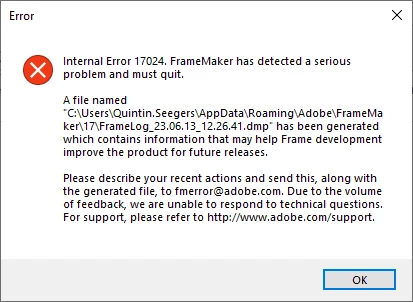
I have :

  • deleted my Appdata\..\17 folder,
  • restarted my PC, 
  • opened a file located on a server,
  • opened a file located on my local drive,


I have a 300 page manual that needs to be updated and ready for publication by the 1st of July, 2023, so it is urgent that I find a solution to this error. I have sent the dump file to fmerror@adobe.com, but as the error states, I my not get a response soon.

Any suggestions on what I can do to fix this?

Thanks,

Quintin


    This topic has been closed for replies.

    4 replies

    DebralynnMedDev
    Inspiring
    October 17, 2023

    I'm having the same issues and I've tried fmerror@adobe.com from two different emails and neither work. 

    Jeff_Coatsworth
    Community Expert
    October 17, 2023

    We've had reports that the fmerror email is down right now - the FM folks are aware of it & recommend using tcssup@adobe.com to contact them instead (the fmerror one is really only used for error reporting, not getting any help).

    DebralynnMedDev
    Inspiring
    October 17, 2023

    The fix was fairly easy to follow C:/Users/name/AppData/Roaming/Adobe/FrameMaker/17
    Once I found the 17 folder, I had to change the name to 17.old and restart the program and it worked. I had FrameMaker 2022 and the error was 17024.

    QuintinSeegers
    Brainiac
    July 5, 2023

    I thought I'd give an update, for those searching for the same issue.

    I managed to recreate the corrupted documents, working off the external harddrive only. After opening, saving, closing the documents numerous times during the workday, the error no longer occured. I saved the fixed files ont our network, opened them and all work ok. Then I closed the files and re-opened them and the error was back again.


    So, my conclusion is that it is an issue caused by our network environment  - a combination of VPN (I have not other means to connect to our corporate network), network speed and internet speed on the other side of the VPN connection (I'm in New Zealand where our internet is reasonable fast, where as our IT infrastructure is in Australia, which is notorious for having mediocre internet speeds on a good day.). I can see FrameMaker creating the lock file, but the transfer of the file content is too slow, causing FrameMaker to crash and corrupt the file.


    Not sure if this information is helpful to anyone else.

    Jeff_Coatsworth
    Community Expert
    July 5, 2023

    Yeah working over a VPN like that sounds like a recipe for trouble - I'd be looking at some system of version control to check out the files to your local machine & check them back in when done.

    New Participant
    June 16, 2023

    I started seeing this same error this week, of course under tight deadline. Did all of the above and uninstalled/downloaded and reinstalled current version of FM -- still getting the same error (when I get an error, usually it just crashes with any error messages. I have to do heroic open to get an actual error message.

    Jeff_Coatsworth
    Community Expert
    June 16, 2023

    @Andrea23391152sn4f  is it happening with all docs or just particular ones? If it was working fine before, what's changed? Are you all updated with the last FM2022 patch?

    QuintinSeegers
    Brainiac
    June 27, 2023

    @Jeff_Coatsworth , in our case, nothing's changed.


    Out of desperation, I uninstalled FM2022, then reinstalled, and the error went away.


    Had no issues up to yesterday. This morning, I opened the same document I worked on yesterday, only for FM to crash yet again with Error 1704. It always crashes when I open a Structured Document that has multiple masterpages with 50+ images inserted by Reference.


    At this point, we're seriously considering going back to FM2019 - we didn't experience any of these constant crashes in FM2019.

    Community Expert
    June 13, 2023

    OK.You did everything what I would have done as well.

    You have also the latest updated.

    What I would do/test:

    Do you work with structured or unstructured files? If structured, does FrameMaker also crash with unstructured files?

    Does FrameMaker also crash, when you open the FrameMaker default template file provided from Adobe?

    Make a backup copy of your FM folder in your appdata folder.

    Make a backup copy of your dictionaries.

    Then deinstall and reinstall FrameMaker.

    Contact the FrameMaker support: tcssup@adobe.com

    Good luck!

    QuintinSeegers
    Brainiac
    June 13, 2023

    Hi Winfried,

    I'm hesitant to uninstall/reinstall FrameMaker as it has caused issues with printing to PDF in the past for me.

    FrameMaker doesn't crash if I open one of the template documents. We only work in Structured FrameMaker, but I did attempted to open one of our structured documents in Unstructured FrameMaker with success. Unfortunately that doesn't solve the issue as I need to use Structured FrameMaker.

    I will contact FrameMaker support, as you suggested. Hopefully they can provide a solution.

    Community Expert
    June 13, 2023

    Hi,

    When you say that you can open the unstructured Adobe template files or your structured files in the unstructured mode, then it seems that your structured files or your structured setup is the issue.

    When did FrameMaker start to crash?

    Had you (or someone else) changed something with your structured setup or your files?

    I am not an expert with structured FrameMaker and cannot suggest, whether you can check anything.

    Best regards, Winfried