


Known Participant
November 30, 2018
Question

FrameMaker 2017 - Unable to Use Space Under Table/Table Anchor Separates from Table

  • November 30, 2018
  • 5 replies
  • 2467 views

I did not create this documentation originally, so I am not familiar with any buried setting(s) that may be causing this issue. Please refer to the image below and the description that follows.
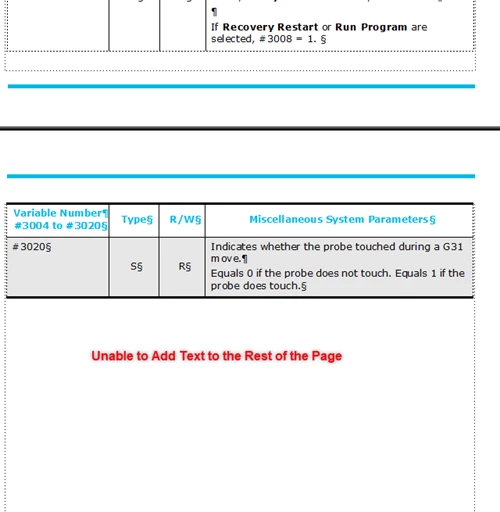
The top of the image shows the majority of the table and the bottom of the image shows the table continuation onto the next page. However, when the table continues onto the next page, the table caption gets pushed down to the beginning of the following page, even with plenty of room under the table. Not included in the image is the table anchor tag completely separating from the table and creating a new page to itself. I was able to fix the table anchor issue by setting the table to start a Top of Page, but I am lost on the other issue.

If anyone knows why this formatting issue is occurring, please let me know!

Thanks! 

    This topic has been closed for replies.

    5 replies

    Community Manager
    December 18, 2018

    Is the table at the end of the document? In this case, the table will just render to that last page because it does not fit on the second-to-last page anymore. However, the end text flow (displayed as "§") is actually on the second to last page (or wherever your table starts).

    Make sure that the text symbols are visible (View > Text Symbols), go to the beginning of the table, look for the table anchor in the paragraph before the table and place the text insertion mark there.

    My hunch here is that at the end of your text flow you have this situation:

    Some text¶

    §

    While is the table anchor. Please place the text insertion mark between and § and then hit return. This will add another (empty) paragraph below the table.

    Known Participant
    December 18, 2018

    Stefan,

    Thank you for the suggestion. The table is not at the end of the document.

    The red arrow is pointing to the table caption paragraph tag. In the page above, there is a massive amount of white space below the table continuation where I wish to place the table caption. However, as you can see, the paragraph tag is pushed to the top of the following page. That is my current issue.

    Barb Binder
    Community Expert
    Community Expert
    December 18, 2018

    As I offered before, I'm happy to look at the file. You can put it on dropbox and post a link here (public) or message me (private).

    ~Barb

    ~Barb at Rocky Mountain Training
    Barb Binder
    Community Expert
    Community Expert
    December 4, 2018

    Hi Clayton:

    linsimsis correct—you can use Table Designer's option to add the title/caption below the table and still call it into the LOT. You can even use the current tag name so as to not mess up the existing LOT.

    Again, it's not that having the table title as its own paragraph is wrong—and there is another more important problem with your table that we haven't identified yet—but it is an easy way to manage the title locations.

    ~Barb

    ~Barb at Rocky Mountain Training
    Community Expert
    December 5, 2018

    Hi,

    I assume that Clayton can add a regular table title when he sets this correctly in the table designer.

    However, he also reported that the table and the next paragraph (his table title) have a gap which is too big.

    I do not know the cause in his case, but now and then (last time was probably a year ago with FM 2015) I also have the problem, that FrameMaker blocks lots of space below a table which I cannot edit. The next paragraph comes with a much bigger gap than set in the table designer and the paragraph designer. As far as I remember the distance below had the same height as the last table row. It was definitely a bug. Other tables with the same format had the correct distance below.

    Best regards

    Winfried

    Known Participant
    December 5, 2018

    Winfriend,

    It has to be a bug. I can recreate the problem in other others of the documentation as well, but the behavior is just so bizarre. You are correct, I can add a table title through the table designer (above or below), but my organization does things a little differently, so we use separate paragraph tag placed directly below the table called 'Table Caption." When the table continues onto the following page, the ginormous gap.

    Barb Binder
    Community Expert
    Community Expert
    December 2, 2018

    HI Clayton:

    I can't see enough of the document to be able to help you. Can you show us 3 screen shots please:

    1. the table anchor with surrounding area for context (click on it and show Paragraph Designer > Pagination) and
    2. the Table Designer > Basic properties (with your cursor in the table)?
    3. the caption ¶ (click on it and show show Paragraph Designer > Pagination)

    ~Barb

    ~Barb at Rocky Mountain Training
    Known Participant
    December 3, 2018

    Yes, I'd be glad to provide those screen shots.

    1.The top screenshot shows the table anchor and the paragraph designer with the pagination info.

    2.The second screenshot shows the Table Designer for the table with the basic properties info.

    Known Participant
    December 3, 2018

    For some reason, I am not able to post anymore images...

    LinSims
    Community Expert
    Community Expert
    November 30, 2018

    OK, then part of your problem is that the caption isn't part of the table. It also sounds like what you actually have there is TWO tables, not one, or you wouldn't have the caption appearing at the top of the next page in between the table sections.

    Known Participant
    November 30, 2018

    It's one table that continues onto the following page. The white space under the table continuation is unusable ; I am not able to write/place anything in that space. The table caption (which is a separate paragraph tag) is pushed to the page below the table continuation. However, it should sit under the table. I've looked at every relevant setting in Table Designer (to my knowledge), and it remains a mystery.

    LinSims
    Community Expert
    Community Expert
    November 30, 2018

    If you want the table caption to sit under the table on each page it appears, you will have to use Title: Below Table. There is no other way in Frame that I know of that will do what you want automatically.

    The only way I can figure out that you have the title appearing in the manner you describe is if it's in a table row of its own. If it is, then you can select the row and cut and paste it above the last row on the previous page.

    If you want to send me the file in an email, I can take a look at it to see if I can figure out what's going on.

    LinSims
    Community Expert
    Community Expert
    November 30, 2018

    Just to confirm, you went into Table Designer and the Title is set to Below Table? What's the Gap set to? I did a quick test table, and these work the way you'd expect.

    Known Participant
    November 30, 2018

    I went into Table Designer to set the Start setting to "Top of Page." The Title is set to "No Title."