


Inspiring
August 22, 2023
Answered

FrameScript Script stops with error after years of faithful service. What has changed?

  • August 22, 2023
  • 2 replies
  • 481 views

Hi there,

first the facts - I´m using

  • FrameMaker 2019 (15.0.8.979)
  • ElmScript Version 7.0R1p25 (the german FrameScript)
  • Windows 10 Pro (22H2)

I have been using my trusty Script for years. It pulls texts from the text resource database for the machines we build (sql) into FrameMaker variables.

Since recently the script stops with the following error message:
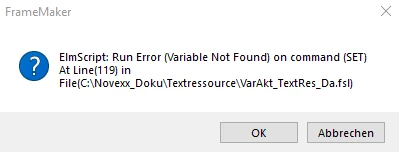


The error is clear to understand, the question is "why can that variable suddenly not be found any longer?".

I appreciate any guesses about the reason of this behaviour. The only thing that has changed shortly before was a Windows update. Could that be the reason?


Best regards,

Lutz

    This topic has been closed for replies.
    Correct answer Mr_Hulot

    I answer to myself, because I found the solution:

    After newly installing Framemaker, this time as 32bit, all works as usual.

    Apparently, something has changed in the background of Windows what did not let 64bit FramMaker accessing the 32bit database...

    2 replies

    frameexpert
    Community Expert
    Community Expert
    August 22, 2023

    It would be helpful to see a few lines around and including 119 in the script. My guess is that a Windows update did something to the database connection that FrameScript is establishing.

    Mr_HulotAuthor
    Inspiring
    August 23, 2023

    Hello, thanks for the reply,

    but I guess in this case the error would have been rather "Database connection could not be established" or something similar, but anyway, here is the relevant part of the script. Because it is a shortened script version for test purposes, the error is in line 53:


    Another aspect is the 32bit/64bit mess inside of Windows. Datasource and Database driver are 32bit, FrameMaker and ElmScript are 64bit. But as I said: It worked before for a long time.

    Mr_HulotAuthorCorrect answer
    Inspiring
    August 23, 2023

    I answer to myself, because I found the solution:

    After newly installing Framemaker, this time as 32bit, all works as usual.

    Apparently, something has changed in the background of Windows what did not let 64bit FramMaker accessing the 32bit database...

    K.Daube
    Community Expert
    Community Expert
    August 22, 2023

    Maybe it's to hot for ordinary work... Try to restart Windows and then start FM again.