


jenna_frenak
Inspiring
January 29, 2021
Question

Getting an Unusual Alert When Trying to Save

  • January 29, 2021
  • 2 replies
  • 252 views

Hello!


I'm working in FM 2020 and I just opened up a document I created in 2019. No issues with that, but now whenever I try to save, I get the alert I attached to this post. 


It's definitely a strange one... if I type hello, save, and click ok on that alert, I can no longer use the undo function to get rid of the hello. However, I can still delete it. This is happening every time I save now, and I've never seen this alert before/with any of my other documents. 
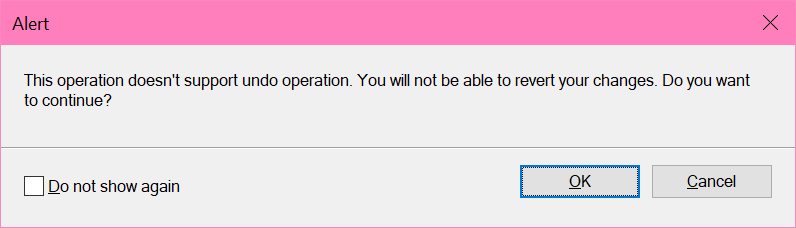
Anyone ever seen this, know what causes it, or what to do about it?

This topic has been closed for replies.

2 replies

Barb Binder
Community Expert
January 31, 2021

Hi Jenna:


I'm just confused why this is now randomly showing up on some of my docs, but never did for others

FrameMaker will clear the history (preventing the opportunity to use Edit > Undo) after we use certain commands, i.e., modifying margins or columns. FrameMaker can tell you every time this happens, or once for each of these commands. This is reset after a major upgrade.


How often you see this message is determined by your settings in Edit > Preferences > Global > Alerts. 

I always disable the history warnings because I know which commands will clear history, and I know the options for backtracking that don't use undo. Some of my students initially like to see them every time, until suddenly they've had enough of the extra click to move past the message. As I say to them, turn this off whenever you are ready. 


~Barb 

~Barb at Rocky Mountain Training
frameexpert
Community Expert
January 29, 2021

These undo messages are fairly useless. I would click the checkbox so you don't have to see them again.

jenna_frenak
Inspiring
January 29, 2021

Yeah I most likely will, I'm just confused why this is now randomly showing up on some of my docs, but never did for others