


Known Participant
December 18, 2019
Question

Hide shortcuts in FrameMaker 2019 menus

  • December 18, 2019
  • 1 reply
  • 507 views

Hello.


We have custom API client for FrameMaker and we are migrating it to FrameMaker 2019. We have defined a new menu with lot of submenu. We use keyboard shortcuts such as Esc Wfi.. But it doesn't look nice in menus. Is there a property or some FM settings to hide it but shortcuts still functional?

See this for example of menu shorcuts:
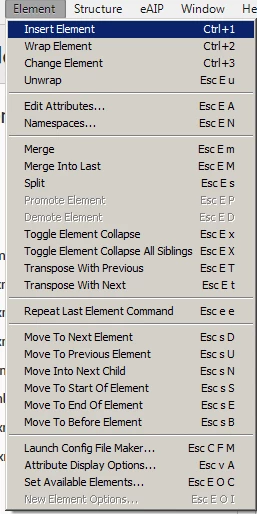
 
This topic has been closed for replies.

1 reply

Jeff_Coatsworth
Community Expert
Community Expert
December 18, 2019

You should probably reach out to Klaus Daube - he's the FM UI wizard 😁

K.Daube
Community Expert
Community Expert
December 19, 2019

Hello, HanzelKo

The short cut labels are defined in the KeySeqLabel of a command, for example the following is in $HOME\fminit\configui\cmds.cfg

<Command DitamapOpen
   <Label Open...>
   <KeySeqLabel !fo>
   <Definition \x301>
   <Mode All>>

To remove the KeySequenceLabel you either must remove these lines or (better) comment them out - but this is not done with a ; or // at the beginning of the line. After all, the cfg files are not xml - the format was created long time before xml was defined... Replace the < by « and the > by » to comment/invalidate the statement:

«KeySeqLabel !fo»

 If you have a appropritate text editor then you can do so with a rgular expression find /replace

find   <(KeySeqLabel.*)>

repl   «\1»

Most of these labels however, are generated from the KeySequence itself. For example, the command ElementSplit (see your screen shot) has no explicit defintion of the KeySeqLabel:

<Command !ElementSplit
   <ReservedLabel Long Split>
   <ReservedLabel Undo Split Element>
   <KeySequence \!Es>
   <Definition \xFD5>
   <Mode All>>

Removing/commenting the KeySequence line would remove the shortcut function!

HTH Klaus Daube