



How do i uncheck a character style?
I have some problematic character styles that I believe are causing some paragraph styles from staying when I close and reopen the document.
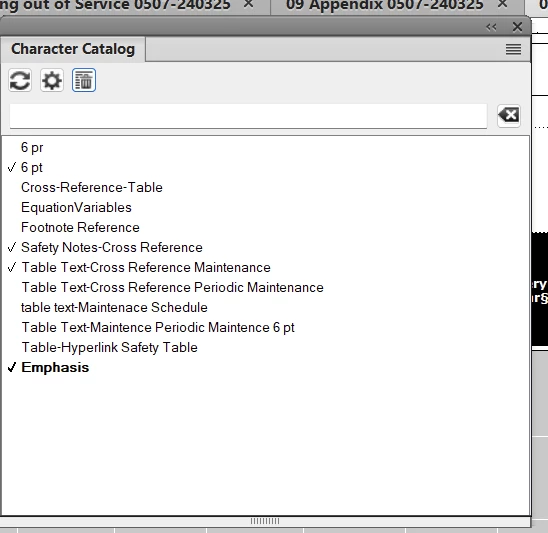
There are several character styles that are checked (and I presume applied to a paragraph style) and I believe it is causing paragraph styles to not stay when I close and reopen the document. I am a point that every time I close the document and open it again, the application of the paragraph style disappears, despite the fact that when I select the text, the paragraph catalog shows that the style is applied, and shows the style has all the correct properties in the paragraph catalog (it shows the paragraph style as a 6pt font, but the text appears as 9 point).
I'm assuming the problem has to do with something in the character styles. So i'm trying to uncheck the character styles. Also, ive even tried to delete some of these character formats and I've gone through the process of doing so, and the delete doesn't take effect.
I've looked on the internet to try to solve this problem, and all I find are outdated solutions that show a "delete" button at the bottom of the character catalog panel. I don't want to delete it. I just want to un-apply it because it's causing trouble, I think. Also, the "delete" button does not exist in the version of FrameMaker I have (2020).
Thank you for your help.
 AdChoices