


Inspiring
February 5, 2013
Question

How to enter Escript world

  • February 5, 2013
  • 1 reply
  • 1666 views

Hello friends!

I face a strange hurdle at the entrance tothe Escript world:

- Running existing scripts out of FM (10 or 11) is possible via File > Scripts, select a script and Run it.

- Opening the ToolKit, opening the script and trying to run it (green triangle) , issues the message:

Canot execute script
Target Adobe Framker 10 (10.0) provides no engine for debugging.

I have cut this down to the most basic 'script':
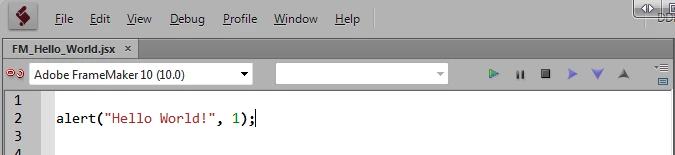
Klicking on the red (broken) link button makes it gray - not green as it is when selecting ExtendScript Tookit CS6 from the drop down list.

When this is selected, the 'scipt' runs and displays the message box.

What is wrong with my connection between FM and the ESTK?

Klaus Daube - definetely new to the subject

This topic has been closed for replies.

1 reply

frameexpert
Adobe Expert
February 5, 2013

Hi Klaus,

Try adding this line to the top of the script:

#target framemaker

and see what you get.

Rick

D_DDAuthor
Inspiring
February 6, 2013

Rick, this does not make a difference.

While FM-10 is open, selecting FM 10 from the drop down makes the link-icon intact, gray;

selecting FM 11 from the drop down makes the icon broken, red.

And selecting Extend Script CS6 (which is the tool kit) makes the icon intact, green and the script can be executed (if I remove the target directive).

Maybe my installation of FM is the source of the problem:

There are some versions of FM on my Win-7 system, including 9, 10 and 11. They all work fine except for this ESTK problem.

And there are as a result 2 versions of the toolkit:

"C:\Program Files (x86)\Adobe\Adobe Utilities - CS5\ExtendScript Toolkit CS5\ExtendScript Toolkit.exe"

"C:\Program Files (x86)\Adobe\Adobe Utilities - CS6\ExtendScript Toolkit CS6\ExtendScript Toolkit.exe"

I'm reluctant to re-install FM-10 (although it takes only 30 mins including the update) - it was re-installed just a onth ago fue to that nasty license problem...

frameexpert
Adobe Expert
February 6, 2013

Hi Klaus, Try running the CS5 version of the Toolkit and see if that will connect with FrameMaker 10. Don't launch it through FrameMaker, but launch it as a standalone program.