

New Participant
November 27, 2012
Answered

how to print grayscale image as process black?

  • November 27, 2012
  • 2 replies
  • 8413 views

how to print grayscale image to PDF as process black only rather than CMYK colors?  I'm using FM10

This topic has been closed for replies.
Correct answer Arnis Gubins

Ed,

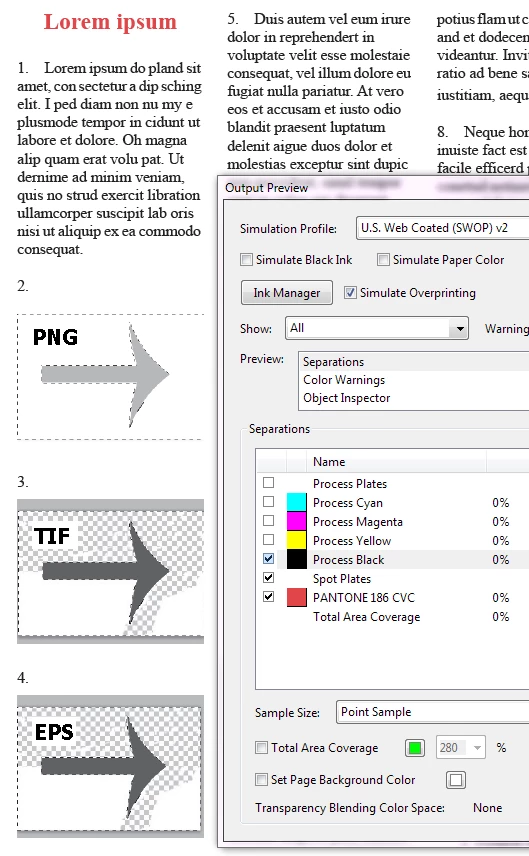
What file format did you save the image in? It's important, as Error indicates. If you left it as a PSD, then FM does an RGB conversion. A TIFF or an EPS will properly stay as greyscales (i.e. on the K plate). Other formats, like PNG in greyscale are actually Indexed colours and resolve to RGB when FM creates the PDF in the presence of Spot plates and hence components get mapped to the CMY plates also.

Here's a sample generated using SaveAsPDF with the CMYK option with the same "greyscale" file saved as PNG, TIF and EPS from Photoshop (note how the PNG isn't all there on the K plate):
2 replies

Arnis Gubins
Inspiring
November 27, 2012

Are you certain that the images are actually greyscale instead of RGB or CMYK that look grey? What format is the image file? What joboption was specified for the PDF creation? How was the PDF created: SaveAsPDF or printing to PDF or printing to PS and distilling?

True greyscales should print on the K plate when you use the CMYK output option in FM10.0.2. Note: if you haven't updated your FM version, then earlier versions didn't produce correct CMYK or spot output.

New Participant
November 27, 2012

I am using 10.0.2.419.  Photoshop shows mode grayscale, 8-bit.  I have tried

all three methods to create the PDF.  If I use the same images in In-Design

and create a PDF the images and text are process black at various

percentages of intensity.  I have also tried FM 11.  I am using a custom

settings file, but have tried many of the other out of the box setting files.

I can use Acrobat Pro "Advanced > Print Production > PreFlight >  PDF

fixups > Convert to grayscale", but that also changes my revised text that

is Pantone 186 (red) to grayscale as well.

New Participant
November 28, 2012

Ed,

What file format did you save the image in? It's important, as Error indicates. If you left it as a PSD, then FM does an RGB conversion. A TIFF or an EPS will properly stay as greyscales (i.e. on the K plate). Other formats, like PNG in greyscale are actually Indexed colours and resolve to RGB when FM creates the PDF in the presence of Spot plates and hence components get mapped to the CMY plates also.

Here's a sample generated using SaveAsPDF with the CMYK option with the same "greyscale" file saved as PNG, TIF and EPS from Photoshop (note how the PNG isn't all there on the K plate):


I'm right on the edge of hiring an expert consultant to resolve this Framemaker Color issue. A stong background with structured Framemaker, graphics, and color management would be required.

But maybe all I have to do is figure out how to bulk convert color PNG images to grayscale and then to CMYK JPGs using only percentages of K with no CMY.  This combination looks like it will work with FM 10.0.2.149 and FM 11.

I am learning a lot.  At first I thought this solution worked, but later I relaized that all of my black text is now distilled as a mix of CMYK process colors.  I could approach this scientifically by carefully running senerios documenting exact inputs, settings, processes, and outcomes, but I'd rather learn the "best practice" methods and go from there. Using my current set of data and images, each method (Save as PDF, Print to .ps, or print to PDF) results in one problem or another.

The most interesting result is that when I create a one page test using Adobe In-Design everything comes out as Process Black and Spot Pantone 186, i.e. exactly what the commercial printer is requesting. This test includes black and Pantone 186 (red) text and PNG and JPG graphics that are causing me issues in Framemaker.  I going to do more In-Design testing with other .PNG image files to verify this.

There was a patch for CMYK processing to FM 10 since this file was processed last year, FM 10.0.2 Nov. 17, 2011  //forums.adobe.com/message/4038702. So maybe the processing works differently than last year.

The source data is a 11 Mb XML file.  For that past 7 years I would read the file into FrameMaker, do some final format and pagination cleanup and deliver a set of FM files for each chapter.  Last year the final PDF was produced by an employee with a strong background in In-Design using FM10, but she really doesn't like FM.  Last year's PDF is process black and spot Pantone 186. She says she did nothing special an simple printed the FM book.  Probably to a .ps file first.

This year I am responsible to produce the final PDF.  The graphics department has also converted many of the main product images to PNGs  and declared that PNG would be the standard.  I have learned that PNG files will not work, but I am still confused why "In-Design" easily converts the grayscale PNG images to percentages of process black in the PDF.

I am not sure I know the correct question to ask at this point. It apppears that grapichs and color management is a large subject to digest. For example, In Photoshop I get an ICC color profile message on older graphics, and I see that the mode of Grayscale results in CMYK gray and the are many modes, profiles and setting to learn about. This morning Corporate says we will send the PDF as is to the printer and see what they can do.  I think they can convert or print the CMY channels as K.   But that will not make this issue go away.

I am going to try the conversion to JPGs using only K and see if that's a "best practice" process to be used from here on out.

I'll post further results as I get them.

Ed

Bob_Niland
Adobe Expert
November 27, 2012

Is this native Frame graphics or an imported image?