

Community Expert
December 5, 2022
Question

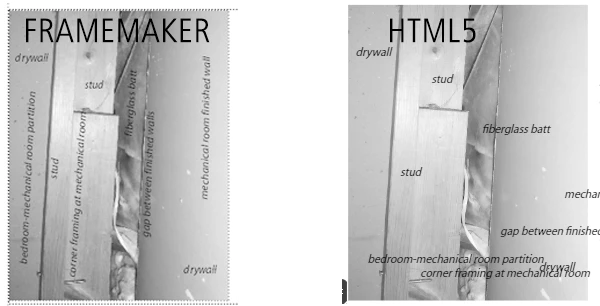
HTML5 conversion makes a mess out of my graphics
  • December 5, 2022
  • 3 replies
  • 580 views

I have a bunch of graphics with Object Text on top. When I publish as HTML5, FrameMaker 2022 straightens out the texts ruining the layout.

Can it be avoided?

 

    This topic has been closed for replies.

    3 replies

    Matt-Tech Comm Tools
    Community Expert
    December 6, 2022

    Place each callout as an SVG. That should keep the rotation and allow for localization.

    -Matt SullivanFrameMaker Course Creator, Author, Trainer, Consultant
    Community Expert
    December 8, 2022

    Thanks for the advice, @Matt-Tech Comm Tools I may have to take that route, eventually.

    Bjørn Smalbro - FrameMaker.dk
    Bob_Niland
    Community Expert
    December 11, 2022

    If it comes to re-do, spend some time weighing the options. While rotated text frames provide full text Flow features, SVG has the neat property of being passed through to HTML5 as unmolested SVG XML.

    Bob_Niland
    Community Expert
    December 5, 2022

    Might be worth testing different ways of doing that, such as overlays of rotated text frames.


    Text frames would have the advantage of supporting most text flow features, such as ¶format, character formats, variables, Xrefs, conditions, and perhaps being the easiest to translate.


    So if everything has to be replaced anyway, get the most return for the effort. But I would have expected what you're doing to just work as expected.

    Community Expert
    December 6, 2022

    Yes, it can be solved but not without a lot of extra work. Thank you for answering.

    Bjørn Smalbro - FrameMaker.dk
    Jeff_Coatsworth
    Community Expert
    December 5, 2022

    My quick & dirty reaction to that would be to stick all the labels on the image outside of FM and then just have it in the FM content as a "finished" image - publishing to HTML5 shouldn't impact it then.

    Community Expert
    December 5, 2022

    Hm. And when you want your document translated? Best is to have all text which is going to be translated in FrameMaker.

    Jeff_Coatsworth
    Community Expert
    December 5, 2022

    Lol - see "quick & dirty" - actually, for localization, I would have numbers on the images and all text separate in FM (and not in strange orientations).