


danr60755957
Participant
July 12, 2019
Question

I'm trying to add a row to the bottom of a table but framemaker 2019 wont let me put the cursor in the table to add/edit text.

  • July 12, 2019
  • 1 reply
  • 811 views

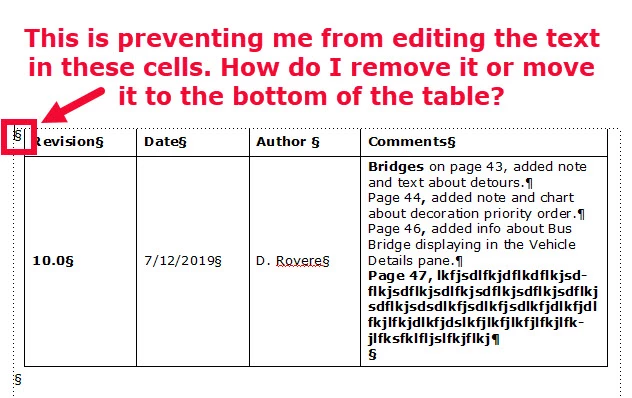
I am working with a table and added a row to the bottom. As I added text to the row, it moved onto the next page. Once I clicked out of the table, I was unable to click back in it in the new row that was added. There is a squiggly paragraph symbol on the outside left of the new row in the table. This is the issue. How do I get rid of that symbol and put it beneath the table where it belongs? I am not able to place the cursor inside the table with it there. The cursor always goes outside the table to that symbol.
This topic has been closed for replies.

1 reply

danr60755957
Participant
July 12, 2019

I found a work-around by deleting the last page with the misbehaving row. When I added a row again, the paragraph marker was gone and I was able to click in the table to edit it. Is there a better way to fix this?

Barb Binder
Community Expert
Community Expert
July 13, 2019

Hi Dan:

The "squiggly paragraph symbol" is the end of flow marker. Oddly, your screenshot shows two on one page, outside the table, which doesn't make a lot of sense. Maybe there was some corruption and deleting the last page took care of it? Without looking at the original file, it's just guesswork at this point.

~Barb

~Barb at Rocky Mountain Training