Inspiring
May 19, 2024
Answered

import PDF inside an FM document

  • May 19, 2024
  • 4 replies
  • 4398 views

Hello,

I am trying to import a PDF inside a FM document (landscape mode because my PDF is also landscape).

But the result : I can see the PDF inside the FM document (File/Import/File), but if I do "File/Save as PDF", I have an error message saying me "PDF generation failed". Why ?

This topic has been closed for replies.
Correct answer pierret18811376

In Frame maker, here are the publish settings for PDF (distiller is not selected) :
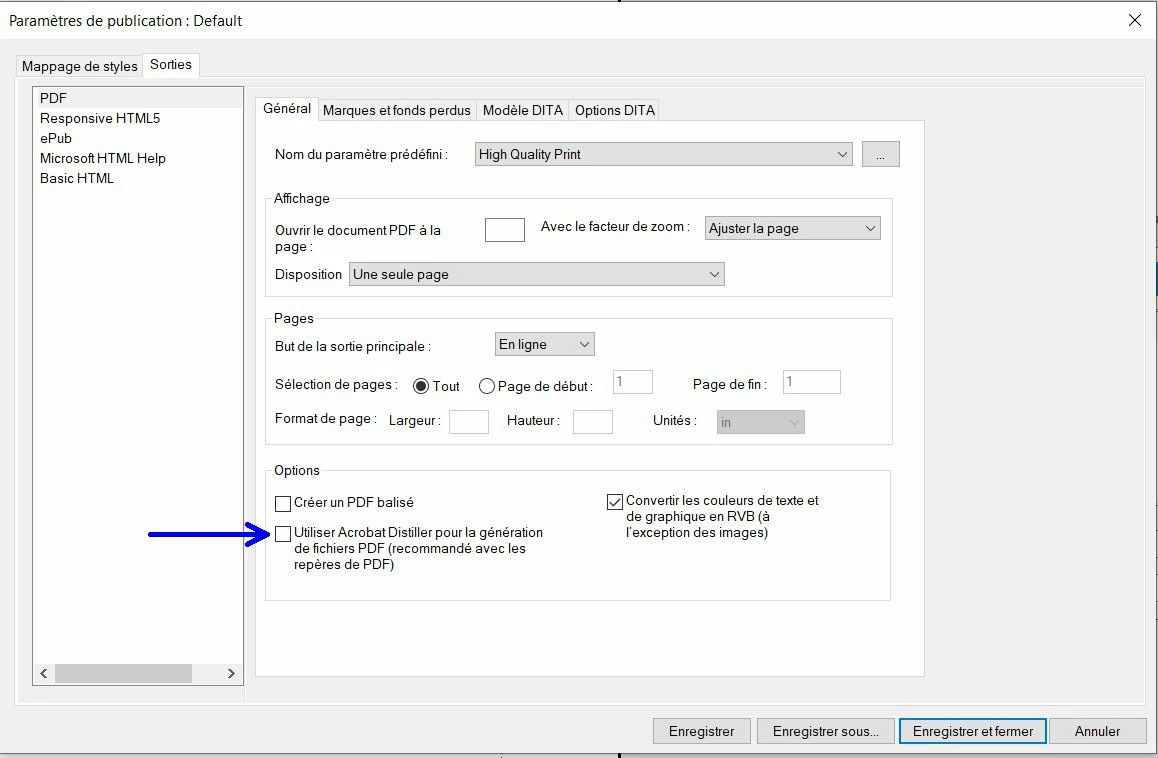


Hi Bjorn,

Today I have tried one thing : I gone in publish panel and double clicked on "PDF", and suddenly, FM asked me to save the FM document before in order to be able to create PDF. So I saved the FM document and ... it worked !


When I tried to do File/Save as PDF, I was completely focused on the error message and I have not seen that just before the error message I had a message asking me to "save the document".


So, in a new FM document, I saved first the new FM document, then I done File/Save as PDF, and ... it worked !


Usually I use FM only to print (not for PDF). Now I know that I need to save the FM document before to save as PDF.


Thank you very much, Bjorn, for all your help ! 

I was wondering what was going on with Frame maker, but now I am completely reassured.

4 replies

Braniac
May 22, 2024

About the "failing to save as pdf" stuff.... Have you tried deleting and reinstalling Adobe Acrobat and Distiller?

When you do a Save as PDF, FrameMaker will pick up the settings described in the Publish panel. The Publish panel offers two options for creating pdf. One option without Distiller and one option using Distiller. With the latest update of Acrobat I have several times expericed that FrameMaker was unable to invoke Distiller when creating PDF. Sometimes the process just went to sleep to never wake up again, or just merely failed, producing no pdf. Reinstalling Acrobat/Distiller might be worth a try.

Bjørn Smalbro - FrameMaker.dk
Inspiring
May 22, 2024

About the "FM does not save as PDF" problem :

I have just uninstalled Acrobat/Distiller  (from windows, not from creative cloud app), then I have install it again (from the creative cloud app), but the result in FM is the same : unable to save as PDF and error message "PDF generation failed".

Braniac
May 22, 2024

What settings do you have in the Publish settings for PDF?

Are you using Distiller?


Bjørn Smalbro - FrameMaker.dk
Inspiring
May 20, 2024

I have just uninstalled and re-installed Frame maker 17.04, and same problem : error message with "PDF generation failed".

Braniac
May 21, 2024

Sounds really odd...

Do you have Adobe Acrobat and Adobe Distiller installed as well?

The latest version of FrameMaker is 17.0.4.628. Is that the version  you have?


Bjørn Smalbro - FrameMaker.dk
Inspiring
May 21, 2024

Hi Bjorn,

Yes, I have Frame Maker 17.04.628 installed, with Adobe Acrobat Pro and Adobe Distiller.

Inspiring
May 20, 2024

Hi @FrameMaker-dk 

I have opened my PDF and save it as Postscript. Then I have opened the postscript file in Acrobat distiller, so Acrobat distiller distilled it and save the result in a new PDF.

In Frame maker, if I try to do File/Import/File, and try to import this PDF (made by Acrobat distiller), the result is the same : error window with "PDF génération failed".

Braniac
May 20, 2024

Well - you have certainly done what you could in order to make it work. I can't say what's happening, but if this is a "one time thing" I might consider exporting the pdf as svg/image and use no more time on troubleshooting the pdf. I don't know what is in your pdf, but I have recently experienced that FrameMaker has an issue handling big CAD drawings. If this is something you need to do more times, we shall probably start looking in the big box of tricks and figure out what is the cause. 🙂

Bjørn Smalbro - FrameMaker.dk
Inspiring
May 20, 2024

@FrameMaker-dk 

I have tried to save my PDF as JPEG, then in Frame maker I have made Insert/image, and tried to do File/Save as PDF. Result : same problem : error window with "PDF generation failed".

In order to better understand what is the cause, I put here my PDF file.

Braniac
May 20, 2024

It sounds as if something in the pdf you have imported, is not being properly parsed. Are you saving to pdf using Distiller? If not, I would suggest using Distiller.  Thing is -  you can have almost anything in a PDF, but it is not "almost anything" that is printable or being able to be parsed through FrameMaker.

Bjørn Smalbro - FrameMaker.dk

