

November 24, 2017
Answered

In FM 2017, where is the Resize Table Columns dialog?

  • November 24, 2017
  • 1 reply
  • 689 views

In FM 2017 (14.0.3.500), I can't find the new Resize Table Columns dialog? It's not in Table>Resize All Table Columns.

    This topic has been closed for replies.
    Correct answer Stefan Gentz

    Many thanks for the detailed explanations.

    But I'm NOT looking for the "Resize Selected Columns" dialog.

    It works fine on my machine. And I'm using it nearly every day.

    I'm looking for the "Resize Table Columns" dialog. It looks like this:
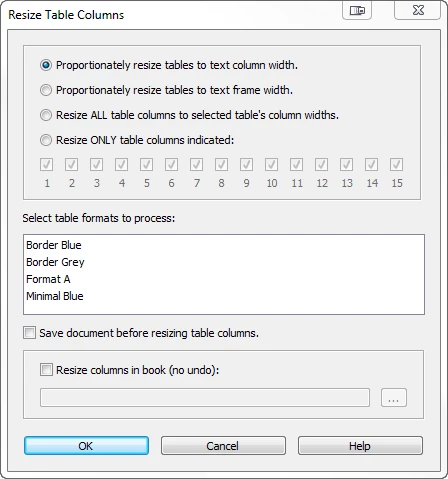
    Is it only part of an additional script?

    If yes, why is it mentioned in Matt's book as a new FM 2017 function?


    Ah, sorry, for the misunderstanding. This "Resize Table Columns" dialog is not part of FrameMaker. It's part of frameexpert's "TableCleanerES" solution. You probably already have it and just need to reinstall it. Contact frameexpert with any question. He'll be happy to help you.

    1 reply

    Barb Binder
    Community Expert
    Community Expert
    November 24, 2017

    Table > Format > Resize Columns or Esc t z.

    [Edited]

    ~Barb at Rocky Mountain Training
    November 24, 2017

    Hmmm, there is no menu entry like that in my FM version. And the shortcut doesn't work.

    The new Command Search (F7) isn't helpful, too.

    I've found two screenshots of the mentioned dialog:

    1. In Matt's book on page 170
    2. At http://frameautomation.com/introducing-tablecleaneres/

    Perhaps this feature has been disabled in the latest FM version 3 (14.0.3.500) ?!?!

    Community Manager
    November 24, 2017

    In FM 2017 it's in the menu > Table > Resize Columns...

    Alternatively, you can mark a table column completely and then right-click on that column and select Resize Columns... from the context menu:

    The command search (F7) will give it to you e.g. when you type "resize".

    or e.g. "table":

    Please note, that all this is "context sensitive". That is, your text insertion mark should be in a cell in the column of the table that you want to resize. Or the table column to resize needs to be marked up (like in the screenshot of the context menu above.)

    Any of these ways will open the "Resize Selected Columns" dialog: