


Inspiring
July 20, 2020
Answered

In FM HTML5 output, my topics all output as heading1?

  • July 20, 2020
  • 5 replies
  • 734 views

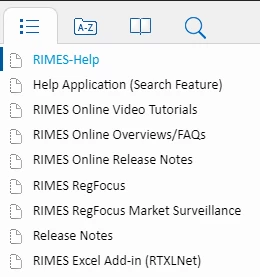
I am using FM 2019 and publishing to html5 output via File-Publish. I would like my headings 2 and 3 to be within Heading 1, branching as subheadings. Im sure there is setting for this, just not sure where it is. My output just shows every topic as a heading1? ->
 

Cheers,

Bill


    This topic has been closed for replies.
    Correct answer COHAN3

    1. The book items do not have to be orange.

    2. If your Frame table of contents is set up correctly and appears properly, then the HTML output should also be OK.

    What does your FrameMaker TOC look like?


    i figured this out, turns out I first needed a designated folder in my local hard drive for the book name, with the book file and content fm file in that folder. Then I needed to do book-create toc, as opposed to adding a previously generated toc to the book file. Then I specified TOC heading differences in indentation within the TOC file. Then I published to html5 and the output contained a properly nested toc (phew!). 

    5 replies

    Jeff_Coatsworth
    Community Expert
    Community Expert
    August 6, 2020

    "Then I needed to do book-create toc, as opposed to adding a previously generated toc to the book file." - I think that was the issue - your "previously generated toc" sounds like it was just a manually created one that you built, instead of a FM-generated one.

    Hezy A
    Inspiring
    August 6, 2020


    Good to hear.

    I do not think that you need a designated folder for the book that only has this book in it. My folder has this book, and a few other subsets in it.

    But creating the TOC in this way, is the best practice

    Jeff_Coatsworth
    Community Expert
    Community Expert
    August 6, 2020

    Is your FM TOC file a generated TOC or did you just create one yourself?

    Jeff_Coatsworth
    Community Expert
    Community Expert
    July 20, 2020

    It's the "Split into topics based on this style" setting in the Style Mapping tab of the Publish Settings.

    COHAN3Author
    Inspiring
    July 28, 2020

    Hi Jeff,

    I have the Split box checked for headings 1-4 but I still cant get the TOC to properly nest topics based on heading heirarchy. Allow me to show you what I have so that you can possibly pick up an error in the settings or something that is missing.


    Current Output TOC – all topics at the heading 1 level


    I have each heading defined in a standalone TOC and that TOC is the first file in my book. Selected source document is the book file:


    Here are my output settings; keep Automap unchecked?:


    My Headings 1-4 map to an output style of the same name and Split is checked:


    Do I need to have certain ‘Positioning’ settings?


    Any advice you can offer would be greatly appreciated.

    Cheers,

    Bill


    COHAN3Author
    Inspiring
    July 29, 2020

    As an add-on comment - I was told that both my doc icons in the book pod should be orange in order for them to be recognized by RH. I see my TOC icon is orange, but not the content doc; how do I get them both to be orange? 


    Cheers,

    Bill


    Jeff_Coatsworth
    Community Expert
    Community Expert
    July 20, 2020

    Did you tell it to paginate on Headings 1, 2, and 3?

    COHAN3Author
    Inspiring
    July 20, 2020

    Hi, thanx for replying; can you tell me please how or where I can do paginate commands? Thanx.