


nancy33534756
Inspiring
March 22, 2017
Question

Indents are wrong in .chm/HTML5 output from FM 2015

  • March 22, 2017
  • 1 reply
  • 363 views

Hi, all.

This problem is as old as the hills; it seems to me that indents have been wrong in help output ever since I was struggling with Forehelp (remember Forehelp?) back in the day.

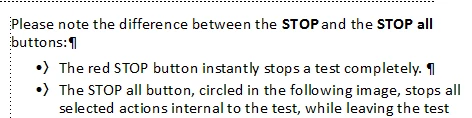
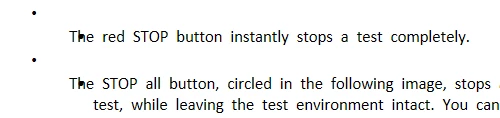
BUT... I'm struggling with it now with regard to my .chm file and HTML5 outout from FM 2015. Bullets and numbered items wrap incorrectly.

Framemaker source file:
.chm output:

HTML5 output is even worse:
Does anyone have any idea what is going on here? I have to say, the Publish/Settings user interface is far from clear, and I have not had any success editing the Block settings -- or any other settings -- to get a satisfactory result.

All suggestions gratefully received.

    This topic has been closed for replies.

    1 reply

    Jeff_Coatsworth
    Community Expert
    March 23, 2017

    "Publish/Settings user interface is far from clear" - that's an understatement ;>)

    They took the engine out of RH to create help output, but didn't give you the dashboard controls to run it.

    Anyway, the bullet issue looks like that setting in the Conversion Settings screens on how lists get translated (I'm assuming that you've got a separate bullet para tag defined in FM, right?) It should crank out an unordered list element in the resulting HTML (one of those ul tags) that you should be able to control with the CSS applied.

    nancy33534756
    Inspiring
    March 23, 2017

    Hi, Jeff.

    I searched my FM project directory for the .css file, found it, and changed the color of body text to FF0000 (red). I republished the .chm, but there is no change to the color of the body text. I have some followup questions:

    1. Is the .css file somehow not attached to my project?

    2. If it isn't, and I need to attach it, how do I do that?

    3. I have edited the Publish/Settings/Block settings for some of my paragraph formats. If I attach the .css to my project, will those settings be overwritten?

    Thanks.

    --Nancy

    Jeff_Coatsworth
    Community Expert
    March 23, 2017

    I think it creates a default css to use named for the FM doc - that what I just found in a quick look of my FMOutput folder; I think you can assign one (actually pick one) in the Settings - in the Outputs tab there seems to be a "Override Style" checkbox that allows you to Import a css file.