


vpratap_tw
Known Participant
November 9, 2017
Question

Is it possible to generate 100% accessible (qualifies VPAT testing) and responsive HTML5 from FM 2017?

  • November 9, 2017
  • 4 replies
  • 1021 views

I need to create accessible HTML output through FM 2017 since all our guides are already in FM so we cannot migrate to robohelp or any other HTML editor, because it may take too much time.

There are few points that has to be considered while generating accessible output.

  • Structure -  I see an error for the title element which says "Title" is not marked up as a heading but has Font Size (30.0px) significantly larger than that used on most of the page (17.2px). Check if this should be a heading (WCAG2 1.3.1). So how can we make it as heading by default?
  • Language attribute - I can edit the HTML for this. But, if there is some method to implement it within the framemaker, it would be great.
  • Table design - This is the major challenge for me where I need to create scope for each row and column header. The error for this looks like following:
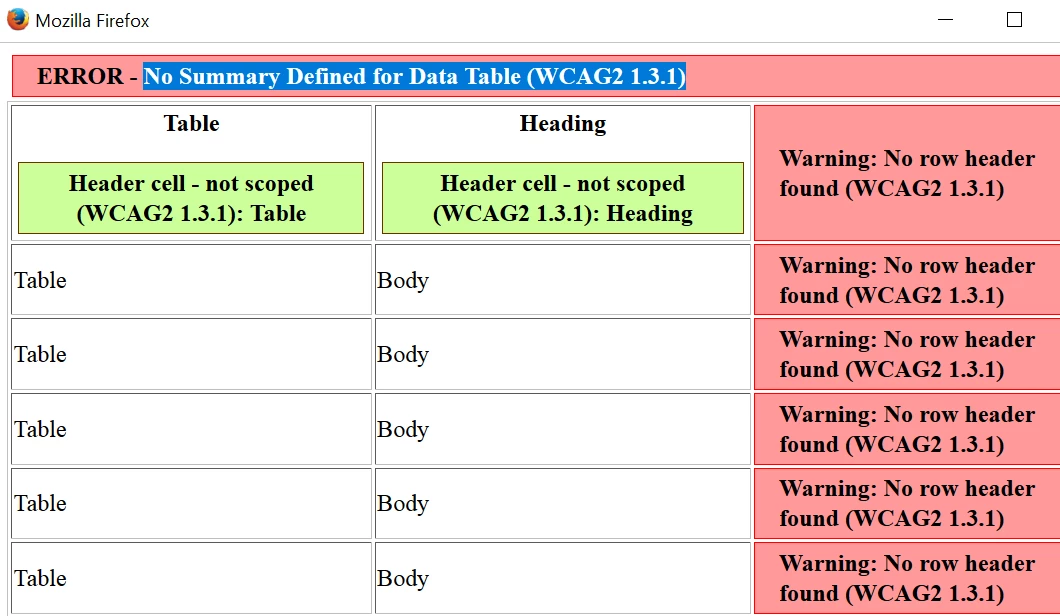
This topic has been closed for replies.

4 replies

New Participant
April 9, 2018

Hi I'm facing all the above issues. Can you please guide me on how to fix these issues?

1. No ‘lang’ attribute used

2. Duplicate ID ‘OGHAGheaders’ found.

3. Headings are not marked as headings.

4. No summary and no row headers for the two tables

Please help me!

Matt-Tech Comm Tools
Adobe Expert
November 20, 2017

You can get information on my 2 FrameMaker 2017 structure workbooks
(Structured Authoring, and Structured EDD Development) at http://www.techcommtools.com/books/

The EDD workbook has an entire chapter devoted to structuring legacy content.

I also have a series of FrameMaker courses (structured and unstructured) available.
More info at Online Training Courses - Tech Comm Tools

-Matt SullivanFrameMaker Course Creator, Author, Trainer, Consultant
vpratap_tw
Known Participant
November 21, 2017

Thank you so much.

Matt-Tech Comm Tools
Adobe Expert
November 16, 2017

It looks like your example is using DITA, so it's good to know that DITA HTML5 is nearly valid using your accessibility eval tool.

How did you resolve the row heading message? I don't see where you identified a row heading to address that message from your checker tool.

Migrating to DITA is a manageable task, but not a pushbutton process. As with any conversion process, make sure you provide time and budget to do the migration and hand work to switch over.

-Matt SullivanFrameMaker Course Creator, Author, Trainer, Consultant
vpratap_tw
Known Participant
November 20, 2017

Actually, the accessibility testing tool considers scope for each row and column. When we insert a table in framemaker in structured way, it looks like following, where by default the codes are good for accessibility. I can see each row and column has a header element and it also has a scope.

The code  <row rowsep="0"> and <entry colname="1"> fix this issue by default and it's very good.

vpratap_tw
Known Participant
November 20, 2017

Migrating to DITA may take a little more time, but we can manage since we don't have to struggle too much in editing part.

I would  be very happy if you can suggest something about creating/editing EDD/DTD. Or share some link where I can learn to re-structure and format my content.

That would help a lot.

Thanks.

Matt-Tech Comm Tools
Adobe Expert
November 10, 2017

Structure

Have you mapped Title to Heading1 in the Style Mapping dialog?

Language

No opinion on this

Table Design

Do your tables contain heading rows? If not, can you add them to remedy the Header cell - not scoped message?

Please respond back, as I'd like to know if/how you get these remedied!

-Matt SullivanFrameMaker Course Creator, Author, Trainer, Consultant
vpratap_tw
Known Participant
November 14, 2017

I tried doing them. But couldn't resolve issue for Tables specially. That is only possible through HTML editing so Robohelp is must. Because we have an option for HTML editing on the go.

Matt-Tech Comm Tools
Adobe Expert
November 14, 2017

Are you saying that your tables now contain heading rows, and that the problem still occurs?

-Matt SullivanFrameMaker Course Creator, Author, Trainer, Consultant